Token – Queue Management System
Product Overview
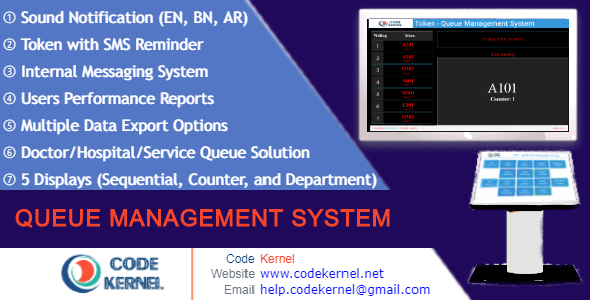
Token, a dedicated Queue Management System for WordPress, provides an on-premise solution for physical service locations. This robust Token – Queue Management System simplifies customer flow, helping businesses with walk-in traffic manage wait times and service delivery efficiently. It’s designed for anyone needing to organize customer queues without relying on external SaaS platforms, suitable for clinics, banks, government offices, or repair shops looking for self-hosted control.
Setting up the system involves defining your service counters and staff roles within the admin dashboard. Customers can then generate a token either directly from a dedicated customer panel shortcode on your website, or staff can issue one manually. Once a token is generated, its number appears on the public display screen, typically shown on a large monitor via a specific shortcode, updating in real-time as staff call each number forward.
Highlights & Value
This system delivers tangible benefits through its practical application, directly impacting operational smoothness and customer experience. It moves beyond abstract concepts by focusing on direct user interaction and clear process management.
- Streamlined Customer Journey: Customers see their place in line and can wait comfortably, reducing perceived wait times and frustration. The display panel clearly shows ‘Now Serving’ and ‘Next In Line’ numbers.
- Intuitive Staff Interface: The staff panel uses distinct buttons like ‘Call Next’, ‘Re-call’, ‘Serve’, ‘No-Show’, and ‘Finish’. When ‘Call Next’ is clicked, the display updates instantly and an optional sound alert plays.
- Flexible Token Generation: Besides staff issuing tokens, customers can use a frontend shortcode to print their own physical token or simply note the number. This reduces staff workload during peak hours.
- Detailed Reporting: The system logs every token’s journey, from generation to completion. Admins can view daily, monthly, or yearly reports showing service times and no-show rates, accessible directly from the dashboard.
- Multilingual Support: Text strings are easily translatable from the backend, ensuring the customer and display panels can be adapted for various linguistic needs without code edits.
This approach to queue handling sets a high standard for any Queue Management System, providing immediate feedback and control for both customers and service providers alike.
Real-World Use Cases
The practical application of this system spans various environments where managing customer queues is essential for maintaining order and efficiency.
- Medical Clinics: Patients check in at a kiosk or with reception, receive a token, and wait until their number appears on the waiting room screen, minimizing crowded waiting areas.
- Bank Branches: Customers select their required service (e.g., ‘Deposits’, ‘Loans’) from a touchscreen, get a token, and are called to the appropriate counter by number.
- Government Service Centers: Manages citizens applying for documents, distributing tokens for different departments like ‘Passports’ or ‘ID Renewals’, ensuring fair queue progression.
- Retail Customer Service: Handles returns, exchanges, or complex product inquiries where customers need to wait for a specialist, preventing disorderly lines.
Technical & Compatibility
The plugin integrates as a standard WordPress installation, creating custom post types and database tables for managing tokens, counters, and staff. It’s designed to function well with most standard WordPress themes and popular page builders like Elementor or Beaver Builder, primarily relying on shortcodes to embed its front-end components. We’ve found it generally plays nicely, displaying its elements within content areas without major styling conflicts, though minor CSS adjustments might be needed depending on your theme’s default paragraph spacing or button styles.
For notifications, it offers options for SMS via Twilio or custom gateways, and email using SMTP. This requires basic setup in the plugin’s settings, where you input API keys or SMTP details. The system’s responsiveness means the customer-facing shortcodes adapt to various screen sizes, from mobile phones to large display monitors. The Token – Queue Management System keeps its core logic contained, reducing potential conflicts with other plugins.