Karenderia Location-Based Service Search Addon
Product Overview
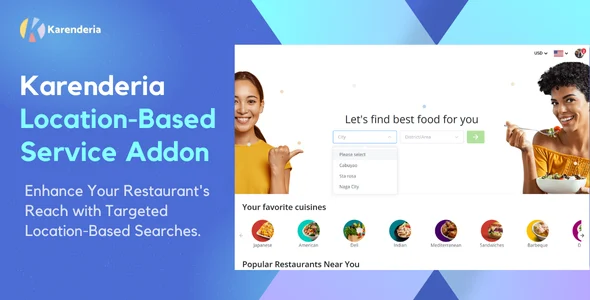
The Karenderia Location-Based Service Search is an essential Addon designed to empower businesses built on the Karenderia platform. This plugin allows customers to efficiently discover services, such as restaurants, stores, or other local providers, based on their geographical location. It’s purpose-built for service directories, food delivery systems, or any platform where proximity to a service provider is a key factor for the user. Its core function is to enhance the discoverability of businesses for end-users, simplifying the search experience for anyone needing services within a defined area.
Integrating this addon means a user visiting your site can input their address or allow the browser to detect their current location. The system then processes this information to display relevant service providers near them. On a typical setup, a search bar appears prominently, often at the top of the content area. As a user types, suggestions might appear, and upon selection or submission, a map section dynamically updates to pinpoint nearby businesses, accompanied by a scrollable list of detailed results.
Highlights & Value
- Location-aware Search Capabilities: Users can specify a location via text input or leverage browser-based geolocation for automatic detection. The system then filters and presents service providers within a configurable radius of this point.
- Interactive Map Integration: Search results are visually plotted on an embedded map, providing an intuitive geographical overview. This map often features clickable markers that reveal additional information about each service provider when selected.
- Dynamic Result Display: As users pan or zoom the map, or apply additional filters (like service type or rating), the accompanying list of businesses updates in real time. This ensures the information presented is always relevant to the user’s current view or criteria.
- Refined Search Filters: Beyond basic location, users can typically narrow down their search using categories, keywords, or even specific service types. This allows for a more precise discovery process, helping users quickly find exactly what they need.
- Enhanced User Experience: The overall design prioritates ease of use. The interface guides users from entering a location to viewing a clear set of results, reducing friction and improving the likelihood of a successful service discovery. This streamlined process is a key benefit of the Karenderia Location-Based Service Search Addon.
Real-World Use Cases
- Food Delivery Platforms: A customer opens the app, enters their address, and immediately sees a list of restaurants and their menus available for delivery in their vicinity. The map shows each restaurant’s location relative to the user.
- Local Service Directories: For a directory listing plumbers, electricians, or tutors, users can find professionals available in their neighborhood. They enter their postcode, and the platform displays service providers, complete with contact details and reviews, within a 10-mile radius.
- Retail Store Locators: A brand with multiple physical outlets can enable customers to find their nearest store. The user types their city, and the map populates with store icons, along with opening hours and directions in an accompanying list.
- Event Discovery Platforms: Users looking for local events, such as farmers’ markets or concerts, can specify a date and location. The system then pulls up a list of happenings within that area, often with event details appearing as cards that can be clicked for more information.
Technical & Compatibility
The Karenderia Location-Based Service Search Addon functions as an extension to the core Karenderia platform. It requires a stable installation of the base Karenderia system to operate correctly. Installation follows standard WordPress plugin procedures: upload the plugin files via the dashboard or FTP, then activate it. Configuration typically involves setting up API keys for mapping services, such as Google Maps, to ensure the map displays and geolocation features work as expected. Without valid API credentials, the map component will likely not render or function properly.
This addon is designed with responsiveness in mind, ensuring the search interface and results display correctly across various devices, from desktop browsers to mobile phones. Its compatibility extends to modern WordPress environments, provided the underlying Karenderia platform is also up-to-date. Regular updates from the developer help maintain compatibility with the latest WordPress versions and address potential security enhancements or feature improvements. Site builders should always test the addon in a staging environment before deploying to a live site, especially after major updates to either WordPress or the Karenderia core.