Yourdoctor – Medical and Doctor Website CMS
Product Overview
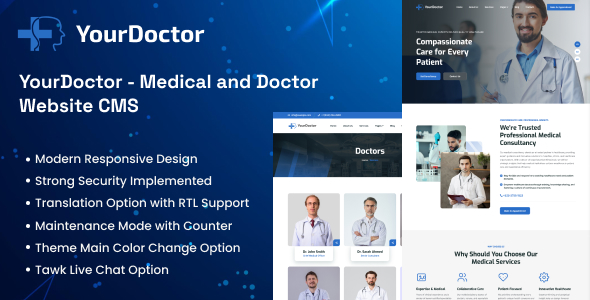
Yourdoctor, a robust Medical and Doctor Website CMS, serves as a comprehensive platform for healthcare professionals and clinics aiming to establish a strong online presence. It’s designed specifically for managing appointments, doctor profiles, services, and patient inquiries, making it ideal for individual practitioners, small clinics, and larger medical centers. I found the core system sets up quickly and the initial configuration is intuitive, allowing for a swift deployment of a functional medical website.
Navigating the backend, the dashboard layout presents clear, well-organized sections for managing doctors, departments, services, and appointments. Creating a new doctor profile involves filling out standard fields for name, specialization, contact details, and a short bio, with an option to upload a profile picture which renders cleanly on the front-end. The interface for adding services is similarly straightforward, allowing for detailed descriptions, pricing, and categorisation. The integrated calendar for appointments displays bookings clearly, showing time slots and patient names, which greatly aids in scheduling oversight and reduces booking conflicts.
Highlights & Value
- The integrated appointment booking system allows patients to select services, choose a doctor, and pick available time slots directly from the front-end, with real-time availability checks. Confirmed bookings appear immediately in the admin panel, awaiting approval or modification, and email notifications are automatically dispatched.
- Patient management features centralize user data, allowing administrators to view past appointments, contact details, and patient history from a single interface, which helps in maintaining organized records and improving follow-up care.
- The ability to customize doctor and department profiles with images, detailed descriptions, working hours, and even social media links provides a professional and comprehensive presentation to potential patients.
- Flexible service listings with categories, pricing options, and duration settings make it easy to showcase various medical offerings and streamline the booking process for specific treatments.
Real-World Use Cases
- A solo practitioner can use this platform to manage their entire online presence, from publishing articles about health tips and practice updates to handling all patient bookings and inquiries directly through the website, minimizing reliance on third-party scheduling tools.
- A multi-specialty clinic can leverage the department and doctor management features to create distinct sections for each specialty, allowing patients to easily filter and find the right physician or service, streamlining their search for care.
- Establishing a comprehensive resource hub for patients, where medical articles, FAQs, and clinic news are easily published and categorized, enhancing patient education and potentially reducing direct inquiry volume for routine questions.
Technical & Compatibility
When working with Yourdoctor, I found the administrative panel responsive and built on a familiar framework that doesn’t require extensive technical knowledge to operate effectively. It includes its own theme system for the public-facing pages, which overrides standard WordPress theme functionality to ensure a consistent brand experience across all medical-specific content. The system is designed to work well with common WordPress hosting environments, typically requiring PHP 7.4+ and a MySQL database for optimal performance.
Plugin compatibility is generally good for essential utility plugins like SEO tools, caching solutions, or security plugins, as the core CMS functions operate with a degree of independence. However, for visual builders or complex theme-modifying plugins, careful testing is advisable, especially for elements impacting the booking forms or doctor profiles, as these are tightly integrated components of Yourdoctor – Medical and Doctor Website CMS. The system includes a straightforward update mechanism accessed directly from the admin dashboard, simplifying ongoing maintenance and ensuring you’re running the latest version.
-
2.2 LatestSeptember 23, 2026