WPIDE Premium – Powerful File Manager & Code Editor for WordPress
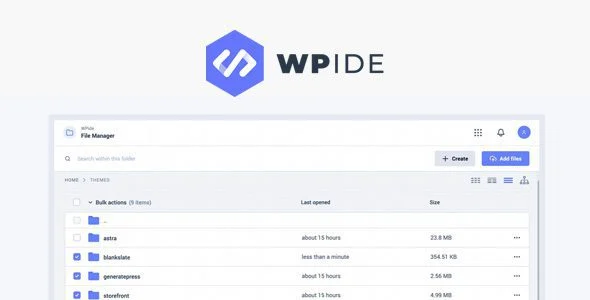
WPIDE Premium Overview & Dashboard-Native Development Control Surface
WPIDE Premium is a WordPress plugin that consolidates file management, code editing, snippet deployment, and database administration into a single dashboard-native workspace. The package removes the operational bottleneck of FTP and cPanel round-trips by routing every file operation through the native WordPress Filesystem API, which executes reads, writes, and deletions inside the site’s own permission and security context. Within agency delivery pipelines it functions as the primary control surface for editing PHP and other languages, deploying validated code snippets across multiple client sites through WPIDE Cloud, and configuring conversion tracking without shell or panel access.
Technical Specifications & Deployment Matrix
| Engineering Metric | Deployment Specification |
|---|---|
| Base Technology / Framework | WordPress plugin built on the native WordPress Filesystem API for all file operations |
| Runtime / Language Requirements | Standard WordPress hosting environment; code editor supports multiple languages including PHP |
| Data Exchange / Communication Protocols | Browser dropzone for bulk folder uploads; batch downloads delivered as zip archives; zip/unzip compression pipeline |
| Front-End / Engine Dependencies | Self-contained modern UI modules: file manager, code editor, image editor, database manager |
| Database / Persistence Footprint | Direct WordPress database access via the database manager; cached folder-size records; WPIDE Cloud private library storing every snippet version |
File Operations Pipeline & Snippet Deployment Workflow
The execution pipeline begins when an authenticated administrator issues a file action from the manager interface, which validates the request and dispatches it to the Filesystem API rather than raw PHP file handlers. Every create, rename, edit, upload, or delete operation inherits WordPress core’s security layer, so permissions, ownership, and path traversal checks behave identically to native core behavior. Folder sizes are calculated on demand or on load, and the results are persisted so subsequent browsing sessions skip recomputation.
Transfer operations follow a batch-oriented path. The dropzone accepts entire folder structures in a single bulk upload, while outbound requests can select multiple files and directories at once; folders are automatically packaged as zip archives before download. The same archive engine works in reverse, letting administrators unzip packages in place or compress an entire WordPress content folder as a site-level backup. Beyond the file layer, the snippet subsystem draws from a catalog of more than 3,000 free code snippets, and each accepted snippet is versioned in a private library before deployment. WPIDE Cloud then distributes approved code to multiple connected sites, and a one-click rollback restores any prior stored version when a deployment needs reverting.
Core Technical Capabilities of WPIDE Premium
- Native Filesystem API Execution: All file mutations pass through WordPress core’s filesystem abstraction, keeping permission checks and security validation consistent with the host environment instead of bypassing them with direct PHP calls.
- Batch Transfer & Archive Engine: Bulk folder uploads land through the dropzone, multi-select downloads resolve to zip archives, and the zip/unzip pipeline supports full content-folder backups without external tooling.
- Multi-Language Code Editor: The editor parses and highlights most coding languages including PHP, enabling in-dashboard theme and plugin file modification with a modern interface.
- Database Manager & Image Editor: A dedicated module exposes the WordPress database for direct inspection and control, while a parallel image editor applies corrections to media assets without leaving the dashboard.
- Conversion Tracking Layer: Event pipelines cover Meta Pixel with Conversions API, Google Analytics 4, Google Ads, TikTok, Pinterest, Snapchat, and OpenAI Ads, plus WooCommerce, Easy Digital Downloads, and MemberPress events, click tracking by CSS selector, consent banners, and Google Consent Mode v2.
Production Implementation & Operational Resilience
For agencies managing concurrent client environments, the package’s versioned snippet library acts as the safety net for staged rollouts: every snippet change is recorded before it reaches production, and WPIDE Cloud’s one-click rollback bounds the blast radius of a faulty deployment across all connected sites. Because file operations run through the Filesystem API rather than custom handlers, error states surface through WordPress’s standard filesystem failure reporting, and administrators can diagnose write-permission conflicts using core-native feedback instead of silent failures.
Operational boundaries worth noting: the tracking layer’s consent banners and Google Consent Mode v2 support address regional consent requirements before events fire, and event coverage for WooCommerce, Easy Digital Downloads, and MemberPress is predefined rather than hand-coded, so commerce funnels report without custom JavaScript. Click-event tracking driven by CSS selectors lets teams instrument dynamic page elements without touching templates. When a site’s presentation layer also needs document display outside the media library, embedding PDFs, DOCX, and spreadsheets via File Viewer keeps front-end rendering decoupled from backend file administration. For storefronts that additionally require Elementor-based comparison and wishlist interfaces on the customer-facing side, JetCompareWishlist operates as an independent presentation-layer module while WPIDE Premium remains the backend administration surface.
Frequently Asked Questions
Can WPIDE Premium fully replace FTP or cPanel for day-to-day file administration?
Yes, the file manager handles file and folder creation, editing, bulk uploads, batch downloads, and zip or unzip operations directly from the WordPress dashboard, covering routine administration without separate connection credentials.
Is it possible to revert a code snippet after it has been deployed to multiple sites?
Yes, the private library stores every version of each snippet, and WPIDE Cloud provides one-click rollback, so administrators can restore a previous version across connected sites when a deployment misbehaves.
Does the conversion tracking module support Google Consent Mode v2?
Yes, the tracking layer ships with consent banners and native Google Consent Mode v2 support, allowing event pipelines for Meta, Google Analytics 4, Google Ads, TikTok, Pinterest, Snapchat, and OpenAI Ads to respect visitor consent states.
Can conversion events be tracked for membership platforms as well as WooCommerce stores?
Yes, predefined event coverage spans WooCommerce, Easy Digital Downloads, and MemberPress, and click events can additionally be captured by assigning CSS selectors to specific page elements.