WP Food – Restaurant Menu & Food ordering
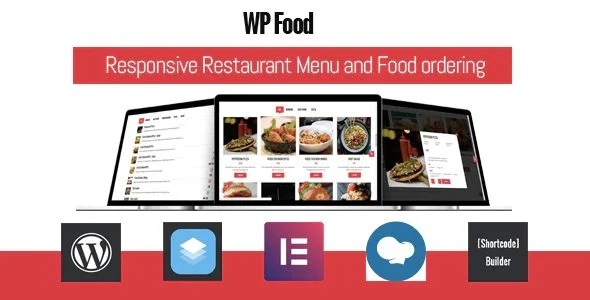
WP Food Overview & Restaurant Ordering Engine
WP Food is a WordPress plugin engineered for restaurant, café, and food service operators to publish menus and accept direct online food orders without attaching a full e-commerce framework to the site. The package replaces generic commerce workflows with purpose-built menu management, an internal cart and checkout stack, and PayPal-based payment capture, all administered from the standard WordPress dashboard. Within agency delivery pipelines, the engine sits behind the presentation layer, supplying item data, fulfillment rules, and order records while the theme controls visual identity.
Technical Specifications & Deployment Matrix
| Engineering Metric | Deployment Specification |
|---|---|
| Base Technology / Framework | WordPress plugin built with PHP, JavaScript, CSS, and XML configuration files |
| Runtime / Version Requirements | WordPress 4.9.x through 6.9.x; PHP through 8.3 (validated in release 2.7) |
| Communication / Payment Protocols | PayPal payment gateway; transactional email dispatch to administrators and customers |
| Front-End / Builder Dependencies | Elementor, Elementor Pro, WPBakery Page Builder, WPML; Firefox, Safari, Opera, Chrome, Edge |
| Data Persistence Footprint | Native WordPress storage using the bundled CMB2 metadata library for custom fields |
Menu Rendering & Order Execution Pipeline
The plugin converts food items into a structured content pipeline, rendering them through shortcode-driven layouts and routing orders through an internal cart, checkout, and notification flow. Menu construction begins at the item level: administrators define dishes with descriptions, image galleries, and custom price text fields, then organize them into categories and parent-child location trees. Output is injected via shortcodes whose parameters control layout mode—grid, list, table, or carousel—column counts from one to five, and filter behavior, including the active_filter and hide_ftall parameters that override the default All filter. On the front end, Ajax load more and pagination govern payload delivery, while popup modals expose detailed food information without full page reloads.
Order capture follows the same contained pipeline. Customers select delivery or carryout, choose a store for carryout pickups, and pick a delivery date and time slot constrained by per-weekday slot configuration and per-slot order ceilings. Validation layers enforce minimum order amounts, order-before cutoff windows measured in minutes or days, and open/closing time schedules before checkout renders. PayPal processes the transaction, and email notifications dispatch simultaneously to administrators and customers, with distinct recipient addresses configurable per location.
Core Technical Capabilities of WP Food
- Layout engine: four rendering modes—grid, list, table, and carousel slider—support up to five columns, Ajax load more, pagination, and popup food info modals, all driven by shortcode parameters without template hacking.
- Fulfillment rules engine: advanced delivery time slots configured per weekday, maximum order counts per slot, order-before-X-minutes-or-days cutoffs, open/closing time gates, minimum order amounts, and free shipping triggered above a configurable cart total.
- Payment and fiscal layer: PayPal integration, tax calculation, shipping fees, configurable thousand and decimal separators with adjustable decimal counts, and a custom price field that accepts arbitrary text where numeric pricing does not apply.
- Hardened checkout and access control: a reCAPTCHA challenge at checkout, plus security hardening in releases 2.7 and 2.7.2 addressing local file inclusion vectors and broken access control paths.
When the storefront must express a complete restaurant brand rather than bare shortcode output, pairing the engine with a purpose-built presentation layer such as Yumyum supplies the fast-food-oriented theme architecture that the plugin deliberately delegates to the front end.
Production Implementation & Operational Resilience
In client staging and production environments, the codebase deploys across WordPress 4.9 through 6.9 and PHP through 8.3, with browser coverage spanning Chrome, Edge, Firefox, Safari, and Opera. Builder interoperability extends to Elementor, Elementor Pro, and WPBakery, while WPML support covers multilingual menus for multi-market restaurant groups. Conflict resilience is handled at the code level: release 2.6.1 prefixed internal function names to prevent collisions with co-installed plugins, and the CMB2 metadata library is maintained inside the package so custom field handling stays decoupled from theme or other plugin versions.
Operational boundaries are equally explicit. The ordering subsystem can be disabled independently while menus remain publicly visible, which suits display-only catalogs or maintenance windows. Checkout fields can be individually removed, a terms-and-conditions field is available, and child locations inherit parent structures for multi-branch deployments. Customers receive a frontend user dashboard on a dedicated my-orders page, while administrators process and print incoming orders from the backend. Historically, CSS conflicts on mobile and single-food quantity buttons were patched in successive releases, indicating an active defect-correction cadence rather than a frozen codebase.
Agencies populating large catalogs can shorten data-entry cycles through bulk post operations; WPBulky edits post titles, meta, and taxonomies at scale with filters, previews, and rollbacks, which reduces manual effort when hundreds of dishes enter the pipeline at once.
One architectural boundary deserves emphasis: the plugin does not support WooCommerce. Its cart, checkout, and order records run on an independent stack, so any deployment already standardized on the WooCommerce runtime will not interoperate with this package. For decoupled implementations that specifically require the WooCommerce engine, a separate sibling product exists outside this codebase and should be evaluated independently.
Frequently Asked Questions
Does WP Food operate on the WooCommerce runtime?
No, the package ships its own cart, checkout, and order subsystems, and the documentation states explicitly that WooCommerce is not supported. A separate sibling plugin targeting the WooCommerce stack exists as an independent product.
Is the codebase validated against PHP 8.3 and WordPress 6.9?
Yes, release 2.7 added compatibility with WordPress 6.9 and PHP 8.3, while release 2.6.3 established PHP 8 support, keeping the engine deployable on current hosting environments without version downgrades.
Can customers choose between delivery and carryout when placing an order?
Yes, version 2.0 introduced order type selection covering order-and-wait-delivery and order-and-carryout, including a store selector for carryout pickups and a delivery date and time field at checkout.
Does the plugin provide a frontend order history area for customers?
Yes, version 2.0 added a user dashboard where customers track their orders on a dedicated my-orders page, complementing the administrator dashboard that handles order processing and print output.
-
2.7.2 LatestOct 30, 2026