WP Cafe – Restaurant Reservation, Food Menu & Food Ordering for WooCommerce
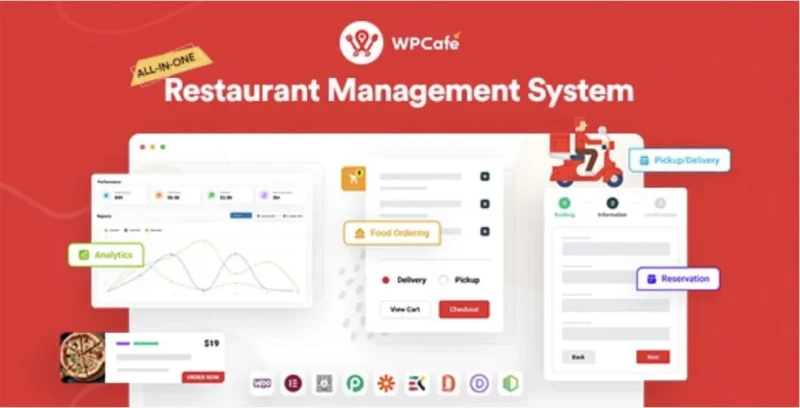
WPCafe Overview & WooCommerce Restaurant Commerce Engine
WPCafe is a WooCommerce-native WordPress plugin, engineered for restaurant operators and agency developers to build food menus, online ordering pipelines, and table reservation workflows inside a single WordPress runtime. It removes the operational bottleneck of wiring separate plugins for menu rendering, checkout, booking, and delivery scheduling by unifying those layers against WooCommerce’s product and order schema. In production deployments it functions as the commerce and reservation engine behind restaurant sites, with Elementor, WP Bakery, and Divi Builder widgets supplying the presentation layer.
Technical Specifications & Deployment Matrix
| Engineering Metric | Deployment Specification |
|---|---|
| Base Technology / Framework | WordPress plugin (PHP source, Sass stylesheets), current release WPCafe Pro 3.0.19 |
| Runtime / Language Requirements | WordPress 5.5.x through 7.0.x; WooCommerce 6.x–9.x required for the ordering pipeline |
| Data Exchange / Communication Protocols | Ajax mini-cart state updates, customizable confirmation and cancellation e-mail notifications, Google Places address autocomplete |
| Front-End / Engine Dependencies | Elementor (14+ widgets), WP Bakery, Divi Builder, WordPress shortcode API; Gutenberg optimization not implemented |
| Database / Persistence Footprint | Reads and writes against WooCommerce product and order records; reservation schedules, locations, and daily order limits stored in plugin-managed tables |
Food Menu, Ordering & Reservation Execution Pipeline
WPCafe delegates all transactional logic to WooCommerce’s native cart and checkout pipeline. Menu items register as WooCommerce products, so adding a dish to the Ajax mini cart dispatches the same add-to-cart request handlers that standard product purchases use; taxes, discounts, invoices, and PDF receipts are produced through WooCommerce’s order lifecycle rather than a parallel payment stack.
On the presentation side, menu output is delivered through three interchangeable delivery channels: Elementor widgets (including a food menu list widget and a tab widget), WP Bakery and Divi modules, and WordPress shortcodes that inject menus into posts, pages, and widget areas. Menus can be filtered by location, rendered in one or two column layouts, searched live, and stacked in multiple styles on a single page — 10+ styles ship in the free tier and 33+ in Pro. Category list and location list layout widgets handle taxonomy-driven navigation, and variation product quick view plus WooCommerce default-layout overrides reshape the stock storefront output.
The reservation subsystem operates as an independent scheduler that can run with or without food orders attached. Restaurant opening and closing windows are defined day-wise in single-slot or multi-slot configurations, with a separate special-day booking system for holidays. Seat capacity is enforced per day, and early-booking and late-booking windows restrict how far in advance or how close to service time a guest can reserve. When a slot fills, a waiting list lets guests register for a seat and receive an offer when capacity opens.
Core Technical Capabilities of WPCafe
- Pickup and Delivery Scheduling Engine: Per-location scheduling with per-food end-time overrides, a location selection popup on the homepage, global minimum order amounts inherited by locations lacking local settings, and daily order caps configured independently for pickup versus delivery.
- Reservation State Management: Guests create and cancel reservations from the front-end; the admin dashboard renders reservation lists with detail views, printing options, and analytical reports correlating ordered food with reservation records.
- Multivendor Distribution: Dokan compatibility exposes food menus to vendor storefronts, with vendor names rendered across all shortcodes — a structural fit for multi-restaurant marketplaces.
- Localization Layer: RTL support applies to reservation forms and the booking calendar, covering right-to-left language deployments without stylesheet forks.
- Notification & Receipt Pipeline: Customizable e-mail notifications handle confirmations and cancellations, while receipts print item add-ons and support selectable default layouts with PDF download and WooCommerce invoice printing.
Production Implementation & Operational Resilience
Pre-deployment checks are minimal but firm: WordPress 5.5 or higher, an active WooCommerce installation (6.x through 9.x), and a supported browser target — Firefox, Safari, Opera, Chrome, or Edge. Because Gutenberg optimization is not implemented, agencies building native block-editor sites should route presentation through Elementor, WP Bakery, Divi, or the shortcode API; shortcodes act as the graceful fallback path, inserting menus and reservation forms into any content area regardless of the active builder.
Recent releases hardened resilience in ways worth auditing during staging: script payloads on food menu and business hours pages were reduced, smaller product images in sliders cut page weight, legacy discount breakdowns no longer crash classic cart and checkout pages, and pickup/delivery checkout pages render correctly against WPCafe v3. Single alert boxes replace overlapping notification popups, and Elementor style controls now apply to the new menu card styles. For teams pairing the plugin with a purpose-built front-end such as Nigiri, the theme supplies the visual shell while WPCafe continues to own menu, ordering, and booking data. For decoupled point-of-sale implementations outside the WordPress runtime, iRestora PLUS operates as an independent POS alternative rather than an extension of this plugin’s data model. Google Places autocomplete on checkout address fields reduces failed delivery entries, and paused-order modules avoid stray API calls when disabled per location.
Frequently Asked Questions
Does WPCafe require an active WooCommerce installation to process food orders?
Yes. Online ordering, checkout, invoice printing, and PDF downloads all route through WooCommerce’s order controllers, compatible with versions 6.x through 9.x. Menu rendering and shortcodes display independently, but transactions depend on WooCommerce being active.
Is the plugin optimized for the Gutenberg block editor?
No. The sales documentation lists Gutenberg Optimized as not applicable. Menu and reservation layouts are delivered through Elementor widgets, WP Bakery modules, Divi Builder support, and WordPress shortcodes instead of native blocks.
Can reservations be restricted by daily seat capacity?
Yes. The scheduler enforces day-wise booking restrictions based on seat capacity, and when a slot reaches capacity, guests can join a waiting list and receive an offer the moment a seat opens up again.
Are pickup and delivery daily order limits configured separately?
Yes. Pro 3.0.17 introduced order limit controls that cap how many orders a day accepts, with distinct thresholds for pickup and for delivery, and the limit settings hide automatically when the module is disabled.
Does the plugin support right-to-left language deployments?
Yes. RTL language support covers both the reservation forms and the booking calendar, so Hebrew, Arabic, and similar right-to-left locales render correctly without custom stylesheet overrides.