WooCommerce Email Templates
WooCommerce Email Templates Overview & Brand Delivery Layer
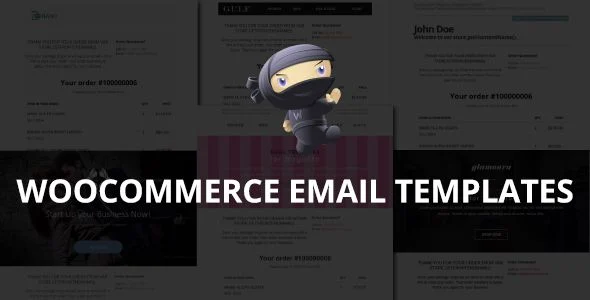
WooCommerce Email Templates is an HTML, CSS, and PHP template package engineered for store owners and developers to override the default transactional email rendering of WooCommerce. Stock WooCommerce dispatches plain administrative order, invoice, and registration emails that carry no visual connection to the storefront, breaking brand continuity at the most engagement-sensitive touchpoint of the purchase lifecycle. In production workflows, the package supplies twenty prebuilt, responsive style presets that replace native email markup, allowing agencies to deliver branded confirmation, invoice, and account notifications across client storefronts without authoring email-safe markup from scratch.
Technical Specifications & Deployment Matrix
| Engineering Metric | Deployment Specification |
|---|---|
| Base Technology / Framework | HTML, CSS, and PHP template files layered on the WooCommerce email subsystem |
| Runtime / Language Requirements | WordPress with WooCommerce active; PHP server runtime |
| Data Exchange / Communication Protocols | Transactional email dispatch through the WordPress mailing stack (PHP mail or configured SMTP transport) |
| Front-End / Engine Dependencies | Responsive CSS layout targeting smartphone and tablet email clients, including Outlook rendering compatibility |
| Database / Persistence Footprint | Zero custom database writes; templates operate as static presentational assets over existing order data |
Template Override Architecture & Email Rendering Pipeline
The package overrides WooCommerce’s native email template files with its own PHP, HTML, and CSS markup. When a store event fires, an order placement, invoice generation, or customer registration, the WooCommerce email class assembles the message subject, heading, and body variables, and the template lookup resolves to the package’s styled layout instead of the plugin’s default plain wrapper. Order line-item data is then injected into that layout, and product thumbnails together with direct product permalinks are rendered inline so recipients can visually confirm and revisit purchased items directly from the inbox. Because the styling layer sits above WooCommerce’s own data assembly, the package modifies presentation without altering how order records are queried or persisted.
Core Technical Capabilities of WooCommerce Email Templates
- Full Template Override Set: All customer-facing transactional emails, including order confirmations, invoices, and registration messages, are covered by the twenty included style presets, eliminating per-email custom coding.
- Responsive Multi-Device Rendering: Layout markup adapts to smartphones and tablets, addressing the variance between mobile email clients and desktop renderers such as Outlook, whose rendering behavior required a documented compatibility fix in release 3.1.
- Product Thumbnails and Links in Emails: Sales emails embed product imagery and clickable product URLs, added in the 3.0 release cycle, converting order notifications into secondary merchandising surfaces. Stores layering interactive commerce flows, where integrating Auctions for WooCommerce introduces bidding and winner notifications, inherit the same styled transactional pipeline for every dispatched message.
- Editable Style Variables: Texts, colors, images, and fonts are exposed as customizable parameters, so each preset can be aligned to a store’s identity without rebuilding the underlying markup structure.
- Multilingual String Support: Template text is prepared for translation, enabling stores that operate in multiple locales to localize their transactional communications.
Production Implementation & Operational Resilience
Deployment follows the standard WooCommerce template distribution pattern: the package files are placed so the email subsystem resolves them during message assembly, and the included user’s guide documents both setup and per-preset customization steps. Because the package performs no database writes, it introduces no schema migration risk and leaves the order persistence layer untouched, which keeps rollback paths clean in staging-to-production promotion cycles. Operational risk in email templating concentrates in client rendering variance rather than server load: desktop Outlook applies a constrained rendering engine, so layout decisions must be validated across a spread of clients before release, a constraint the changelog’s Outlook compatibility work directly reflects. Customization boundaries are presentational: agencies edit colors, fonts, imagery, and copy within each preset, while deeper structural changes require modifying the supplied HTML and PHP directly. For storefronts where visual product presentation also needs enrichment, Iconic WooCommerce Attribute Swatches operates on the catalog side of the same WooCommerce stack, converting variation dropdowns into selectable visual swatches without conflicting with the email layer. The release history, spanning versions from the 1.0 launch in 2015 through the 5.9 release in 2026, demonstrates a sustained correction and refresh cadence, including full rewrites at 2.0, 5.0, and the 2026 update.
Frequently Asked Questions
Does the package cover every transactional email a WooCommerce customer receives?
Yes. The deliverable includes all customer-facing transactional emails such as order notifications, invoices, and registration confirmations, distributed across the twenty included style presets, so no default WooCommerce email remains unstyled.
Are product thumbnails rendered inside the sales emails?
Yes. Product thumbnail embedding within sales emails was introduced in the 3.0 release, and product links are likewise included, allowing recipients to visually verify ordered items and click through to the corresponding product pages.
Has compatibility with Outlook desktop rendering been addressed?
Yes. The changelog documents a dedicated Outlook compatibility fix in version 3.1, and subsequent maintenance releases through 5.9 continued applying corrective adjustments, indicating that cross-client rendering behavior is actively maintained.
Can the templates be used on stores operating in multiple languages?
Yes. Multilingual support is an explicit feature of the package, so transactional emails can be localized alongside the rest of the store rather than remaining locked to a single default language.