Wiloke Product Focal for Elementor
Wiloke Product Focal Overview & Elementor Product Rendering Architecture
Wiloke Product Focal for Elementor is a WordPress plugin written in PHP, JavaScript, HTML, and CSS, engineered for agencies and WooCommerce store operators to render catalog items as structured, interactive cards inside Elementor-built pages. The module addresses a concrete bottleneck: native WooCommerce product loops output plain list markup that resists per-card control over inventory status, review aggregates, pricing, wishlist actions, and quick view triggers on a single design surface. In production delivery, it functions as a drop-in Elementor widget that converts product queries into tab, grid, or masonry layouts without requiring template file overrides.
Technical Specifications & Deployment Matrix
| Engineering Metric | Deployment Specification |
|---|---|
| Base Technology / Framework | WordPress plugin (PHP, JavaScript JS, HTML, CSS files included) |
| Runtime / Language Requirements | WordPress 5.7.x through 6.0.x on a standard PHP server runtime |
| Data Exchange / Communication Protocols | Consumes native WooCommerce product data structures over standard HTTP request/response cycles |
| Front-End / Engine Dependencies | Elementor and Elementor Pro; WooCommerce 5.x.x and 6.x.x |
| Browser / Rendering Environment | Chrome, Firefox, Safari, Opera, and Edge |
| Database / Persistence Footprint | Reads the existing WooCommerce product layer; no custom database schema writes are documented |
Card-Based Catalog Rendering & Layout Execution Pipeline
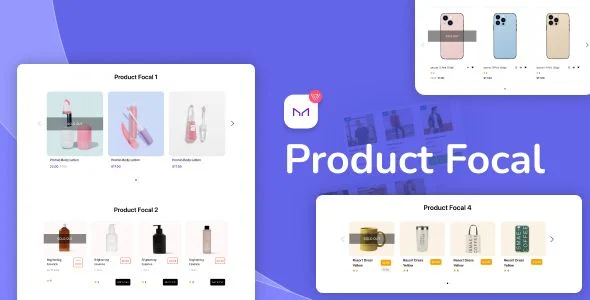
The core mechanism converts WooCommerce catalog queries into card-based layout regions controlled from the Elementor editor. When a widget instance is placed on a page canvas, the module pulls product records and binds each item to its own card markup unit. Category tabs sourced from the WooCommerce product taxonomy let visitors switch between product sets on the same page rather than navigating separate archive screens. Every card exposes discrete data points as renderable states: stock or inventory status, review output, price display, a wishlist toggle, and a quick view entry point. The operator then selects one of three layout modes — tab, grid, or masonry — which determines how the cards flow within the page container.
Layout tuning is handled at two levels. Spacing between cards can be adjusted directly, and custom item widths can be assigned to each layout individually, or a single default width can be applied across all three modes as a fallback configuration. This per-layout control keeps card dimensions coherent across screen sizes, and the documented behavior eliminates horizontal scrolling on narrow viewports. For storefronts that need layered discovery beyond category tabs, deploying Inspect – WooCommerce Product Filter Search adds real-time attribute-based filtering on the front end while the widget layer remains responsible for presentation.
Architectural & Functional Highlights
- Three layout engines in one widget: tab, grid, and masonry modes govern card placement, letting one product source feed multiple visual arrangements without duplicate query work.
- Per-card data binding: inventory status, reviews, prices, wishlist, and quick view render as individual card elements, so shoppers evaluate items without leaving the catalog view.
- Granular width and spacing control: custom item widths can be set per layout or inherited from a shared default, giving designers breakpoint-aware dimension management.
- Cross-browser, cross-device output: rendering is verified across Chrome, Firefox, Safari, Opera, and Edge, with no horizontal scroll on constrained viewports.
Production Implementation & Operational Resilience
Deployment prerequisites are explicit: a WordPress 5.7.x–6.0.x environment, an active WooCommerce 5.x.x or 6.x.x installation, and Elementor (with Elementor Pro supported but not mandated). The package ships with JavaScript JS, HTML, CSS, and PHP files, so front-end adjustments and debugging can be performed directly against the source during staging. Because the module reads the native WooCommerce persistence layer rather than writing custom tables, schema drift risk stays low on supported WooCommerce versions. Catalog imagery flows from the standard media pipeline; for stores that reference remote imagery, Featured Image from URL (FIFU) Pro assigns featured images from external URLs and supports the WooCommerce records this widget consumes.
Resilience behavior is anchored in the configuration model. When per-layout widths are left unset, the default setting acts as the fallback, preventing broken card geometry from partial configuration. The sales documentation confirms Gutenberg optimization, meaning the plugin coexists with block editor workflows on the same site, and its high-resolution output is verified across five major browser engines. Teams should still validate the WooCommerce major version before deployment, since compatibility is bracketed to the 5.x and 6.x series.
Once presentation is settled, order-value strategy becomes the next architectural concern; implementing WooCommerce Upsells and Related Products – Upseller manages targeted offer placement on the shop side while this widget keeps catalog browsing performant.
Frequently Asked Questions
Does the plugin require Elementor Pro to function?
No — compatibility extends to both Elementor and Elementor Pro, so the widget runs on the free builder engine. Pro remains fully supported for sites already relying on its advanced features during page composition.
Can it be installed on a site that also uses the Gutenberg block editor?
Yes — the sales documentation marks the plugin as Gutenberg optimized, confirming coexistence with block editor workflows. Its widgets render through Elementor page canvases, so both editing paradigms operate side by side.
Are source files included in the delivered package?
Yes — the package ships with JavaScript JS, HTML, CSS, and PHP files, giving development teams direct access to the codebase for inspection, debugging, and controlled front-end adjustments during staging.
Can shoppers preview a product without navigating to its single product page?
Yes — each card exposes a quick view entry alongside price, inventory status, reviews, and wishlist controls, allowing item inspection directly from the catalog layout without page navigation.
-
1.0.5 LatestOct 28, 2026