Whistle Clap Phone Finder with AdMob Ads Android
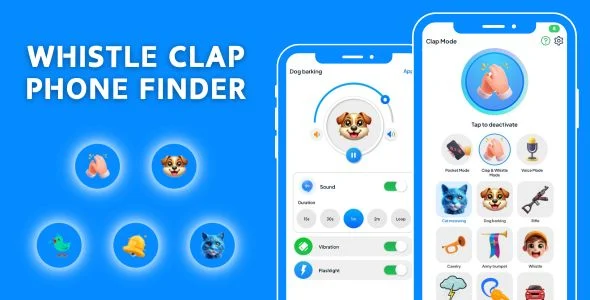
Whistle Clap Phone Finder Overview & Acoustic Detection Engine
Whistle Clap Phone Finder is a Java-based Android utility application source package, engineered for indie developers and mobile studios to publish device-recovery apps on Google Play. It resolves the recurring problem of misplaced handsets by converting microphone input into a trigger channel, so a clap, whistle, or voice command dispatches a coordinated alarm, vibration, and flashlight response. Within an agency’s delivery workflow, the codebase functions as a deployable, AdMob-monetized asset that ships with both a compiled APK and raw Java/XML sources ready for reskinning and store submission.
Technical Specifications & Deployment Matrix
| Engineering Metric | Deployment Specification |
|---|---|
| Base Technology / Framework | Native Android development in Java |
| Runtime / SDK Requirements | Minimum SDK API 21 (Android 5.0); Target SDK API 36 (Android 16) with SDK 36 toolchain |
| UI Layer / Engine Dependencies | XML layouts built on Material Components |
| Monetization / Ad Networks | AdMob and Facebook ad slots integrated into the build |
| Deliverable Formats | .apk, .java, and .xml files |
| Verified Device Compatibility | Android 15.0, 12.0, 11.0, 10.0, 9.0, and other Android versions |
Acoustic Signal Pipeline & Alert Dispatch Flow
The engine samples the device microphone, matching incoming audio against clap and whistle signature thresholds. Audio frames are captured through the RECORD_AUDIO channel, normalized, and passed through a detection routine that separates percussive clap bursts and high-frequency whistle tones from ambient room noise. Once a signature crosses its threshold, the dispatcher fires a coordinated alert sequence: an audio alarm plays at full volume, the vibration motor engages, and the camera torch flashes, producing a multi-sensory response that stays audible and visible in dark rooms, under cushions, or across an open-plan office. A parallel voice-command route feeds the same dispatcher, letting users trigger the response without producing a clap or whistle toward the handset.
The security module runs alongside the acoustic pipeline. When the device registers unauthorized handling, the same alarm stack activates as a deterrent, broadcasting sound and light until the legitimate owner intervenes. Because both modules converge on one alert dispatcher, the Java classes governing alarm state, audio playback, torch control, and vibration can be maintained and tested as a single subsystem rather than four disconnected services.
For studios assembling a parallel monetization portfolio on the same release pipeline, Temp Number ships as an independent Android codebase with its own AdMob wiring, following a comparable Java-and-XML structure without sharing runtime components with this package.
Core Technical Capabilities of Whistle Clap Phone Finder
- Dual acoustic triggers: clap and whistle detection paths share one threshold-validation routine, so both input types drive identical alarm, vibration, and flashlight outputs without duplicated dispatch logic.
- Voice command activation: a speech-based route extends the trigger surface, giving users an alternate input when clapping or whistling toward the handset is impractical.
- Anti-snatching deterrent: unauthorized handling of the device routes into the alarm dispatcher, sounding the siren as a theft deterrent until the owner reclaims the phone.
- Configurable alert stack: alarm audio, vibration, and flashlight parameters are user-adjustable, letting owners tune response intensity to their surrounding environment.
- Material Design interface: XML layouts built on Material Components keep the configuration flow short, with detection modes activatable within seconds of first launch.
Production Implementation & Operational Resilience
Compilation requires Android Studio with the SDK 36 toolchain installed; the minSdk of API 21 keeps the binary installable on hardware stretching back to Android 5.0, while the targetSdk of API 36 aligns the build with Android 16 store expectations. Runtime permission handling is mandatory on API 23 and above, so the RECORD_AUDIO grant flow must complete before the listening logic can register audio frames — a deployment detail worth verifying on every test device, since a denied permission silently disables detection. Torch and vibration permissions follow the same verification discipline across the supported Android 9 through 15 hardware range.
Monetization deployment involves replacing placeholder ad identifiers with production AdMob publisher IDs and validating that both the AdMob and Facebook slots render before a release build is signed. Because the full Java and XML sources ship in the package, studios can reskin themes, swap string resources, adjust detection constants, and rebrand the launcher identity without touching the signal-processing logic. Continuous microphone listening carries an inherent battery cost, so QA cycles should measure drain across long idle sessions and confirm the alarm service behaves predictably under Doze restrictions on the verified device matrix.
Studios broadening a sensor-driven Android utility lineup can treat GPS Tools with Satellites Map Data AdMob Ads Android as a separate standalone codebase covering satellite and map-data use cases, following its own release track rather than merging into this one.
Frequently Asked Questions
Does the deliverable include a compiled APK alongside the editable source?
Yes, the package contains .apk, .java, and .xml files, so teams can sideload the working build for immediate device testing before opening the Java project in Android Studio for modification.
Does the alarm silence itself automatically once the phone is picked up?
No, the alarm is engineered to continue ringing until the user finds and stops it, which is what keeps the response effective when a handset is buried out of sight under furniture or bedding.
Does the anti-snatching alarm respond to unauthorized pickup of the device?
Yes, the security module activates the alarm when someone picks up or attempts to snatch the phone, broadcasting sound and light as a deterrent until the legitimate owner intervenes on the device.
Can the application be rebranded and published under a different identity?
Yes, the included Java and XML sources expose the entire UI layer, so launcher naming, themes, and string resources can be replaced and recompiled before signing a store-ready release build.
Clap to Find My Phone – Find my Device – Find my Phone by clap – Mobile Finder
Recover Deleted Contacts – Contact Recovery – Restore Contacts and Backup – Phone Numbers Recovery
Mouse Cursor Touchpad – Quick Cursor – One-Handed Mode – Remote Mouse – Touchpad for Big Phone Tab