WhatsBot – WhatsApp Marketing, Bot, Chat & AI Personal Assistant Module for Perfex CRM
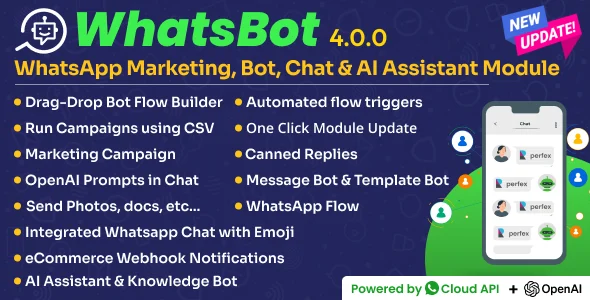
WhatsBot Overview & WhatsApp Automation Layer for Perfex CRM
WhatsBot is a CodeIgniter-based WhatsApp marketing and automation module engineered for Perfex CRM deployments that need native WhatsApp Cloud API connectivity inside the CRM workflow. The package consolidates bulk campaigning, template messaging, bot-driven conversations, and OpenAI-assisted replies into a single admin-area console, removing the operational split between a disconnected WhatsApp tool and the CRM database where leads and customers actually live. In agency and SaaS delivery pipelines, the module functions as the messaging layer of the stack: it captures inbound chats as leads, routes them to staff agents, and records every transaction for later analysis.
Technical Specifications & Deployment Matrix
| Engineering Metric | Deployment Specification |
|---|---|
| Base Technology / Framework | CodeIgniter (Perfex CRM module architecture; requires an existing Perfex CRM installation) |
| Runtime / Language Requirements | PHP 8.x and PHP 7.x; MySQL 8.x and MySQL 5.x |
| Data Exchange / Communication Protocols | Official WhatsApp Cloud API, inbound webhook callbacks, outbound HTTP webhook forwarding, OpenAI API integration |
| Front-End / Engine Dependencies | JavaScript (JS/JSON), HTML, CSS; renders in IE11, Chrome, Firefox, Safari, Opera, and Edge |
| Database / Persistence Footprint | Persists leads, message logs, templates, campaigns, and chat threads within the Perfex MySQL database |
Cloud API Execution Pipeline & Bot Automation Mechanics
WhatsBot executes all messaging through the official WhatsApp Cloud API, with inbound webhook callbacks driving event handling end to end. Incoming messages are parsed, matched against configured trigger keywords, and then routed in one of three directions: dispatched to the drag-and-drop Bot Flow Builder for multi-step conversations, answered by the template bot using pre-approved message templates, or queued into the live chat console embedded in the Perfex admin area. Unknown numbers are converted into lead records automatically, so every conversation enters the CRM pipeline without manual data entry. Delivery state is synchronized continuously — each outbound payload reports sent, delivered, and read transitions, giving campaign managers measurable feedback on audience reach.
Outbound traffic follows three channels: one-to-one conversations, bulk campaigns, and drip sequences that release scheduled template messages over time to nurture leads. CRM event triggers extend this by firing template sends when records are created, updated, or deleted, while the document-type handler and media pipeline support images, videos, voice notes, and attachments across campaigns, bots, and templates alike.
Core Technical Capabilities of WhatsBot
- Cloud API Campaign Engine: dispatches bulk and drip campaigns to large audiences, with CSV-based sending that reads recipient lists directly from an uploaded file and avoids writing unnecessary lead rows into the database.
- Bot Flow Builder & Keyword Dispatcher: a drag-and-drop flow builder (beta) composes complex conversation paths; multiple trigger keywords, bot cloning, and keyword-triggered welcome messages cut per-bot configuration time.
- OpenAI Assistant Layer: the AI assistant performs sentence correction, grammar checking, professional reply generation, and language translation, and accepts custom prompts defined per chat context.
- Lead Acquisition & Webhook Forwarding: inbound conversations from unknown numbers auto-generate lead records, and forwarded HTTP notifications push event payloads to third-party applications on the outside.
- Catalog & Commerce Sync: WhatsApp product catalogs synchronize with CRM products to receive customer orders directly, and an eCommerce webhook listener ingests order events from webhook-capable storefront platforms such as WooCommerce or Shopify.
For order-to-WhatsApp pipelines where the storefront itself must capture purchases over chat, Checkout on WhatsApp for WooCommerce operates on the store side as an independent plugin, while WhatsBot handles CRM-side ingestion of webhook events — two decoupled layers, each running on its own platform.
Production Implementation & Operational Resilience
Deployment follows the standard Perfex module lifecycle: upload the package, activate it inside the CRM, and connect a WhatsApp Cloud API account from the module dashboard. The codebase targets PHP 7.x and 8.x runtimes with MySQL 5.x/8.x persistence and renders across Chrome, Firefox, Safari, Edge, Opera, and IE11. Because everything runs inside the existing CRM install, no separate hosting surface or additional database is introduced.
Operational resilience is handled at the messaging layer. Every interaction is written to message logs, giving administrators a traceable record for diagnosing failed sends and auditing conversation history. Auto-reply rules cover messages arriving outside configured business hours, and opt-in/opt-out management keeps recipient consent state current for compliance-sensitive campaigns. Incoming payloads carry a frequently-forwarded indicator, message reactions, and shared-contact parsing, all of which the engine stores and displays within conversation threads. Internal notes remain private to staff, and the typing indicator preserves conversational context on the recipient device.
For production Perfex installations exposed to public traffic, hardening the authentication surface matters as much as messaging uptime; running Login Attempt Guard for Perfex CRM on the same installation blocks brute-force attempts against the very admin area where live chats and campaign dashboards are managed.
Frequently Asked Questions
Does the AI assistant in WhatsBot require an OpenAI API key to function?
Yes. The redesigned AI assistant integrates with OpenAI and requires an API key with proper permissions. It generates responses based on your prompts and instructions, while core messaging, bot, and campaign features continue to operate independently of the key.
Can bulk campaigns be dispatched without inserting new lead records into the database?
Yes. The CSV campaign feature reads recipients directly from an uploaded file, enabling efficient targeting of large audiences without creating unnecessary lead entries inside the Perfex database.
Are incoming chats automatically distributed among staff members?
Yes. Agent routing assigns incoming chats to the most appropriate agents based on configured rules, and support agents can also be manually assigned to specific leads or customers for personalized handling.
Can the module respond to messages received outside configured business hours?
Yes. The auto-reply outside business hours feature sends automated responses whenever messages arrive outside the configured schedule, maintaining around-the-clock engagement without requiring an agent to be online.