Vintina – Lingerie & Underwear Store Elementor Template Kit
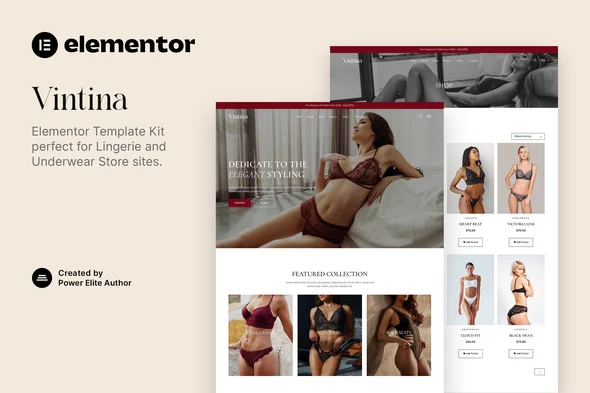
Vintina Lingerie & Underwear Store Elementor Template Kit Overview & Commerce Layout Architecture
Vintina is a WooCommerce-oriented Elementor Template Kit engineered for store owners and agencies that need to launch lingerie and women’s underwear e-commerce sites without writing code. The package removes the layout-construction bottleneck of standard WordPress store builds by supplying 16+ pre-assembled page templates that import directly into the Elementor editor as editable JSON layout structures. Within an agency delivery pipeline, the kit functions as the presentation layer for a WooCommerce catalog, covering home, shop, product detail, blog, and contact flows that can be adapted per client brand.
Technical Specifications & Deployment Matrix
| Engineering Metric | Deployment Specification |
|---|---|
| Base Technology / Framework | Envato Template Kit for the Elementor page builder (WooCommerce commerce context) |
| Builder Compatibility | Elementor 3.4.x through 3.10.x runtime versions |
| Required Plugins | Elementor, Jeg Elementor Kit, MetForm, WooCommerce |
| Import Transport | Envato Elements plugin (Elements > Installed Kits upload or connected-account import) |
| Template Inventory | 16+ templates: Home, About, Shop, Product Detail, FAQ, 404, Blog, Single Post, Contact, Jkit-Tab Description, Jkit-Tab Additional Info, Off Canvas, MetForm Contact, Header, Footer, Global Theme Style |
| Rendering Targets | Responsive layout with retina-ready assets; Chrome, Firefox, Safari, Opera |
WooCommerce Layout Composition & Import Pipeline
The kit operates through Envato’s template import pipeline rather than any server-side build process. After the Envato Elements plugin is activated, each template’s layout data is parsed into the Elementor editor, where sections, containers, and widgets become individually editable nodes. Global Kit Styles must be imported first so that typography and color tokens propagate across every subsequent page import, keeping the design system consistent instead of per-page overrides. The header, footer, and off-canvas elements are managed as reusable global structures, while Jkit-Tab modules supplied by the Jeg Elementor Kit plugin render the description and additional-information panels on product pages.
Core Technical Capabilities of Vintina
- Full WooCommerce page coverage: Shop, Product Detail, and tabbed information templates map onto the standard store browsing and checkout funnel, so the visual layer works against native WooCommerce product records once product meta (price, attributes) is completed.
- Decoupled product display: On product detail pages, visible content is edited directly in the builder rather than pulled from the WooCommerce product post, which lets teams maintain internal catalog data separately from the presented layout.
- MetForm contact integration: The included MetForm block imports as a reusable form template and binds to the Contact page through the widget’s form editor, so inquiry capture works without external form services.
- Global Theme Style layer: A single imported style definition governs fonts and palette across all 16+ templates, reducing token drift when agencies rebrand the kit for different clients.
- Responsive and cross-browser layout: Templates ship with responsive breakpoints and retina-aware imagery, verified against Chrome, Firefox, Safari, and Opera rendering engines.
Because the kit runs entirely inside the Elementor editor, widget behavior beyond the bundled set is not included by default; extending the widget inventory through Elemix gives builders additional Elementor widget types to layer into the imported layouts when a client requires components the kit does not ship.
Production Implementation & Operational Resilience
Deployment follows a deterministic sequence: activate the Envato Elements plugin, upload the kit archive without unzipping, install the orange-banner plugin requirements, import Global Kit Styles first, then import individual templates one at a time. Imported layouts land under Templates > Saved Templates, from which pages are assembled by creating a new Elementor page, setting Elementor Full Width, hiding the page title, and inserting the saved template from the My Templates tab. Product detail pages require an additional configuration step: under Elementor > Settings, Products must be checked in the post-type list so single product layouts can be edited with the builder.
For MetForm, the form block must be imported separately before the page template, then attached via the widget’s Navigator-located form editor using the Add Template > My Templates insertion path. On shared hosting, larger kit imports can approach PHP memory limits (wp_memory_limit), so staging validation before client handover is prudent. Content boundaries are documented explicitly: demo images originate from Envato Elements and require separate licensing or substitution, and blog/shop listings populate only after actual posts and products exist in WordPress. These boundaries make the kit a layout system rather than a content deliverable, and teams planning client onboarding should budget for image sourcing and catalog entry as separate workstreams.
Teams preferring a classic theme-based architecture over a kit-based import workflow can evaluate parallel solutions such as Alice’s as an independent lingerie store and fashion boutique WordPress theme, or YourTouch as a separate lingerie and underwear WordPress theme for implementations outside the Elementor template-kit delivery model.
Frequently Asked Questions
Does the kit import its demo blog posts and shop products automatically?
No. Blog and shop content is not included; templates render listing layouts only after actual WordPress posts and WooCommerce products are created, so catalog and editorial entry remain manual deployment tasks.
Can the contact form be used without an external form service?
Yes. The kit bundles a MetForm contact block that imports through the form widget’s template library, and the required MetForm plugin is listed among the installable requirements during the import process.
Do product detail pages display data directly from the WooCommerce product post?
No. Displayed information is customized in the Elementor builder rather than loaded from the product record, allowing internal WooCommerce product meta to be maintained separately from the visible page layout.