Vaya – E-commerce Elementor Template Kit
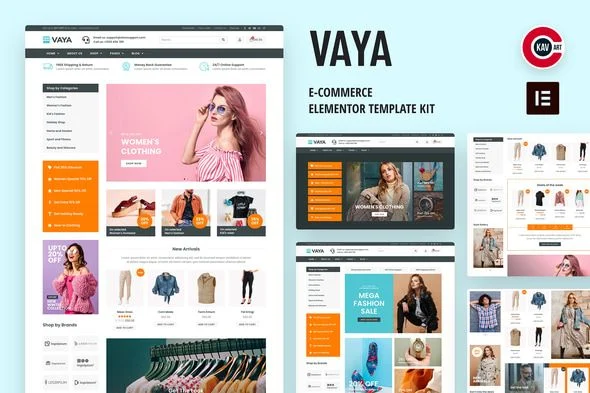
Vaya E-commerce Elementor Template Kit Overview & Retail Storefront Architecture
Vaya E-commerce Elementor Template Kit is a WordPress design package built on the Elementor page builder, engineered for fashion retailers and agency teams to assemble WooCommerce storefronts from pre-structured drag-and-drop layouts. It targets a recurring constraint in conventional WooCommerce themes, where rigid template hierarchies prevent designers from controlling landing page composition without editing theme files. Within agency delivery pipelines, the package operates as a reusable layout library: each template imports into Elementor’s Saved Templates area and deploys to live pages in minutes, giving studios a repeatable build path for retail client projects.
Technical Specifications & Deployment Matrix
| Engineering Metric | Deployment Specification |
|---|---|
| Base Technology / Framework | Elementor page builder running on WordPress 5.0+ |
| Runtime / Engine Requirements | Elementor, Elementor Pro (mandatory), Premium Addons for Elementor |
| Data Exchange / Import Protocol | Kit archive uploaded unzipped via the Envato Elements plugin (Elements > Installed Kits) |
| Front-End / Engine Dependencies | Global Kit Styles governing site-wide typography and color design tokens |
| Persistence Footprint | None of its own; imported layouts reside in Elementor’s Saved Templates library |
Global Design Token Pipeline & Template Import Flow
The import pipeline runs through the Envato Elements plugin: after activation, an orange banner dispatches an Install Requirements action that pulls in every plugin the layouts depend on before any template loads. Global Kit Styles import first, registering typography and color tokens at kit level so each subsequent template inherits the same design variables rather than redefining them per page. Individual templates then import one at a time, each arriving as a JSON layout structure stored under Elementor’s Saved Templates. Deployment to a live page involves three settings: create a new page, switch its layout to Elementor Full Width, hide the native page title, then insert the saved template through the gray folder icon’s My Templates tab. Headers and footers bypass the page layer entirely — with Elementor Pro active, the Theme Builder renders them across the site, keeping global navigation synchronized as page-level layouts diverge.
Architectural & Functional Highlights
- 12+ structured templates: four home pages, two shop pages, three product pages, About, Contact, two blog styles, post single, header, footer, product archive, post archive, and an Error 404 page, covering the full retail browsing path from entry through product discovery.
- Global Theme Style tokens: typography and color variables register once and propagate to every imported template, so a single token edit re-skins the entire storefront instead of requiring per-page adjustments.
- Theme Builder header and footer: navigation and footer sections render through Elementor Pro’s Theme Builder across all pages, preventing drift between global elements and individually composed page layouts.
- Multi-widget page composition: pages accept multiple Elementor widgets simultaneously, letting builders stack, reorder, and restyle sections while the underlying saved structure remains intact for reuse.
- Sales-oriented presentation layer: custom shop layouts and dedicated sales page templates govern merchandising presentation; for rule-based price adjustments and promotional discount logic operating at the WooCommerce data layer, deploying WooPricely alongside the store keeps cart totals driven by transparent conditions rather than static template values.
Production Implementation & Operational Resilience
Because every template arrives as a JSON payload parsed inside the Elementor editor, the primary operational constraint during bulk imports is server memory: hosts enforcing a low wp_memory_limit can abort a transfer mid-file, so raising that threshold before importing the full set prevents partially written template states. The documented sequence installs the Envato Elements plugin first, uploads the kit archive without unzipping it, then imports Global Kit Styles ahead of individual templates so token inheritance is never broken by out-of-order loading. Error containment is per template — a failed import leaves previously stored layouts intact, and re-running the operation replaces the saved copy, which makes staging-environment rehearsals low risk before a client-facing deployment.
Customization boundaries are style-level rather than code-level: widget reordering, design token overrides, and asset substitution all occur inside the Elementor editor, while the package exposes no action hooks or child-theme extension points because it is a layout kit, not a theme. Responsive behavior is handled at the builder level, with layouts adapting to viewport changes without separate mobile templates. For studios weighing a theme-based storefront path as a standalone alternative outside this kit workflow, Partdo exists as an independent WooCommerce theme option suited to catalog-heavy retail builds where fitment data and checkout flow take priority over layout-kit flexibility.
Frequently Asked Questions
Is Vaya distributed as a certified Envato Template Kit?
No — the package is listed as a standard, non-certified Envato Template Kit. This does not alter its import mechanics, since it installs through the same Envato Elements plugin workflow with the same requirements installer as certified kits.
Does the kit ship with the shop and blog demo content shown in the preview?
No — shop and blog content is excluded from the package. You must create a few posts and products in WordPress before that content can be customized inside the imported Elementor templates.
Can the preview images be used on a production website as-is?
No — the demo photography is sourced from Envato Elements and must be acquired through that service for production use, or substituted with your own assets once the templates are imported and under active customization.