Uroan – Jewelry & Ornament Store WordPress Theme
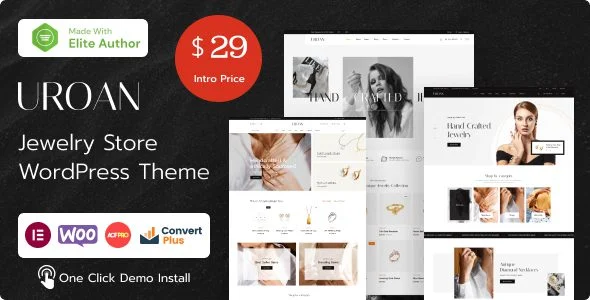
Uroan Jewelry & Ornament Store WordPress Theme Overview & AJAX Commerce Foundation
Uroan Jewelry & Ornament Store WordPress Theme is an Elementor-driven WooCommerce storefront architecture, engineered for jewelry retailers and agency teams to deploy AJAX-based product catalogs without writing custom PHP. The package resolves the full-page-reload bottleneck of stock WooCommerce storefronts by shipping variation swatches, live AJAX search, an AJAX mini cart, and single-product AJAX add-to-cart as built-in theme modules. In production delivery workflows it operates as a self-contained codebase bundling PHP templates, header/footer builders, and commerce widgets together, whereas studios preferring kit-based design paths can treat Saffire as an independent Elementor template kit outside a full theme runtime.
Technical Specifications & Deployment Matrix
| Engineering Metric | Deployment Specification |
|---|---|
| Base Technology / Framework | WordPress theme (PHP, HTML, CSS, JS files) on a Bootstrap 5.x responsive grid |
| Runtime / Language Requirements | PHP 7.4 minimum; WordPress 6.0.x through 6.5.x |
| Commerce / Engine Dependencies | Elementor page builder, WooCommerce 7.x, Contact Form 7 compatibility |
| Browser Compatibility | IE11, Chrome, Firefox, Safari, Edge, Opera; high-resolution retina rendering |
| Persistence & Data Footprint | MySQL via WordPress core; widget-ready regions; translate-ready string layer |
AJAX Storefront Execution Pipeline & Template Rendering
Uroan executes its storefront pipeline by pairing Elementor’s rendering engine with overridden WooCommerce template files. Inbound catalog requests resolve through the standard WordPress template hierarchy until those overridden files take over archive and single-product rendering; Elementor then composes headers, footers, and landing sections from stored layout documents, while the mega-menu module dispatches navigation structures and the newsletter popup injects capture forms. Commerce interactions bypass full reloads: the AJAX search module queries product payloads in the background, the mini cart mutates quantity and totals state through cart endpoints, and quick-view modals load product data into an overlay without navigating away. A size-guide module and an unlimited color scheme operate through the theme options panel, letting merchandisers adjust presentation without touching template code.
For hero and product carousel motion that outgrows the bundled sliders, Prime Slider Pro contributes zero-code Elementor slider widgets to the same builder canvas, keeping motion design inside the visual layer rather than in hand-written JavaScript.
Architectural & Functional Highlights
- AJAX Search & Mini Cart Runtime: search queries and cart mutations dispatch background requests that patch DOM fragments in place, so filtering, pagination, and add-to-cart flows never force a full document reload.
- Variation Swatches Engine: attribute dropdowns are replaced by swatch UI bound to the WooCommerce variation form; since v1.4.6, re-clicking an active swatch preserves the selection, and only the explicit Clear control resets it.
- Quick View & Product Zoom: quick-view modals and image zoom load product imagery into overlays, while single-product galleries sync thumbnails to the main frame through a one-directional Flickity asNavFor binding.
- Builder-Driven Composition: headers, footers, and sticky-header variants are assembled as Elementor documents with extensive customization options, exposing mega menu and product grid layouts as configurable widgets.
Production Implementation & Operational Resilience
Production deployment requires PHP 7.4 or higher on a host running WordPress 6.0.x through 6.5.x, with WooCommerce 7.x activated as the commerce backbone and Bootstrap 5.x supplying the responsive grid beneath catalog layouts. Because Elementor renders sections as stored JSON documents assembled into DOM trees, agencies should budget database headroom and enable CSS/JS minification at the caching layer to contain asset fragmentation across long product pages. The overridden WooCommerce template files carry current version headers, which keeps the admin’s outdated-template notice clear after commerce engine updates.
Resilience work is visible in the codebase’s event handling: the single-product gallery binds Flickity thumbnails through a one-directional asNavFor link so carousel navigation cannot crash page JavaScript before the variation form registers a selection, and swatch re-clicks preserve state instead of silently clearing it. The package is translate-ready, retina-ready, and mobile-optimized, and it interoperates with Contact Form 7, YITH Ajax Filter, YITH Compare, and WPClever Smart Compare for teams extending catalog behavior. Teams comparing parallel jewelry storefront codebases can evaluate Goldium as a separate WooCommerce jewelry theme, while customization of this codebase should stay confined to the generated child theme so parent template overrides remain upgrade-safe.
Frequently Asked Questions
Does the installation routine generate a child theme automatically?
Yes, the one-click demo import provisions the required plugins, sample store data, and an auto-generated child theme, keeping template-level customizations isolated from the parent codebase so future parent releases can be applied without overwriting edits.
Is Uroan optimized for the Gutenberg block editor?
No, the author’s technical attributes list Gutenberg optimization as not included; page, header, and footer composition routes entirely through the Elementor builder engine and its widget ecosystem rather than native WordPress block patterns.
Does the theme render layouts in right-to-left orientation?
Yes, RTL rendering ships inside the package, so the same template set mirrors navigation, typography, and product grids for right-to-left locales without maintaining a parallel template branch.