Ultra Charging Animation – Ultra Charging 3D Animation – 4D Charge Animate – Theme Art App – Charge
Ultra Charging Animation Overview & Android Charging Experience Engine
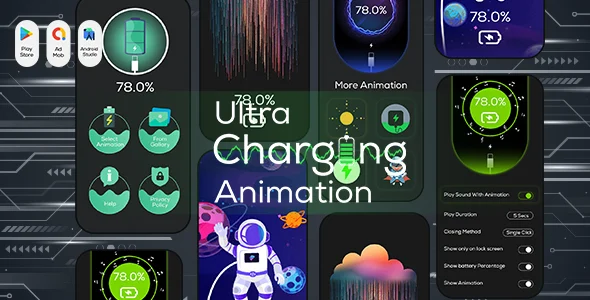
Ultra Charging Animation is a native Android application source package, engineered for indie publishers and mobile studios to deploy a live charging-screen personalization product on the Google Play store. The module replaces the stock power-connect visual state with an animated 3D battery overlay that auto-triggers whenever a charger event is detected, eliminating manual app launches. Within an agency delivery pipeline, the codebase functions as a reskin-ready foundation: animations, alarm tones, and wallpaper logic are exposed through settings-driven configuration, letting teams ship branded variants under their own store accounts.
Technical Specifications & Deployment Matrix
| Engineering Metric | Deployment Specification |
|---|---|
| Base Technology / Framework | Native Android application (Java-based source with XML layouts) |
| Runtime / Language Requirements | Android 9.0 through Android 12.0 (plus “Other” compatible targets) |
| Data Exchange / Communication Protocols | Android system broadcast receivers for charger-connect and battery-state events |
| Front-End / Engine Dependencies | Layered PSD and Layered PNG artwork for animation asset replacement |
| Database / Persistence Footprint | Local .db storage plus .dat/.dex/.so runtime components bundled in the APK |
Charging Render Pipeline & Execution Flow
The core mechanism is an event-driven overlay: the system broadcast for a connected power source dispatches the animation engine, which renders the selected 3D battery visual directly onto the lock screen without any user interaction. Once the charger state is captured, the runtime validates whether the feature flag in settings is enabled; if so, it inflates the custom charging screen layered with live percentage readouts pulled from the BatteryManager-style battery information service. Minimizing the overlay requires a double-tap gesture on the display, while a single settings toggle disables the renderer entirely, keeping the execution path fully under user control. Battery telemetry flows continuously during a session, so remaining-life percentage, temperature, health, capacity, and charger type are queried and displayed through the battery information panel. Gallery-selected video files can also be bound to the charging screen, meaning the render surface accepts both packaged animation assets and user-supplied media payloads.
Architectural & Functional Highlights
- Custom Charging Screen Pipeline: A settings toggle activates the overlay on the lock screen, with selectable image inputs from device gallery, multiple animation presets, and both light and dark theme modes resolved at render time.
- Charge Alarm Dispatcher: When the battery reaches a full state, an alarm routine fires using either the default tone or one of several alternates, while a low-battery warning light signals when charging is required, guarding against overcharge.
- Battery Information Service: One-click diagnostics surface battery type, health, capacity, life, temperature, and connected charger type, all read from system battery APIs rather than estimation logic.
- Video Wallpaper Binding: Users can select a video animation from local storage and attach it to the charging screen, extending the renderer beyond packaged assets.
- Gesture-Based Overlay Control: A double-tap listener collapses the active animation, providing a non-blocking exit path that does not interrupt the underlying charging process.
Production Implementation & Operational Resilience
Because the package ships with .java sources, .xml layouts, and layered PSD/PNG artwork, a studio can recompile, restyle, and re-sign the APK after modifying animation frames, neon color palettes, or theme tokens. The included .db and .dat components carry local persistence, so preference state, selected animations, and alarm tone choices survive process death without a backend dependency. Operational boundaries worth documenting before release: the overlay depends on Android broadcast delivery, and OEM-specific battery managers on some 9.0–12.0 devices may throttle background listeners, so testers should verify auto-launch behavior across vendor skins. The double-tap minimize gesture and the settings-disable switch act as the two graceful fallback paths when a user wants the animation suppressed. For agencies assembling a wider Android portfolio rather than a single utility SKU, parallel source assets exist on independent runtimes: Fingerprint Live Animation 3D targets the same device-personalization niche with AdMob monetization wired in, while Smart Hospital Android App serves as a sector-specific alternative for healthcare delivery builds. None of these merge into one codebase; each is a separate decoupled deployment path evaluated on its own store strategy. Secondary development on this package centers on asset replacement: swapping layered PSD frames, adjusting neon effect colors in app settings, and rebinding alarm tones are all documented extension points, whereas deeper changes to the broadcast listeners require native Android recompilation of the Java sources.
Frequently Asked Questions
Does the deliverable include editable design source files for rebranding the animation assets?
Yes. The package bundles Layered PSD and Layered PNG files alongside .java sources and .xml layouts, so studios can modify animation frames and recompile the application under their own branding without rebuilding artwork from scratch.
Can a user set a personal video from the phone gallery as the charging screen animation?
Yes. The app exposes a gallery picker that binds a locally stored video to the charging screen, letting the renderer display user-supplied media in place of the packaged 3D animation presets whenever the charger is connected.
Is the charging overlay triggered automatically, or must the app be opened manually each time?
Automatically. The engine listens for charger-connect events and displays the animation on the lock screen without a manual app launch, provided the feature is enabled in settings; a double-tap minimizes it on demand.
Does the alarm feature only fire when the battery is completely full?
No. In addition to a full-charge alarm with selectable tones, the app also raises a low-battery warning light when charging is required, giving users alerts at both ends of the charge cycle.