Ultimate Row Gradient Background for WPBakery Page Builder WordPress plugin
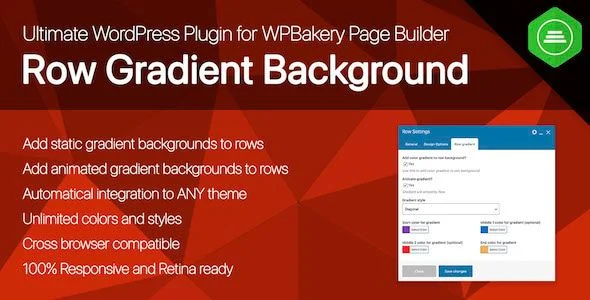
Ultimate Row Gradient Background Overview & Row-Level Visual Extension Layer
Ultimate Row Gradient Background is a WordPress add-on for WPBakery Page Builder, engineered for agencies and site builders to apply static or animated two-to-four color gradients directly onto any builder row. The package addresses a concrete gap in the WPBakery row attribute set: native background controls accept single colors and images, while multi-stop, animated gradient output normally requires hand-written CSS injected per template. In production workflows, the module functions as a zero-configuration extension layer that activates alongside any theme and exposes gradient controls directly inside the row editing interface.
Technical Specifications & Deployment Matrix
| Engineering Metric | Deployment Specification |
|---|---|
| Base Technology / Framework | WordPress plugin (PHP), extending WPBakery Page Builder row parameters |
| Runtime / Version Requirements | WordPress 5.9.x through 6.8.x; original WPBakery Page Builder plugin required |
| Browser Matrix | IE11, Firefox, Safari, Opera, Chrome, Edge |
| Localization & Multilingual | Translation-ready via POT file; declared WPML compatible |
| Persistence Footprint | No custom database tables; settings stored through native WordPress meta handling |
Gradient Rendering Pipeline & Row Extension Mechanics
The module extends the WPBakery row parameter registry with a dedicated gradient settings group. Once activated, it registers additional attributes against the standard row element, so the gradient controls appear natively inside the page builder interface rather than through a separate options screen. When a page renders, the plugin reads the stored gradient configuration for each row, validates the two-to-four selected color stops, and emits the corresponding CSS declarations into the row’s markup at output time.
Four gradient types are available, each combinable with an unlimited range of color and style permutations. Static configurations produce a fixed multi-stop background applied to the row container, while animated configurations introduce motion between the defined color stops so the background transitions continuously across the rendered surface. Because the output attaches to the row container itself, any WPBakery element placed inside the row — columns, text blocks, media, widgets — renders on top of the generated background without requiring per-element adjustments.
Responsiveness is handled at the CSS level. Gradient output scales with the row container across viewport widths and touch devices, and because the backgrounds are computed rather than rasterized, they render sharply on high-density and Retina-class displays without swapping image assets.
Core Technical Capabilities
- Four gradient types with 2-4 color stops: Each row accepts up to four color values, mixed across four distinct gradient type configurations, giving a combinatorially large style space without duplicating row templates.
- Static and animated output modes: The same color-stop configuration can render as a fixed background or as a continuously animating surface, selectable per row from the builder interface.
- Theme-agnostic attachment: The extension binds to the WPBakery row element rather than to theme-specific template hooks, which is why it operates across any WordPress theme without configuration steps.
- Translation and multisite readiness: A POT file ships with the package for generating localized language files, and the codebase is declared compatible with WordPress Multisite and multiuser installations.
- Lightweight codebase: The deliverable consists of PHP files with gradient CSS generated at render time, keeping the package compact and free of bundled asset directories.
For teams evaluating visual addon options on a different page-builder stack entirely, the Video Popup addon for elementor exists as an independent WordPress plugin targeting the Elementor ecosystem, illustrating how builder-specific addons remain scoped to their respective engines rather than sharing a common integration layer.
Production Implementation & Operational Resilience
Deployment requires the WPBakery Page Builder plugin as a hard prerequisite; the module performs no standalone layout rendering. After installation, it attaches its controls to the existing row interface with no configuration pass, which shortens onboarding on client projects where the builder is already in place. Agency staging environments benefit from this activation model: gradient definitions travel with the row data, so moving content between staging and production preserves the visual configuration without export or import steps.
On the rendering side, static gradient output serves as the base layer, with animation applied on top for engines that support the required CSS behavior. This ordering gives older browsers — IE11 is explicitly listed in the compatibility matrix — a stable background even where animated behavior is unavailable. Because gradients are pure CSS constructs, the module introduces no raster image payloads, keeping the visual layer’s bandwidth contribution at effectively zero and avoiding the asset-fragmentation penalties that image-based row backgrounds can introduce on Core Web Vitals measurements.
For multilingual client deployments, the declared WPML compatibility allows gradient-configured pages to operate inside translated site trees. Agencies coordinating multiple concurrent builds frequently track such staging-to-production rollouts through project tooling; running delivery schedules through RISE – Ultimate Project Manager & CRM keeps client milestones and deployment checklists in one operational view, separate from the WordPress stack itself. Ongoing plugin updates are delivered for the package, and the developer documents release history for version tracking during upgrade cycles.
Frequently Asked Questions
Does the plugin run on WordPress Multisite networks?
Yes, the codebase is declared compatible with WordPress MU, WPMU, and WPMS configurations, so gradient controls remain available across network installations once the package is activated within the WordPress environment.
Is the plugin optimized for the Gutenberg block editor?
No. The plugin targets WPBakery Page Builder rows specifically and is explicitly listed as not Gutenberg-optimized. Gradient controls attach to the WPBakery row interface, so native block-editor layouts fall outside its operating scope.
Which file types are included in the downloadable package?
The deliverable ships as PHP files. Gradient styling is generated as part of the rendering path and applied to row markup, which keeps the package compact and avoids bundling separate stylesheet or media asset directories.
Can gradients be tested before purchasing the full package?
Yes, the developer distributes a free version of the plugin for evaluation, and a live demo environment is published where the static and animated gradient behavior can be inspected across the four supported gradient types before deployment.

Chronos CountDown – Responsive Flip Timer With Image or Video Background – WordPress Plugin
WP ERP Pro – Supercharge Your Growing Business from Your WordPress Dashboard

WC Vendors Pro – Grow WooCommerce Marketplace Faster