Trixa – Construction Equipment Rentals WordPress Theme
What Is Trixa? Construction Equipment Rental WordPress Theme
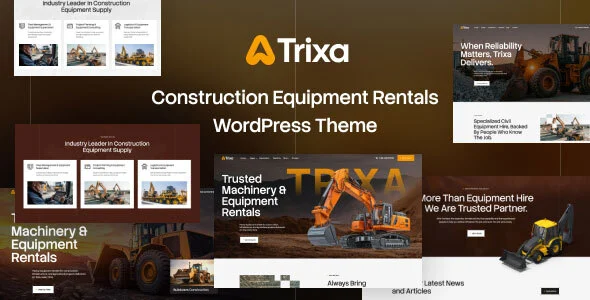
Trixa is a WordPress theme engineered for construction equipment rental companies, heavy machinery hire businesses, tool rental providers, and contractors. It solves the structural problem of presenting an equipment fleet online by pairing dedicated equipment categories, machine specification pages, and rental pricing with billing periods in a coherent layout. In agency staging or client delivery, the theme functions as a complete site framework covering services, team profiles, career listings, and a WooCommerce-powered parts shop.
Trixa System Requirements & Technical Compatibility
| Parameter | Verified Specification |
|---|---|
| Base Runtime | WordPress 6.0.x through 7.0.x (tested up to WordPress 7.1); PHP 8.1 or higher |
| Required Dependencies | Elementor, Pavo Core (bundled), WooCommerce |
| Recommended Plugins | CMB2 (equipment, service, team, career details); Contact Form 7 (contact and rental enquiry forms) |
| WooCommerce Compatibility | WooCommerce 5.x.x through 10.x.x |
| Browser Targets | Chrome, Firefox, Safari, Edge, Opera, IE11 |
| Layout & Localization | Responsive 4+ column layouts; RTL support; WPML compatibility; translation-ready with included .pot file |
| Package Files | PHP, HTML, CSS, JS files; widget-ready |
Equipment Catalog, Rental Enquiry & Page Builder Capabilities
The theme renders its equipment catalog through custom post architectures driven by the bundled Pavo Core plugin and Elementor widgets.
Verified Capabilities & Core Highlights
- Equipment catalog with two archive layouts: Rental pricing and billing periods display directly on equipment cards, letting visitors compare excavators, loaders, rollers, and graders without opening each record.
- Detailed specification pages: Each machine page exposes model, operating weight, maximum travel speed, image galleries, and related equipment for pre-enquiry evaluation.
- Rental enquiry popups: Contact Form 7 powers enquiry modals, with service and job dropdowns populated automatically from existing business content.
- Elementor theme building without Elementor Pro: Headers, footers, archive templates, and mega menus are editable through 24 custom widgets with per-widget styling controls; Pavo Core supplies the supported theme-building features.
- Commerce and content layers: WooCommerce shop, cart, and checkout templates ship with compatibility for WPC Smart Wishlist, Compare, and Quick View; the blog offers grid and list layouts, while GSAP handles scroll animations.
Implementation Scope, Customization & Deployment Boundaries
Deployment follows the standard WordPress theme workflow: upload the package through wp-admin, activate it, install the required Elementor, Pavo Core, and WooCommerce plugins, then run the one-click demo import with its setup wizard. A built-in child theme generator preserves customizations across parent updates, and theme options live in the WordPress Customizer. The package adheres to standard WordPress directory structures and requires no custom server daemons or background services. For contractors who also need a broader building-company site, Constructo serves as a complementary construction-focused theme, while agencies prototyping simpler construction landing pages may pair Trixa with the Brickon Elementor template kit. Note that the promotional landing preview, demo images, and site-specific settings such as social links require manual configuration or replacement after import.
Security Audit & VirusTotal Malware Verification
WordPress ThemesPre-deployment cloud scan •
3155cc244a695c9e8e11573706868e7646e8b14e5df60f67297d2d66cb648602
Frequently Asked Questions
Does the theme require Elementor Pro to build headers and footers?
No. The bundled Pavo Core plugin provides header, footer, and archive template building for supported features, along with a mega menu and popup builder, so Elementor Pro is not required for these theme-building workflows.
Are all demo pages included with the one-click import?
Yes. The import covers 25 demo pages including three homepages, equipment listings, single equipment views, service, team, and career pages, blog views, and WooCommerce shop, cart, and checkout templates; demo images must be replaced with licensed assets.
-
v1.0.2 Latest