Trashcure – Waste Management & Recycling Service Elementor Template Kit
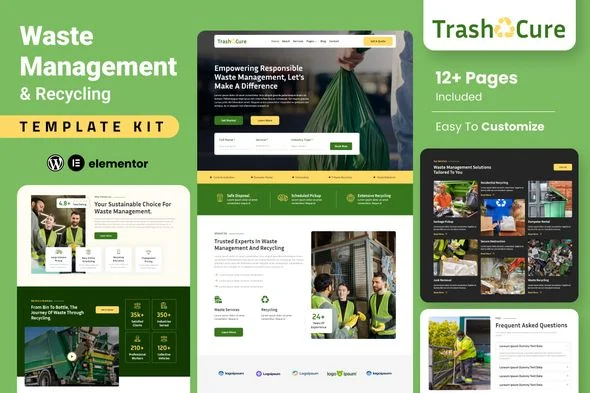
Trashcure Overview & Environmental Services Layout Architecture
Trashcure is an Elementor Template Kit for waste management and recycling service businesses, engineered for agencies and freelance builders who need to launch disposal, garbage pickup, and sustainability-program websites without writing code. The package resolves the bottleneck of hand-building an entire eco-services site from scratch by shipping pre-structured page layouts, header and footer blocks, and form modules that import directly into the Elementor page builder. Within an agency delivery pipeline, it functions as a design-data layer: layouts arrive as builder-ready structures that a production team restyles, repopulates, and binds to forms in hours rather than days.
Technical Specifications & Deployment Matrix
| Engineering Metric | Deployment Specification |
|---|---|
| Base Technology / Framework | Elementor 3.10.x page builder; Envato Template Kit distribution format |
| Runtime / Environment Requirements | WordPress install with the Hello Elementor theme active and Post Name permalink structure selected |
| Data Exchange Mechanism | Delivered as an unzipped ZIP archive imported through the Envato Elements plugin into Elementor Saved Templates |
| Front-End / Engine Dependencies | Elementor, Jeg Elementor Kit, Happy Elementor Addons, Metform |
| Persistence Footprint | Layout data stored as Elementor template records; no custom database schema is introduced |
Import Pipeline & Layout Execution Flow
The kit’s core mechanism is a staged JSON-design import that transfers prebuilt layout structures into the Elementor editor environment. Because this is a template kit rather than a WordPress theme, all page composition happens inside the builder: containers, typography tokens, and widget bindings are read from the imported structure and rendered on the front end by Elementor’s rendering engine. Correct import ordering matters — the Global Kit Styles must be brought in first so that site-wide font and color settings are registered before individual page templates are loaded one at a time.
Page assembly follows a defined sequence. After import, a new page is created, its layout set to Elementor Full Width with the page title hidden, and the desired template inserted from the My Templates tab. The home page is then assigned as the static front page under the WordPress Reading settings. Importers must also verify that the Flexbox Container feature is active in Elementor’s settings panel, since the layouts are constructed on container-based nesting rather than the legacy section-and-column model.
Architectural & Functional Highlights
- Full page inventory: Eleven templates ship in the kit — Home, About, Services, Single Service, Blog, Contact, Team, FAQ, a rate plan page, Coming Soon, and a 404 page — covering the full marketing surface of a disposal-services business.
- Metform-driven form layer: Booking, message, and newsletter forms are handled through Metform blocks, which are imported separately and then bound to their host pages via the Elementor Navigator before content fields are customized inside the form builder.
- Global design tokens: Fonts and colors are centralized in the Global Kit Styles layer, allowing a single-point restyle of the entire site rather than per-widget edits across every page.
- Decoupled header and footer builder: The Jeg Elementor Kit plugin constructs headers through a dedicated template system with an All Site display condition, keeping global chrome editable independently of page content.
One architectural boundary deserves emphasis: the stored templates under Elementor’s Saved Templates panel are source records and should not be edited directly. Customization happens on the live pages into which those templates are inserted, preserving the originals as a rollback reference.
Production Implementation & Operational Resilience
For agency staging environments, deployment resilience depends on a disciplined pre-flight sequence. Elementor and the Envato Elements plugin must both sit at their latest versions before import begins, and the permalink structure must be switched to Post Name and saved to flush rewrite rules. Hosts running tight resource ceilings should have adequate PHP memory headroom, since a full multi-template import into a single Elementor instance can momentarily spike allocation during JSON parsing. The kit also assumes compatibility with most Elementor-capable themes, though Hello Elementor is the documented baseline.
When a waste-services client needs collection-route directories, query-driven service listings, or dynamic content beyond the kit’s static layouts, JetEngine supplies that dynamic layer for Elementor through its listing, relation, and query modules. On the operational side, browsers introduce their own gotchas: Safari users must disable the ‘Open safe files after downloading’ preference so the kit ZIP is not automatically unpacked before upload. Demo imagery ships under Envato Elements terms, meaning production sites either acquire those assets or replace them with owned photography before client handover. For studios running parallel builds in other verticals — for example, a steakhouse or BBQ client — Meati offers an equivalent kit-based starting point within the same Elementor workflow, letting one team standardize its build process across unrelated industry briefs.
Frequently Asked Questions
Is Trashcure a standalone WordPress theme that activates from the Appearance menu?
No. The package contains Elementor design data only. It requires the Hello Elementor theme as a base and is installed by importing the kit ZIP through the Envato Elements plugin into the Elementor builder environment.
Is Elementor Pro a mandatory dependency for running this kit?
No. Headers and footers are constructed through the Jeg Elementor Kit plugin, and forms run on Metform, so the free Elementor build covers core functionality. Elementor Pro remains optional, with Theme Builder as an alternate header-editing route.
Can the kit ZIP be uploaded while using the Safari browser without any configuration change?
No. Safari’s ‘Open safe files after downloading’ preference must be disabled in browser settings before download, otherwise the archive may be automatically extracted and fail the single-ZIP upload requirement.