Train Builder – Advanced Math Practice (Construct) Fun Game
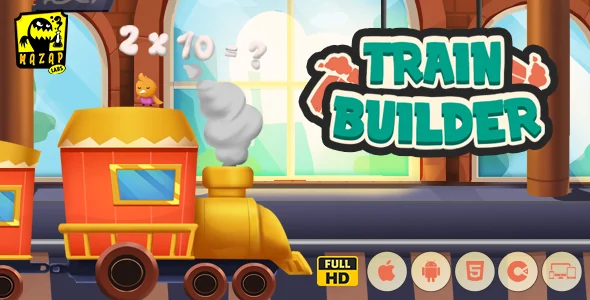
Train Builder Overview & Interactive Learning Engine
Train Builder is a Construct 3 HTML5 game source package, engineered for developers and education-focused studios to deploy a drag-and-drop math practice experience across desktop browsers, tablets, and mobile handsets. The architecture addresses a concrete bottleneck in learning-game production: building timed arithmetic drills that hold a child’s attention long enough to improve solving speed. It converts each equation into a physical action, where the player drags a boggy onto the train and, once the target is met, watches the locomotive depart the station. Within agency delivery and production workflows, the package operates as a self-contained front-end asset that ships with an editable project file plus pre-built runtime output ready for direct server upload.
Technical Specifications & Deployment Matrix
| Engineering Metric | Deployment Specification |
|---|---|
| Base Technology / Framework | Construct 3 engine exporting to HTML5 |
| Runtime / Language Requirements | JavaScript, JSON, HTML, and CSS executed client-side in the browser |
| Front-End / Engine Dependencies | No external framework required; runs on the Construct 3 runtime |
| Native Resolution | Full HD 1920×1080 canvas rendering with layered PNG assets |
| Input Model | Touch, mouse, and keyboard events handled by a unified input layer |
| Compatible Browsers | IE10, IE11, Firefox, Safari, Opera, Chrome, and Edge |
| Target Devices | Mobile, tablet, laptop, and desktop form factors |
| Editable Source Artifact | Construct 3 project file (.c3p) included in the package |
| Gameplay Modes | Equation mode and multiplication Table mode |
Equation Assembly Loop & Execution Pipeline
The runtime drives a drag-and-drop loop in which the player attaches bogies to a locomotive by resolving arithmetic prompts under departure-target conditions. On the engine level, the Construct 3 event system dispatches pointer gestures across the touch, mouse, and keyboard input channels, maps them onto the same drag logic, and updates the canvas scene every frame until the assembled train reaches its target count and the departure state fires. Equation mode generates arithmetic problems the player must solve within seconds, sharpening responsiveness, while Table mode drills multiplication recall through the same assembly mechanic. The presentation layer renders at a fixed 1920×1080 composition built from layered PNG sources, which keeps visual ordering deterministic across screen sizes. For studios examining separate standalone titles in the adjacent rail-themed hypercasual segment, Track Control exists as an independent Construct 3 build that tackles a different control mechanic rather than arithmetic practice.
Architectural & Functional Highlights
- Unified Input Abstraction: Touch, mouse, and keyboard events resolve to a single drag handler inside the Construct 3 event sheets, so one interaction pipeline covers phone, tablet, and desktop sessions without per-device branching.
- Dual Practice Modes: Equation and Table modes are enabled in the project, letting the same runtime serve both free-form arithmetic solving and structured multiplication-table drills.
- Full HD Rendering Pipeline: The scene composes at 1920×1080 using layered PNG artwork, giving designers separated visual tiers for wagons, track elements, and interface chrome.
- Zero-Code Reskin Path: Because the editable .c3p file and layered source art ship together, visual rebranding requires no programming background, only asset replacement inside the Construct 3 editor.
- Self-Contained Client Runtime: The published build consists of HTML, CSS, JavaScript, and JSON files with no server-side dependency, so the game executes entirely within the browser container.
Production Deployment & Implementation Considerations
Deployment requires nothing beyond a static hosting surface: the published files transfer to any web server as-is, and the game initializes in the visitor’s browser without backend services, database connections, or server-side scripting. Editing workflows run through the Construct 3 editor, which opens the included .c3p project and exposes the event sheets, layout objects, and layered PNG assets for modification. Reskin scope covers art replacement, difficulty tuning within the existing equation generator, and mode configuration, since the documentation positions the asset as editable without coding skills. Implementation boundaries are worth stating plainly: the package is a client-side game, not a platform, so account systems and leaderboards are not part of the shipped runtime. Browser coverage extends back to IE10 and IE11, which constrains any custom modification to APIs supported across that legacy matrix. Teams assembling a broader casual-games catalog can treat this arithmetic trainer as one title among parallel offerings; Bamboo Forest Operation represents a separate HTML5 platform-game codebase occupying a different genre entirely, with no shared runtime between the two packages.
Frequently Asked Questions
Do I need the paid version of Construct 3 to edit the project?
Yes, the editable .c3p file is authored for the Construct 3 editor, so any modification to events, layouts, or assets must be performed inside that environment rather than by direct code editing. The published output, however, runs without the editor.
Are both equation solving and multiplication tables available in one build?
Yes, Equation mode and Table mode are enabled in the shipped project, allowing the same train-assembly loop to serve general arithmetic practice as well as structured multiplication recall without building a second variant.
Does the game work on smartphones as well as desktop browsers?
Yes, the input layer accepts touch, mouse, and keyboard, and the package lists mobile, tablet, laptop, and desktop as target devices across Chrome, Firefox, Safari, Opera, Edge, and IE10/IE11.
Is the game documentation included with the download?
Yes, game documentation ships alongside the editable Construct file and the published files, giving deployers setup references for hosting the runtime and locating the editable project artifacts.