Toyqo – Toys & Kids Store Responsive Shopify Theme
Toyqo Toys & Kids Store Shopify Theme Overview & Storefront Rendering Role
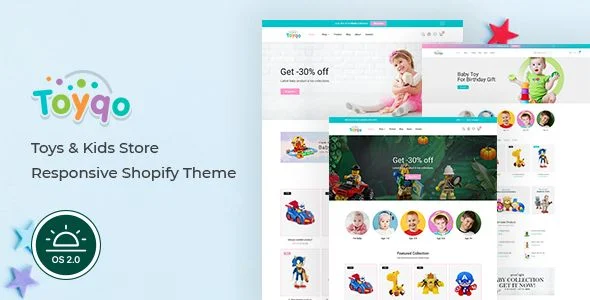
Toyqo Toys & Kids Store Shopify Theme is a responsive Shopify Online Store 2.0 storefront package, engineered for toy retailers and kids-goods merchants to launch a color-rich, conversion-focused eCommerce presence without custom front-end development. The package addresses a concrete merchant bottleneck: most toy-shop builds demand extensive template work to combine mega-menu navigation, layered product grids, promotional banners, and social-proof widgets onto a single coherent storefront. Within agency delivery pipelines, it operates as a drop-in Liquid theme whose modular sections and JSON templates allow teams to assemble three distinct homepage variants — plus a dark-mode variant — entirely through the native Shopify theme editor.
Technical Specifications & Deployment Matrix
| Engineering Metric | Deployment Specification |
|---|---|
| Base Technology / Framework | Shopify Online Store 2.0 architecture (theme version 1.0.4), Bootstrap 4.x front-end grid system |
| Runtime / Language Requirements | Liquid templating engine; deliverables include HTML, CSS, and JS files running on Shopify’s hosted runtime |
| Browser Compatibility | IE11, Firefox, Safari, Opera, Chrome, Edge — cross-browser optimized |
| Layout / Resolution | Responsive layout, high-resolution asset support, 4+ column product grid structures |
| Data Exchange / Communication | Ajax cart, wishlist, compare, quick view, search, contact form, newsletter capture, multi-currency switching, back-in-stock notifications |
| Persistence Footprint | Shopify-native product, collection, and blog data stores — no external database layer required |
Online Store 2.0 Section Architecture & Execution Pipeline
The rendering engine is organized around Shopify’s Online Store 2.0 section model, where each page is assembled from drag-and-drop Liquid sections rather than a locked single-file template. When a shopper requests a storefront URL, Shopify parses the page’s JSON template definition, renders each declared section through its Liquid partial, and then hydrates the interactive modules — cart drawers, wishlist panels, quick-view modals — through asynchronous JavaScript calls against the storefront’s Ajax endpoints. Because section placement is persisted per template, merchandisers can add, remove, or reorder blocks on any page, including custom landing pages built entirely from the bundled default sections, with no page builder involved.
Version 1.0.4 completed the migration to Online Store 2.0, extending drag-and-drop control to every element of the product page and introducing an FAQ/accordion section directly inside the product template. This means frequently asked sizing, safety, or age-range questions render inline without custom Liquid edits, and each block can be repositioned per product category.
Core Technical Capabilities of Toyqo
- Ajax state synchronization: the cart drawer, wishlist, compare table, and inventory indicators exchange data through background HTTP requests, so adding an item updates the mini-cart and product counters without a full page reload, preserving scroll position and rendering state.
- Product discovery layer: a mega menu, slick slideshow, ajax search, quick-view modal, and swatch-based customer-choose variant selection route shoppers from landing to checkout through fewer full page transitions, reducing abandonment friction.
- Merchandising blocks: tabbed product groups, collection thumbnails, featured collections, product countdown timers, and multiple banner formats — including video banners and collection-linked banners — expose repositionable promotional slots per template.
- Retention and trust modules: newsletter popup, notification bar, back-in-stock alerts, customer reviews, testimonials, and an FAQ section capture re-marketing consent and social proof without third-party app dependencies.
Merchants operating adjacent retail verticals on the same Shopify runtime can evaluate parallel storefront packages during discovery — for organic grocery sellers, Waffy applies a comparable section-driven architecture to spices and dry-goods catalogues.
Production Implementation & Operational Resilience
Deployment follows the standard Shopify theme-upload path: install the package through the admin themes panel, stage configuration in the theme editor, then publish live. The package ships with three homepage presets and a dark variant, giving agencies distinct visual directions for A/B testing within a single codebase. Cross-browser optimization spans IE11, Firefox, Safari, Opera, Chrome, and Edge, while the responsive layout scales the 4+ column product grids down to mobile viewports without horizontal overflow.
Operationally, the codebase includes several resilience patterns worth noting during staging. A coming-soon page and a password page handle pre-launch and maintenance states, and preloaders mask initial asset hydration on slower connections. Multi-currency support received a targeted fix at version 1.0.3 to correct a currency rendering defect, and version 1.0.4 repaired the collection sidebar URL filter so that faceted size and color parameters function on every individual collection — a practical requirement for apparel-adjacent toy inventories. For customization boundaries, secondary development is confined to the section layer: colors, banners, typography, and content blocks are editable through the theme editor, and no child-theme scaffolding or external build tooling is documented as necessary.
One deliverable boundary requires explicit pre-deployment planning: all preview photography is excluded from the downloadable package, so media assets must be sourced and mapped to banner, slider, and product slots before client handover. Merchants comparing vertical-specific alternatives on the same platform can likewise benchmark Chrono Dial, which targets watch and luxury-goods storefronts with its own section library.
Frequently Asked Questions
Are the demo preview images bundled with the downloadable theme files?
No — the downloadable package contains the HTML, CSS, and JS theme files only. All preview photography is excluded and must be replaced through the theme editor’s media and banner settings before a production launch.
Is a third-party page builder required to construct new landing pages?
No — following the version 1.0.4 migration, every bundled section supports drag-and-drop placement on any page, so custom pages can be composed from the default section library directly inside the Shopify theme editor.
Does the product template support unit pricing for German and Japanese storefronts?
Yes — version 1.0.4 introduced product unit price output specifically for sellers operating in Germany and Japan, satisfying those markets’ pricing display requirements without additional template modifications.