Thames – Personal Portfolio WordPress Theme
Thames Personal Portfolio WordPress Theme Overview & One-Page Identity Architecture
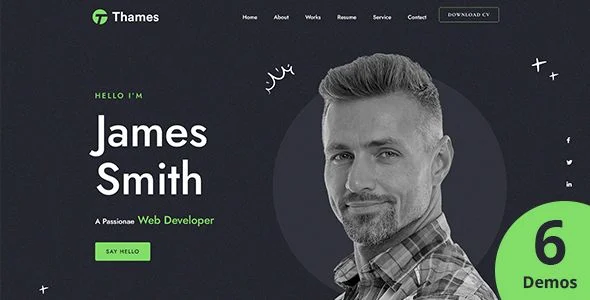
Thames Personal Portfolio WordPress Theme is an Elementor-driven, one-page WordPress theme, engineered for software engineers, freelance developers, and IT specialists to consolidate biography, resume, project works, partners, and blog output on a single scroll surface. The package resolves the fragmentation problem of multi-page CV sites, where recruiters jump between disconnected pages, by binding every portfolio section into one continuous anchor-based navigation flow on a 4+ column responsive grid. In agency and production workflows, it operates as a self-hosted deployable that puts a personal-brand site online without hand-coding PHP templates from scratch.
Technical Specifications & Deployment Matrix
| Engineering Metric | Deployment Specification |
|---|---|
| Base Technology / Framework | WordPress theme built on the Elementor Page Builder with a Bootstrap 5.x / 4.x grid foundation |
| Runtime / Language Requirements | WordPress 4.9.x through 7.0.x; PHP, CSS, and JS source files delivered in the package |
| Data Exchange / Communication Protocols | Contact Form 7 styling integration; built-in shortcode generator for embedded component output |
| Front-End / Engine Dependencies | Elementor builder engine; Redux Options Framework; Font Awesome icons; Animate CSS effects |
| Database / Persistence Footprint | Standard WordPress schema; one-click XML demo importer; widget-ready sidebars and custom widgets |
| Browser Compatibility | IE10, IE11, Firefox, Safari, Opera, Chrome, and Microsoft Edge |
Elementor Rendering Engine & One-Page Execution Pipeline
The theme routes all page composition through Elementor’s drag-and-drop widget rendering engine. Each portfolio section — biography, selected works, partner logos, and blog feed — exists as a builder-managed block whose layout data Elementor persists alongside standard WordPress content records. Inbound front-end requests then traverse the WordPress template hierarchy, locate the theme’s PHP templates, and render the composed sections into one continuous scroll surface with anchored navigation. The Load More control extends listing sections incrementally, letting visitors pull additional portfolio and blog entries without leaving the one-page flow. On the configuration layer, the Redux Options Framework consolidates global parameters — typography, color assignments, and layout switches — into a single admin panel backed by standard WordPress options storage, so site-wide changes propagate without touching template files. Custom widgets and a bundled shortcode generator expose portfolio-specific components that can be dropped into any builder region or post body, and touch plus swipe handling keeps the anchored navigation usable on handheld devices. For agency briefs that scale beyond a single practitioner into a multi-contributor showcase, Okai operates as an agency-scaled portfolio alternative on a parallel WordPress runtime.
Architectural & Functional Highlights
- One-Click Demo Importer: Bundled XML dummy content seeds pages, posts, and media references so a fresh installation mirrors the reference layout, removing manual section reconstruction during client onboarding.
- Child Theme Scaffold: A preconfigured child theme ships in the package, isolating template and function overrides from the parent codebase so version updates do not overwrite custom work.
- Responsive Grid & Retina Output: The layout reflows across desktop, tablet, and smartphone viewports with high-resolution asset support, while Font Awesome vectors and Animate CSS transitions supply motion without external animation libraries.
- Widget-Ready Regions: Built-in custom widgets plug into registered sidebars and footer areas, extending theme regions with portfolio-oriented components beyond WordPress defaults.
Production Implementation & Operational Resilience
Deployment follows the standard theme installation path: upload the package, activate it, run the one-click demo importer on a staging environment, then replace live content through Elementor. Because the editing surface is exclusively Elementor-based, the package is not optimized for the native Gutenberg block editor — teams whose workflow depends on core block editing must account for this boundary before committing to the stack. Output validation is anchored to valid HTML5 and CSS3 markup, and the rendering matrix has been verified against Microsoft Edge, Firefox, Safari, Chrome, Opera, and legacy IE10/IE11 engines, which constrains stylesheet syntax to constructs those browsers parse correctly. Contact Form 7 integration supplies pre-styled markup for inquiry forms, so lead capture requires no custom CSS work. Error handling and extension follow the child theme contract: overrides live in the child directory, and the documented, well-structured source allows any developer to trace template logic without a proprietary abstraction layer. For visual-led briefs such as photography portfolios, where image presentation outweighs resume sections, Skylab runs as an independent WordPress theme under the same self-hosted deployment model. Detailed bundled documentation covers installation and customization steps for implementers who do not write code.
Frequently Asked Questions
Can the theme be built and edited using the native Gutenberg block editor?
No. The documentation lists the package as not Gutenberg-optimized; all layout construction, section reordering, and content editing run through the Elementor page builder interface instead of core block editor workflows.
Does the download include a ready-to-use child theme?
Yes. A child theme ships with the package, so template overrides and function additions stay isolated from parent files and survive version updates applied to the main codebase after the initial deployment.
Are dedicated blog page templates included beyond the one-page portfolio layout?
Yes. Standard blog pages ship with the theme, giving published posts a conventional multi-entry archive view alongside the single-page portfolio surface used for biography, works, and partner sections.