TechLink – Technology and IT Solutions Theme
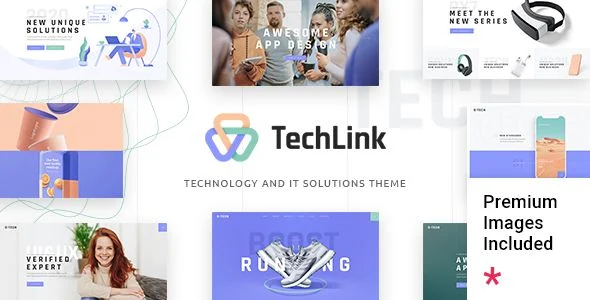
TechLink Technology and IT Solutions Theme Overview & Agency-Grade WordPress Foundation
TechLink is a WordPress theme engineered for IT solutions providers, technology companies, software startups, and digital agencies that need service, portfolio, and app showcase presentation layers on a single codebase. It removes the bottleneck of hand-building campaign layouts by shipping prebuilt technology, corporate, and app showcase templates that deploy through one-click demo content import. In agency delivery pipelines, the theme operates as the presentation layer above WordPress core, with the Qode Framework driving its admin interface and the TechLink Core plugin registering the shortcode library and custom post types.
Technical Specifications & Deployment Matrix
| Engineering Metric | Deployment Specification |
|---|---|
| Base Technology | WordPress theme package containing PHP, CSS, and JS source files |
| Runtime Requirements | WordPress 6.5.x through 7.0.x; PHP 8 and PHP 8.3 compatibility delivered in v1.2 and v1.3 |
| Page Builder Engines | Elementor, WPBakery Page Builder, and Gutenberg-optimized block output |
| Commerce & Localization | WooCommerce 9.x.x and 10.x.x, WPML compatibility with a bundled configuration file, translation-ready string loading |
| Front-End Dependencies | Qode Framework 1.2.6, TechLink Core 1.3, Slider Revolution 6.7.51, Swiper JS 8.4.5, 900+ Google Fonts, eight icon packs |
Template Hierarchy & Rendering Pipeline
TechLink routes every inbound request through the native WordPress template hierarchy, where its template files override core defaults before rendering begins. Layout construction then splits across two engines: Elementor or WPBakery compose free-form page sections inside the content canvas, while the TechLink Core plugin registers shortcodes and custom post types that the theme assembles into structured regions. Portfolio content, for instance, lives in a dedicated custom post type; archive pages render through the Portfolio List shortcode with Gallery, Masonry, Slider, and Justified Gallery layouts, three pagination strategies, and client-side category filtering. Portfolio single items expose seven distinct templates, from the Big Gallery layout to Small Slider variants, so case-study pages can match their content density per project without writing PHP.
The header layer behaves as a configurable state machine, combining Standard, Minimal, and Fullscreen Menu types with sticky, fixed, and scroll-up-only behaviors, while a Mega Menu and Side Area extend navigation depth for deep service taxonomies. For teams evaluating parallel theme options in the same IT services niche, TechXen targets an adjacent services and lead-capture use case as an independent WordPress codebase.
Core Technical Capabilities of TechLink
- Portfolio CPT & Shortcode Renderer: Four list layouts, three pagination types including Infinite Scroll, category filtering, and the Portfolio Category List, Showcase, and Parallax shortcodes provide multiple data-presentation paths over a single custom post type.
- One-Click Demo Import: The importer writes complete demo page trees, widgets, and content payloads into the database in a single admin action, so staging environments mirror production layouts without manual assembly.
- Header Configuration Layer: Three header types cross three behavior types, with a separate header-top widget area, Mega Menu support, and customizable footer layouts ranging from one to four columns on a variable grid.
- Typography & Icon Pipeline: More than 900 Google Fonts join a custom font shortcode for self-hosted typefaces, alongside Font Awesome, Font Elegant, Ionicons, Simple Line, Linea, Linear, Material, and Dripicons icon packs.
- Commerce Presentation Layer: Product List and Product Categories List shortcodes feed storefront sections, with theme styles kept aligned to WooCommerce 9.x.x and 10.x.x markup through selector-level fixes in v1.4.
Production Implementation & Operational Resilience
Deployment in agency staging environments is governed by a registration gate: the theme validates registration through a REST endpoint and blocks shortcode and custom post type loading until that check completes, which prevents half-initialized content layers from rendering on unregistered hosts. Version 1.3 hardened theme security and validated PHP 8.3 compatibility, so modern server stacks run the codebase without deprecation failures. Because the Google Map shortcode depends on Google Maps API integration, production sites must carry valid API configuration for map regions to render; compatibility improvements landed in both v1.3 and v1.4.
Resilience is maintained at the integration boundaries. Elementor compatibility patches and Qi Addons for Elementor support, added in v1.1, guard widget rendering against builder regressions, while WooCommerce empty-cart styling and figure selector fixes keep the store layer consistent across plugin majors. A translation-loading fix in v1.4 ensures internationalized strings resolve correctly, and the WPML configuration file exposes theme fields to translation workflows. Widget-driven sidebars, a search opener, and social icon groups round out the layout system. For AI-agency client engagements on the same stack, Neuros ships as a separate theme codebase rather than an extension of this one.
Frequently Asked Questions
Does the TechLink package include a child theme for safe code overrides?
Yes. A child theme ships in the package, so template files, stylesheets, and function overrides stay isolated from the parent directory while version updates such as the v1.4 framework and slider revisions apply cleanly.
Can separate logo files be assigned to normal, sticky, and mobile header states?
Yes. The header configuration exposes independent logo uploads for normal, sticky, and mobile rendering, and each can be split further into dark and light header-skin versions so the brand mark stays legible across every behavior type.
Does the package ship with written setup documentation?
Yes. The theme is classified as well documented, release notes from v1.0.1 through v1.4 record structured maintenance practices, and a readme.txt file added in v1.3 accompanies the packaged PHP, CSS, and JS source files.