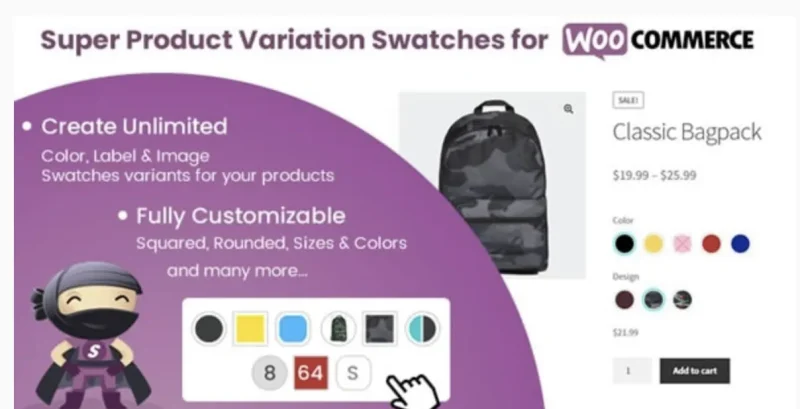
Super Product Variation Swatches for WooCommerce
Super Product Variation Swatches Overview & Front-End Variation Layer
Super Product Variation Swatches is a WordPress plugin built for WooCommerce merchants and agency developers to replace native variation drop-down selectors with color, label, and image swatch components. Stock WooCommerce renders variable product attributes as plain
Technical Specifications & Deployment Matrix
| Engineering Metric | Deployment Specification |
|---|---|
| Base Technology / Framework | WordPress plugin assembled from JavaScript JS, CSS, and PHP source files |
| Runtime / Language Requirements | WordPress 4.9.x through 7.0.x; WooCommerce 5.x through 10.x; PHP 8 compatible |
| Data Exchange / Communication Protocols | Reads and writes standard WooCommerce attribute and variation term structures; WPML and multi-language frameworks supported |
| Front-End / Engine Dependencies | Theme-agnostic output verified against major themes including Avada and The 7; responsive across desktop, tablet, and mobile viewports |
| Database / Persistence Footprint | Operates on top of existing attribute term data; no destructive writes occur when the plugin is toggled on or off |
Swatch Rendering Engine & Execution Pipeline
When a shopper opens a variable product page, the engine intercepts the native attribute selector output and substitutes swatch markup mapped to each attribute term. Each term resolves to one of three configured data types — a color value, an uploaded image, or a text label — and the corresponding interactive element replaces the drop-down. Selection events synchronize with WooCommerce’s variation-form logic, so chosen combinations continue to drive price display, stock status, and add-to-cart validation exactly as the core engine expects. Combinations that cannot produce a valid variation render in a disabled state, dimmed and overlaid with a red cross, giving shoppers immediate feedback about unavailable pairings. Tooltip overlays surface term names on hover, with a settings toggle controlling whether tooltips render at all. Image-based swatches support two display modes: the full product photograph, or a zoomed-in crop that exposes fabric texture or surface detail — the latter also enabling multi-color swatches composed from a single image. The rendering layer targets WooCommerce’s attribute structures rather than theme-specific markup, which is why output stays consistent across catalog-heavy storefronts, a deployment pattern also served by the NextEuv single product shop theme for electric vehicle and gadget catalogs.
Core Technical Capabilities of Super Product Variation Swatches
- Three swatch data types: each attribute term binds to a color, image, or label definition, and multiple swatch groups can operate simultaneously on a single variable product without conflicts.
- Inline term authoring: colors, uploaded images, and new labels are created directly on the product edit screen, eliminating the detour to the Manage Attribute Terms administration page during catalog entry.
- Disabled-state signaling: unavailable variation combinations are dimmed with a red-cross overlay, and administrators can configure how these disabled swatches behave through dedicated settings.
- Archive-page rendering: swatches can be pushed to product listing and archive pages, with an option to render only the first row of variations to keep grid layouts vertically stable.
Production Implementation & Operational Resilience
Deployment requires no code changes: the package activates and immediately works with installed themes, while the settings panel exposes swatch shape (squared or rounded), size, borders, hover border color, tooltip visibility, and image variation mode (full product versus zoomed texture). A separate toggle controls whether WooCommerce’s Clear Variation button appears alongside the swatch UI. Because the module layers on top of the attribute model instead of replacing it, deactivation or removal leaves all configured variation data intact — a plug-and-play behavior that reduces rollback risk in agency staging and client handover workflows. The codebase ships as PHP, JavaScript, and CSS, runs under PHP 8, and carries a lightweight asset footprint that avoids dragging down page performance and SEO signals. Retina-ready image support keeps swatch thumbnails crisp on high-density displays, and mobile tooltip UI was specifically corrected in the 1.8 patch cycle. Gallery and archive integration has been verified against Avada and The 7 product pages, covering two of the most widely deployed commercial theme families. For storefronts that combine swatch-driven listings with live result filtering — a front-end query pattern handled independently by Wiloke Ajax Post Filter for WordPress content — the first-row variation option prevents archive grids from expanding beyond their intended row heights.
Frequently Asked Questions
Is the plugin compatible with WooCommerce High-Performance Order Storage (HPOS)?
Yes, version 2.4, released 30 June 2025, added compatibility with High-Performance Order Storage, allowing the module to run on modern WooCommerce order storage architectures without checkout conflicts.
Can text be displayed next to image swatches?
Yes, version 2.2 introduced an option to show text alongside each image swatch, which helps merchants label material or finish variations while retaining the visual cue of the uploaded thumbnail.
Can tooltips be turned off entirely?
Yes, version 1.7 added a show/hide tooltip setting, and version 1.8 corrected the tooltip UI for mobile view, so administrators control tooltip rendering per storefront need.
Does the plugin support multi-language stores?
Yes, the module is compatible with multi-language setups and the WPML framework, allowing translated attribute terms and swatch labels to render correctly across localized storefronts.
-
v2.4 LatestNov 3, 2026