Super Logos Showcase for WordPress
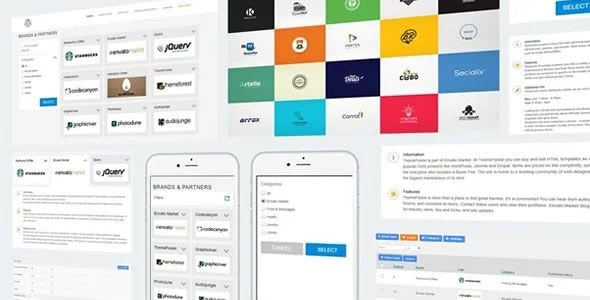
Super Logos Showcase Overview & Shortcode-Driven Brand Display Engine
Super Logos Showcase is a PHP, JavaScript, and CSS plugin engineered for agencies and site builders to publish responsive logo, brand, sponsor, and partner showcases on any WordPress theme. The module addresses the recurring bottleneck of hand-coding logo grids, sliders, and hover states by relocating layout generation, category management, and per-item styling into a WordPress administrator panel. In production workflows it operates as a drop-in content block rendered through shortcodes, verified across WordPress 4.9.x through 7.0.x, WooCommerce 6.x–8.x storefronts, and WPML multilingual configurations.
Technical Specifications & Deployment Matrix
| Engineering Metric | Deployment Specification |
|---|---|
| Base Technology / Framework | WordPress plugin built with PHP, JavaScript (jQuery), CSS, and XML configuration files |
| Runtime / Version Requirements | WordPress 4.9.x through 7.0.x; WooCommerce 6.x, 7.x, and 8.x |
| Page Builder Compatibility | Elementor, Elementor Pro, WPBakery Page Builder, Visual Composer, Beaver Builder, Cornerstone, Layers WP, WPML |
| Browser Support | IE9, IE10, IE11, Edge, Chrome, Firefox, Safari, Opera |
| Front-End Dependencies | jQuery event delegation, admin-generated CSS overrides, responsive viewport breakpoints |
Shortcode Rendering Pipeline & Execution Mechanics
The core mechanism is a shortcode-triggered render cycle backed by an administrator-managed logo registry. Logo entries, categories, captions, and region assignments are persisted through the WordPress admin layer, then resolved when the shortcode is parsed during normal template execution. The engine enqueues its CSS and JavaScript assets, assembles the selected layout — including the Metro variant introduced in version 2.0 — and binds jQuery event handlers for the animated slide-down panel that reveals logo details within the same page without a reload.
Category navigation runs through a collapsible panel built for touch input, dispatching client-side filter events that swap visible logo sets without additional server round trips. Administrators govern per-entity behavior from the backend: each logo exposes configurable background colors, hover effects, a grayscale display filter, and a Call-To-Action routing setting that directs clicks toward internal links, external URLs, or the default animated content panel. Version 2.9 additionally sanitized admin parameter handling across these input paths, closing unvalidated request variables in the management screens.
Architectural & Functional Highlights
- Multiple layout engines: Grid, carousel/slider, and Metro arrangements ship in the package, with full-width template support so the showcase can stretch across custom page templates rather than remaining locked to content-column widths.
- Per-entity styling pipeline: Individual background colors and hover states are emitted as admin-generated CSS, and a grayscale option renders logos in monochrome until pointer interaction restores full color.
- WPML-aligned multilingual layer: Labels, captions, and filter strings are translatable through admin settings; WPML compatibility was formalized in version 2.1 and refined in 2.5 with a dedicated filters-translation patch.
- Role-scoped administration: Multiple role settings added in version 2.0 restrict which user capabilities can manage logos, categories, and global configuration.
- SEO-friendly share targets: Each logo and category exposes a shareable, crawlable link rather than fragment-only anchors, keeping showcase entries indexable.
Production Implementation & Operational Resilience
Deployment follows the standard WordPress plugin installation path, after which shortcodes — including a default-category parameter — embed showcases inside builder-managed pages from Elementor, WPBakery, Beaver Builder, Cornerstone, or Layers WP templates. Because rendering is server-side PHP with client-side jQuery enhancement, no external API calls or third-party runtime services are required, which keeps the payload footprint predictable on shared hosting and staging environments.
Resilience work is documented across the changelog. Version 2.3 closed a vulnerability identified through a penetration test; 2.6 refactored all JavaScript files to strict mode and migrated event binding to delegated .on() handlers, reducing selector churn on large logo sets; 2.1 patched frontend CSS that conflicted with certain themes; and 2.7 fixed background-color application for small logo dimensions. These fixes indicate an actively maintained codebase rather than an abandoned asset. For teams whose requirements extend past static showcases into query-driven custom post type listings, relations, and dynamic forms, JetEngine operates as a separate dynamic-content layer for Elementor, Gutenberg, and Bricks without touching this plugin’s render path. Where showcase pages also need structured question-and-answer sections, Questionar supplies accessible accordion widgets for Elementor as an independent layout addition.
Customization boundaries are deliberate: colors, styles, labels, and captions are editable through the settings panel, meaning rebranding the module from logos to products or sponsors requires no template-file surgery. Secondary development should stay within admin-configurable options and the stylesheet layer, since core PHP modifications would be overwritten on subsequent plugin updates.
Frequently Asked Questions
Does the plugin include a Metro layout option?
Yes. Version 2.0 introduced a Metro layout alongside per-logo background color controls, a grayscale display option, and external link support, giving template builders a masonry-style alternative to the standard grid and slider arrangements.
Can individual logos route clicks to external URLs instead of the animated panel?
Yes. Each logo carries a configurable Call-To-Action that directs visitors to an external link, an internal link, or the default animated slide-down content display, a routing capability introduced in version 2.0.
Is the plugin compatible with WPML multilingual configurations?
Yes. WPML compatibility was added in version 2.1, a related compatibility issue was patched in 2.5, and filter labels plus admin strings are translatable, allowing the showcase to operate across multi-language WordPress deployments.
Can the admin labels be rebranded to display products instead of logos?
Yes. Labels, captions, and category naming are editable in the administrator settings, so the same rendering engine can present products, sponsors, partners, or clients without modifying template files or shortcode output.
-
2.9 LatestOct 26, 2026