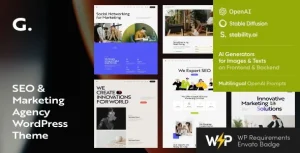
Sola – SEO Marketing WordPress Theme

Sola SEO Marketing WordPress Theme Overview & Lead-Focused Site Architecture
Sola SEO Marketing WordPress Theme is a WordPress theme package engineered for SEO agencies, marketing consultants, and freelancers to publish lead-oriented service websites without writing custom code. The package addresses the recurring delivery bottleneck these teams face: assembling a credible digital footprint of service listings, case studies, testimonials, and contact funnels from scratch under tight client timelines. Within agency production workflows, it operates as the presentational layer of the delivery stack, delegating layout composition to a visual builder while remaining anchored to the standard WordPress template hierarchy.
Technical Specifications & Deployment Matrix
| Engineering Metric | Deployment Specification |
|---|---|
| Base Technology / Framework | WordPress theme (PHP) with full Elementor drag-and-drop page builder compatibility |
| Runtime / Language Requirements | Standard WordPress hosting environment (PHP / MySQL / Apache or Nginx) |
| Rendering Protocol | Native WordPress template hierarchy resolution feeding the Elementor widget engine |
| Front-End / Engine Dependencies | Elementor page builder plugin installed and activated |
| Persistence Footprint | Native WordPress database; builder layouts and options-panel settings stored through standard WordPress data mechanisms |
| Localization | Translation-ready string architecture for multilingual deployments |
Visual Composition Pipeline & Template Execution Flow
Layout output is delegated to the Elementor builder engine, which renders every page as a structured widget tree rather than a set of hard-coded PHP template parts. When a visitor requests a URL, WordPress resolves the query against its template hierarchy and hands rendering control to the builder, which assembles the stored layout data — sections, columns, widgets, and their responsive settings — into the final DOM tree. This architecture means an agency can reorder a services block, adjust a case-study grid, or restructure a contact funnel directly on the builder canvas, and those edits persist as builder-managed layout data instead of requiring file-level template overrides.
The responsive layer follows the same data-driven model. Each section carries device-specific visibility and spacing controls, so a single layout definition produces adapted output for desktop, tablet, and smartphone viewports through CSS media queries — a practical requirement for capturing leads from mobile traffic. Because widgets enqueue their scripts and styles as they are placed, the front-end asset footprint scales with the complexity of each page, giving developers a predictable basis for auditing Core Web Vitals indicators such as LCP and CLS during QA.
Core Technical Capabilities of Sola SEO Marketing WordPress Theme
- Elementor Engine Integration: Full compatibility with the drag-and-drop builder means layout edits execute visually and persist as structured builder data, eliminating manual PHP template surgery for routine content changes.
- Pre-Built Homepage Variations & Inner Page Templates: Multiple homepage demos plus ready-made inner pages reduce initial scaffolding work; teams select a starting layout and replace demo content in place.
- Header & Footer Builder: Global site chrome is composed through a visual builder interface, allowing navigation placement and footer column structure to be adjusted without editing template files.
- Custom Widgets: Purpose-built widgets extend the builder palette with marketing-specific content blocks, giving service sections and result showcases native composition support.
- Options Panel: A centralized settings panel governs theme-wide configuration, consolidating behavioral and stylistic parameters that would otherwise be scattered across individual templates.
Agencies comparing Elementor-based candidates within the same WordPress runtime can also evaluate Digicove, a parallel digital marketing agency theme built around the same builder engine, before committing to a visual direction for a client engagement.
Production Implementation & Operational Resilience
Deployment follows the standard WordPress theme lifecycle: upload the package through the dashboard or place it in the themes directory, activate it, then install and activate the Elementor plugin, which functions as the layout engine. Because the builder dependency is external to the theme package, verifying plugin activation belongs at the top of every staging checklist; without it, layout editing surfaces are unavailable even though the theme itself loads. Configuration performed in the options panel persists through standard WordPress storage, so staging-to-production migrations should treat exported settings as part of the deliverable alongside media and content.
For client handovers, the visual editing model reduces the failure surface considerably: content editors work inside the builder canvas rather than inside template files, which keeps customizations reversible and documentable. The translation-ready string architecture supports multilingual rollouts, since interface strings are exposed to localization tooling rather than embedded in closed layout code. Performance hardening remains an infrastructure concern — builders generate conditional asset output per page, so pairing the deployment with an established caching layer and running a Core Web Vitals audit before launch is sound practice for lead-generation traffic. Teams that require a creative-agency visual direction rather than an SEO-services layout can treat Markino as an independent alternative within the same WordPress runtime.
Frequently Asked Questions
Does layout editing require the Elementor plugin to be installed and active?
Yes, the visual composition pipeline runs through the Elementor builder engine, so the plugin must be present and activated before demo layouts can be edited or new sections can be dragged into a page.
Can headers and footers be constructed visually without editing PHP template files?
Yes, the included header and footer builder lets teams compose global site chrome through a visual interface, removing the need to override header or footer template files when adjusting navigation placement or footer columns.
Is the theme prepared for multilingual client deployments?
Yes, the package is translation-ready, meaning interface strings are structured for localization so agencies can serve audiences in multiple languages without rebuilding templates or forking the layout code.