Slicer – Fun Puzzle Game
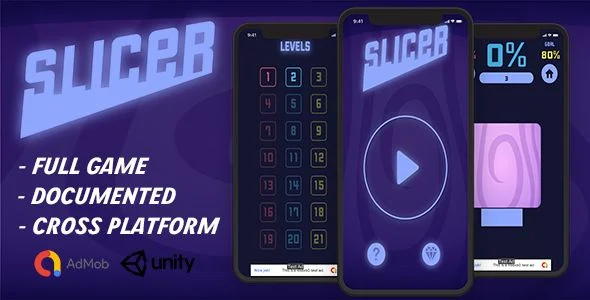
Slicer Fun Puzzle Game Overview & Mobile Source Code Architecture
Slicer Fun Puzzle Game is a Unity-engine arcade source package engineered for mobile studios and indie developers to ship a slide-to-slice puzzle experience on Android. The project removes the production bottleneck of hand-building gesture-driven slicing mechanics, collision handling, and monetization plumbing from scratch by supplying a complete, compilable engine project. Within agency and freelance delivery pipelines, the package functions as a deployable foundation: teams import the codebase into Unity, replace the layered art sources, and export store-ready Android builds without authoring core gameplay logic from zero.
Technical Specifications & Deployment Matrix
| Engineering Metric | Deployment Specification |
|---|---|
| Base Technology / Framework | Unity game engine, version 2020.3.24f or higher |
| Runtime / OS Requirements | Android 9.0, 10.0, 11.0, and 12.0 (plus later versions) |
| Monetization / Communication Layer | Google AdMob ad network integration for in-game ad serving |
| Front-End / Engine Deliverables | .apk binary, Layered PSD, Layered PNG, Unity engine project, documentation file |
| Database / Persistence Footprint | None — self-contained client-side runtime; session state managed locally by the Unity engine |
Touch-Input Slicing Pipeline & Gameplay Execution
The core mechanism routes touch-slide gestures through Unity’s input system to trigger slicing interactions against blocks and obstacles. When a player drags a finger across the screen, the engine samples the pointer trajectory frame by frame and resolves each segment against the colliders attached to block and obstacle objects populating the active scene. Matching trajectories dispatch slice events to the affected objects, producing the visual and audio feedback that defines the arcade loop. Because this loop runs inside standard MonoBehaviour lifecycle callbacks, every gameplay object participates in Unity’s native Update-and-physics cadence rather than a custom tick system, which keeps the codebase portable across editor versions meeting the 2020.3.24f floor.
The monetization layer sits alongside the gameplay loop rather than inside it. AdMob integration is wired into the project so ad units can be configured, served, and tested through Google’s standard ad-network flow before the APK is regenerated for release. This separation means teams can adjust ad placements or unit identifiers without touching the slicing logic itself — a structural boundary that materially reduces regression risk during reskins.
Core Technical Capabilities of Slicer Fun Puzzle Game
- Gesture-driven slicing mechanics: Slide-based input is captured, sampled per frame, and resolved against scene colliders, delivering the cut-the-blocks and obstacle-slicing gameplay without requiring custom input frameworks.
- AdMob monetization integration: The ad-network layer is embedded in the Unity project, allowing ad units to be configured and served as part of the standard Android build pipeline rather than bolted on afterward.
- Layered art source replacement: Included Layered PSD and Layered PNG files expose every sprite, icon, and interface element as editable layers, so full visual reskins happen in image-editing software instead of inside scene hierarchies.
- Verifiable APK deliverable: A compiled .apk ships with the project, letting teams install and play-test the exact shipped behavior on Android 9.0 through 12.0 devices before recompiling from source.
- Complete engine project handoff: The full Unity project is included, not a stripped binary export, so scripts, scenes, and prefabs remain inspectable, editable, and re-exportable within the supported editor range.
For studios benchmarking parallel offerings in the same mobile arcade category, Sharp Rings Unity Arcade and Casual Game for Android and iOS with Admob ad follows a comparable Unity-project-plus-AdMob delivery model and can serve as a reference point when comparing engine-project structures across vendors.
Production Implementation & Operational Resilience
Deploying this package into a production or client-staging workflow begins with an environment check: the workstation must run Unity 2020.3.24f or a newer release, since older editor versions cannot open the project files. Once imported, the included documentation file walks the team through the setup and build sequence, and the layered PSD sources define the reskin boundary — visual identity, sounds, characters, and icons can be swapped wholesale, while the underlying slicing and ad-serving logic remains intact. Because the deliverables target Android 9.0 through 12.0 and later, QA passes should cover that OS spectrum on physical devices, and the shipped .apk provides a known-good baseline build for diffing against any locally recompiled output.
Operationally, the architecture carries a few boundaries worth planning around. The project is a self-contained Android client with no server-side persistence layer, so all runtime state lives on-device and nothing traverses a backend. Rebuilds are required whenever art or configuration changes are made, meaning teams should budget Gradle compile cycles into their delivery timelines. Errors during reskins typically surface as missing sprite references rather than logic faults, which the layered file structure keeps easy to trace. For decoupled deployments outside the Android/Unity runtime — for instance, browser-based puzzle placements on a marketing site — Math Cross Puzzle exists as an independent HTML5/Construct 3 path and cannot be merged into this Unity codebase.
Frequently Asked Questions
Does the package ship with a prebuilt, installable APK binary?
Yes — a compiled .apk is included among the deliverables alongside the full Unity engine project, letting teams install and play-test the exact shipped gameplay on Android 9.0 through 12.0 hardware before recompiling anything through their own editor environment.
Are editable layered design source files part of the download?
Yes — Layered PSD and Layered PNG files ship with the project, so artists can modify block skins, obstacle sprites, interface elements, and icons directly in Photoshop without reconstructing graphics from flattened exports.
Can the project be opened in Unity versions newer than 2020.3.24f?
Yes — the documented requirement is 2020.3.24f or higher, so current Unity releases can load the project; teams should still run a full regression pass on slicing behavior and ad serving after any editor upgrade.
Is written setup documentation included with the source code?
Yes — a dedicated documentation file is included in the deliverables, guiding teams through the project import and build configuration steps required to reproduce the Android release from the Unity source.