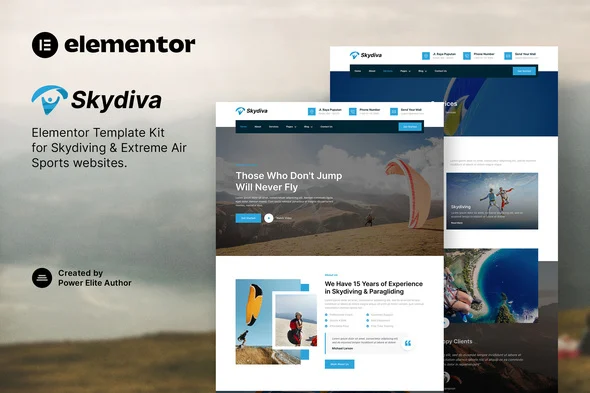
Skydiva – Skydiving & Extreme Air Sports Elementor Template Kit
Skydiva Overview & Elementor Layout Architecture
Skydiva is an Envato-registered Elementor Template Kit engineered for skydiving operators, paragliding schools, parachute tour companies, and extreme air sports agencies that need a production WordPress site without writing a single line of code. The package removes the bottleneck of hand-building layout structures and design systems by shipping 15+ pre-structured templates whose widget trees, container hierarchies, and global style tokens import directly into the Elementor editor. Within agency delivery and production workflows, it operates as the presentation layer: operators import the layouts, rebrand them through global tokens, and publish while WordPress continues handling routing and content persistence underneath.
Technical Specifications & Deployment Matrix
| Engineering Metric | Deployment Specification |
|---|---|
| Base Technology / Framework | Elementor page builder, certified against versions 3.4.x, 3.5.x, and 3.6.x |
| Runtime / Environment | WordPress with the Envato Elements plugin installed and activated |
| Data Exchange Protocol | Kit delivered as a ZIP archive; templates imported as JSON layout structures via Elements > Installed Kits |
| Front-End Dependencies | Free Elementor build, MetForm, and Jeg Elementor Kit — Elementor Pro is not required |
| Persistence Footprint | No custom database tables; imported layouts persist as Elementor template records under Templates > Saved Templates |
Global Design Token Propagation & Template Import Pipeline
The kit executes through a staged JSON import pipeline driven by the Envato Elements plugin. After downloading, the archive is uploaded without unzipping — extraction and parsing happen inside the plugin, not on the filesystem. When the orange banner appears on the Installed Kits screen, clicking Install Requirements loads MetForm and Jeg Elementor Kit automatically. The Global Kit Styles must be imported before any page template; this ordering registers the typography and color design tokens so every subsequent layout binds to those values at render time instead of carrying hard-coded inline styles. Individual templates then import one at a time and land under Templates > Saved Templates, where they remain fully editable widget trees rather than frozen markup.
Page assembly follows the standard Elementor workflow: a new page is created, Edit with Elementor opens the builder, the gear icon at the lower-left sets Elementor Full Width and hides the native page title, and the gray folder icon inserts a saved layout from the My Templates tab. The included site map covers home, about, services, a rate-plan page, team, FAQ, gallery, blog, single post, contact, a 404 page, plus a header, footer, and a MetForm contact block.
Because every imported layout is static JSON, operators who need query-driven content — jump-session calendars, instructor directories, or equipment catalogs rendered from custom post types — extend the same Elementor runtime by integrating JetEngine, which layers relations, listing grids, and query builders onto the identical editor surface without leaving the kit’s visual system.
Core Technical Capabilities of Skydiva
- Global Kit Style tokens: Typography families and color values are defined once at the kit level and referenced by every template, so a single token edit propagates across all imported pages and eliminates per-widget style drift.
- MetForm contact pipeline: The contact block imports as a separate metform template, then binds to the page through the MetForm widget via the Elementor Navigator, keeping form data handling decoupled from layout markup.
- Responsive container architecture: Layouts adapt across the breakpoint set defined by the Elementor editor, with retina-ready image handling that swaps high-density assets for sharp rendering on high-DPI displays.
- Cross-browser rendering: Widget output is verified on Chrome, Firefox, Safari, and Opera, constraining CSS to constructs that resolve consistently across those engines.
Production Implementation & Operational Resilience
In staging and client delivery environments, the primary operational constraint is PHP memory: importing a multi-template kit parses sizeable JSON payloads, so raising wp_memory_limit above the WordPress default prevents mid-import failures on budget hosting. Templates should still be imported sequentially — smaller validation payloads per request keep any single failure recoverable without repeating the entire run.
Error boundaries are handled at the plugin layer. The Envato Elements plugin validates kit structure and flags missing requirements through its banner interface before import proceeds, so configuration gaps surface at install time rather than at render time in front of a live audience.
Secondary development stays inside the Elementor control surface: colors, typography, spacing, and media swap through widget settings, while structural changes remain confined to container and widget manipulation. For studios weighing a decoupled path outside the Elementor kit workflow, XTRM operates as an independent extreme sports WordPress theme with its own presentation stack — a parallel solution for adrenaline-driven brands, not a mergeable codebase.
Frequently Asked Questions
Is Elementor Pro required to import and run these templates?
No. The kit runs entirely on the free Elementor build together with MetForm and Jeg Elementor Kit. Elementor Pro is only optional for customizing headers and footers through the Theme Builder interface.
Are the demo images bundled inside the kit files?
No. All preview imagery is sourced from Envato Elements, so production sites must acquire those assets separately or substitute them with owned media before going live.
Do the MetForm contact forms import automatically with the page templates?
No. The metform block templates must be imported first, then inserted manually through the MetForm widget’s Add Template flow under the My Templates tab before the form renders.