SenCare – Elderly Care Elementor Template Kit
SenCare Elderly Care Elementor Template Kit Overview & Prebuilt Layout System
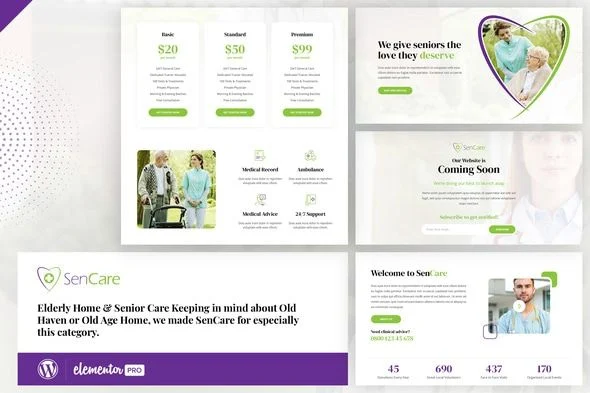
SenCare Elderly Care Elementor Template Kit is an Elementor Pro design package engineered for agencies and freelancers building sites for senior care, assisted living, nursing homes, orphanages, and non-profit care organizations. The kit removes the blank-canvas bottleneck of assembling care-sector page structures from scratch by supplying ten prebuilt templates whose content hierarchy, imagery placement, and typography are already mapped to this vertical. Within a production workflow, it functions as a layout source imported through the Envato Elements plugin, letting a developer assemble a complete care-facility website by selecting and importing documents rather than constructing widgets one by one.
Technical Specifications & Deployment Matrix
| Engineering Metric | Deployment Specification |
|---|---|
| Base framework | Elementor page builder, compatible with Elementor 2.8.x, 2.9.x, and 3.0.x |
| Required dependency | Elementor Pro (premium upgrade required for full template functionality) |
| Import transport | Envato Elements plugin; kit archive uploaded via Elements > Installed Kits > Upload Template Kit |
| Typography stack | DM Serif Display (display headings) and Open Sans (body copy) |
| Template payload | 10 JSON-based layout templates covering landing and supporting pages |
| Persistence footprint | None of its own; imported layouts persist as standard Elementor page documents within WordPress |
JSON Layout Architecture & Design Token Pipeline
The kit operates on an import-and-render pipeline: JSON layout definitions are parsed by the Elementor editor and materialized as editable widget trees. Each of the ten templates ships as a structured document whose sections, containers, and media slots map directly onto Elementor’s rendering model, so nothing executes server-side and no custom code layer needs auditing. Once a template lands in the page canvas, every heading, image, and button becomes a manipulable node governed by the kit’s global settings rather than hardcoded per-element values.
This token-driven approach is what keeps multi-page consistency maintainable across a full care-facility site: because color and typography resolve through global variables, a rebrand pass touches the site-wide panel once instead of ten separate documents.
Core Technical Capabilities of SenCare
- Global design token system: Display typography resolves to DM Serif Display while body text resolves to Open Sans, defined at the kit level so a single font substitution propagates across all imported templates without per-widget edits.
- Ten vertical-aligned templates: The package spans landing, service, and supporting page archetypes scoped to elderly care, senior care, assisted living, orphanages, charity, and fundraising, allowing a complete site to be assembled from kit parts rather than blank canvases.
- Rapid asset substitution: Every image slot binds to a demo asset reference, and replacing it with client photography requires selecting the widget and uploading a replacement through the media library — no code editing, no layout restructuring.
- Dependency gating on import: The Envato Elements workflow exposes an Install Requirements action that activates the Elementor Pro dependency before any template is parsed, preventing imports that would render with missing widget types.
- Conversion-oriented entry layout: The landing page template is structured as the primary entry point, front-loading care services, facility imagery, and contact pathways in the above-the-fold region.
Production Implementation & Operational Resilience
When deploying into agency staging environments, the primary runtime constraint is PHP memory: each template’s JSON payload is decoded inside the editor process, so wp_memory_limit should be sized above the WordPress default before importing layout-heavy documents. Undersized memory typically surfaces as a failed or partially rendered import rather than a visible front-end error, making a server limit check a worthwhile pre-flight step.
Because the package is a pure layout kit, its customization boundary stops at style overrides and asset replacement. Colors, font assignments, spacing, and copy are editable through the Elementor panel, but there are no action hooks, child-theme layers, or code APIs to extend — structural change means editing the widget tree directly. For teams that prefer theme-level control over kit-based assembly, Carra operates as an independent senior care WordPress theme with its own layout system, requiring no Elementor import pipeline.
Asset governance is the other operational boundary: all demo imagery originates from Envato Elements, so a live client build must either source those assets under an active entitlement or replace every reference with owned photography before publication. As a parallel self-contained option in the same vertical, Old Haven Pro ships one-click demo import and native WooCommerce support for teams that want commerce capability without assembling it from kit parts.
Frequently Asked Questions
Should more than one template be imported at the same time?
No, the documented procedure states templates should be imported one at a time for best results; importing multiple layouts in a single session raises the risk of partial imports and memory exhaustion during JSON parsing.
Can the demo images from the preview be published on a live client site as-is?
No, all preview imagery is sourced from Envato Elements. Each asset must be obtained under your own Envato Elements entitlement before publication, or swapped for your own photography through each image widget’s media picker.
Does the kit archive need to be extracted before upload?
No, the zip archive is uploaded intact through the Upload Template Kit screen under Elements > Installed Kits in the WordPress dashboard; the Envato Elements plugin handles extraction internally during the import routine.