Restaurant App Cash Register Web Add-on
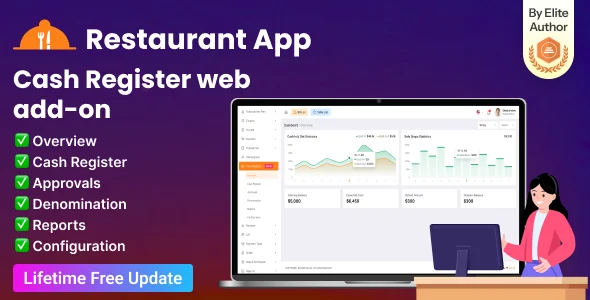
Restaurant App Cash Register Web Add-on Overview & Financial Control Engine
Restaurant App Cash Register Web Add-on is a Laravel-based extension module built for operators of the Restaurant App SaaS food ordering, table booking, and restaurant management platform. The module targets a concrete operational gap: high-frequency cash handling across daily shifts with no structured mechanism for tracking flow, detecting discrepancies, or enforcing accountability at the point of sale. Within an agency or staging-to-production delivery workflow, it functions as a dedicated web-side financial layer that attaches to the existing SaaS admin panel rather than replacing any of its ordering or booking functions.
Technical Specifications & Deployment Matrix
| Engineering Metric | Deployment Specification |
|---|---|
| Base Technology / Framework | Laravel (PHP framework), distributed as a web add-on for the Restaurant App SaaS ecosystem |
| Runtime / Language Requirements | PHP 8.x server runtime |
| Source Files Included | JavaScript JS, JavaScript JSON, HTML, CSS, LESS, Sass, PHP |
| Data Exchange / Communication Protocols | JSON-based data structures exchanged with the parent SaaS admin panel and reporting layer |
| Parent Platform Dependency | Requires a prior installation of the Restaurant App SaaS (Food Ordering, Table Booking & Restaurant Management System with Laravel Admin Panel) |
| Browser Compatibility | IE6 through IE11, Firefox, Safari, Opera, Chrome, Edge |
| Interface Quality | High-resolution assets |
Cash Register Workflow & Execution Pipeline
The engine records every sale, cash-in, and cash-out event against an open, balance-declared shift. Each shift begins when an authorized cashier posts an initial opening balance into the register; from that point forward, all cash-touching transactions occurring inside the SaaS are captured automatically and attributed to the active shift and operator. At closure, the recorded totals are reconciled against physical counts using denomination-level entry for notes and coins, and any adjustment passing through the system must clear a manager-level approval gate before it is committed. This pipeline converts what is normally an untracked, end-of-day manual count into an auditable, shift-scoped ledger. For operators weighing a full platform migration before adopting an add-on architecture, Karenderia Multiple Restaurant System exists as a separate self-hosted multi-restaurant codebase on a different stack and should be evaluated as an independent alternative rather than a companion module.
Architectural & Functional Highlights
- Overview Dashboard: Aggregates all register activity into a single administrative view, surfacing current register status, key financial metrics, and aggregate cash flow so supervisors can audit the day’s position without querying individual shifts.
- Shift Lifecycle Management: Handles the complete open-to-close cycle with a declared opening balance, automatic capture of sales, cash-in, and cash-out events during the shift, and structured closure with reconciliation against counted cash.
- Approval System: Routes cash adjustments and transaction requests through a manager or authorized-user review step, blocking unauthorized financial modifications and creating a traceable approval trail for every change.
- Denominations Management: Accepts physical counts broken down by currency denomination, including notes and coins, so the closing figure can be matched line-by-line against the system-recorded total.
- Advanced Reports: Generates transaction histories, shift summaries, and financial overviews with multi-condition filtering, giving administrators a queryable record of register activity across periods.
Production Deployment & Implementation Considerations
Deployment is bounded by one hard prerequisite: the parent Restaurant App SaaS must already be installed and operational, because this package is an add-on and carries no standalone runtime. The server must satisfy the Laravel stack’s requirements, headlined by PHP 8.x, and the source distribution (JavaScript, JSON, HTML, CSS, LESS, Sass, and PHP files) integrates into the existing admin panel structure. Browser support spans legacy Internet Explorer 6 through 11 alongside current Firefox, Safari, Opera, Chrome, and Edge builds, which matters for POS terminals running older kiosk software. On the hardware side, sales invoices print through any Bluetooth thermal printer; newly created invoices print automatically at the point of transaction, while historical invoices remain retrievable from the sales report section. Customization scope is defined by the configuration layer: administrators can adjust system settings, assign user permissions, and reconfigure approval workflows to match internal cash-control policies, without modifying core Laravel code. Teams that require a single-restaurant native mobile presence decoupled from this Laravel runtime can examine Restorder (Android) as a standalone food-ordering app codebase, though it operates independently of this add-on’s register logic. Additionally, the parent platform’s mobile components depend on a Flutter toolchain: installing Flutter, configuring Android Studio with the required SDK tools, enabling developer mode with USB debugging, and connecting a physical device constitutes the documented path for Android-side builds.
Security Audit & VirusTotal Malware Verification
PHP ScriptsPre-deployment cloud scan •
57cd48d23e4ad2084ea6944dc8408a79f171645ab4b1ed25891df73756729ed2
Frequently Asked Questions
Does this add-on function without the main Restaurant App SaaS platform installed?
No, the package is built exclusively as a web add-on for the Restaurant App SaaS food ordering, table booking, and restaurant management system with the Laravel admin panel, and it requires that parent installation to operate.
Can sales invoices be printed on Bluetooth thermal printers?
Yes, any Bluetooth thermal printer can be used for invoice output. New invoices are printed automatically when sales occur, and invoices from earlier transactions can be reprinted at any time through the dedicated sales report section.
Is a Flutter and Android Studio environment required to run this web add-on?
No, the add-on itself runs on the PHP 8.x Laravel web stack. The documented Flutter installation, Android SDK configuration, and USB device connection steps apply to the parent SaaS platform’s mobile application builds, not to this register module.
Does the demo environment expose multiple user roles for testing the approval workflow?
Yes, the live demo provides separate credentials for super admin, admin, and manager accounts, plus restaurant-side logins for chef, waiter, and cashier roles, allowing the permission hierarchy and approval gates to be verified before deployment.
-
v1.0.0 Latest