Recipe iOS WordPress App – SwiftUI Full Application
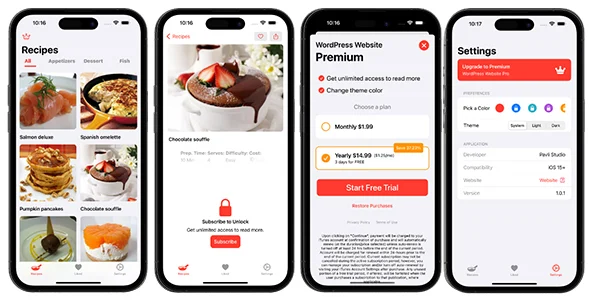
Recipe iOS WordPress App Overview & Native Mobile Content Layer
Recipe iOS WordPress App is a SwiftUI full application package, engineered for food bloggers and culinary publishers to convert a WordPress-powered recipe site into a native iOS client. The package removes the need for manual data migration or duplicate content management by binding the mobile client directly to the WordPress REST API, so posts, categories, and article records stay authored once in the existing database. Within an agency delivery workflow, it operates as the dedicated mobile layer of a content operation: engineers compile the Swift codebase, point it at the site’s endpoints, and ship a branded App Store build without standing up a second backend.
Technical Specifications & Deployment Matrix
| Engineering Metric | Deployment Specification |
|---|---|
| Base Technology / Framework | SwiftUI declarative UI framework, native iOS application source code |
| Runtime / Language Requirements | Swift, compiled through Xcode for iOS device and simulator targets |
| Data Exchange / Communication Protocols | WordPress REST API over HTTPS with JSON payload serialization |
| Front-End / Engine Dependencies | Apple platform SDKs only; fully decoupled from the WordPress theme layer |
| Database / Persistence Footprint | On-device storage of previously viewed content plus client-side user favorites |
WordPress Content Pipeline & Execution Flow
The application functions as a state-driven REST client: SwiftUI views issue asynchronous network requests to WordPress endpoints, decode JSON responses into typed Swift models, and bind the decoded data to declarative interface state for immediate rendering. Because every screen reads from the same endpoint surface the public website exposes, a recipe published in the WordPress dashboard becomes retrievable in the app without export scripts, middleware, or a duplicated content store. Category navigation, article listings, and recipe detail views are populated dynamically at runtime rather than baked into the binary, which keeps the shipped build small and the content perpetually current.
User-facing state follows the same request cycle. Authentication and profile management travel through the REST interface, allowing readers to maintain an identity inside the app that maps back to the WordPress user system. Favorited recipes persist on the device so a saved collection survives app restarts, and search with filtering options dispatches query parameters against the endpoint layer to narrow results by category or keyword. Push notification support supplies an outbound engagement channel for announcing new content, and offline access retains previously viewed recipes when connectivity drops.
It is worth separating concerns here: this codebase handles the iOS reading experience only. Publishers who also want to refresh the desktop presentation layer can treat ShiftCV as an independent theme-level path on the WordPress side, a parallel decision that never touches the Swift project.
Core Technical Capabilities of Recipe iOS WordPress App
- Live REST synchronization: Posts, categories, and articles are fetched at runtime from the WordPress database through the REST API, eliminating export pipelines and guaranteeing parity between web and mobile content.
- Authenticated user state: Login and profile management flow through WordPress endpoints, giving readers persistent identity and personalized context inside the native interface.
- On-device favorites and offline reads: Saved recipes and previously viewed content are cached locally, so the core reading experience survives network interruptions without a server round-trip.
- Parameterized search and filtering: Query construction against endpoint parameters lets users drill into specific categories or recipe names without paginating entire archives.
- Customizable SwiftUI design surface: Colors, typography, and layout are adjustable in the Swift project, allowing the shipped build to carry a distinct brand identity independent of the website theme.
Production Implementation & Operational Resilience
Deployment begins in Xcode: the developer configures the target WordPress endpoint, compiles the SwiftUI source, and produces a signed build suitable for App Store or TestFlight distribution. Since network calls originate from the native app process rather than a browser context, the cross-origin restrictions that complicate JavaScript-based consumers of the REST API do not apply, which simplifies endpoint configuration considerably. The operational boundary that does matter is site-side readiness: the WordPress installation must expose its REST routes and serve recipe content through them, and the included documentation walks through this setup alongside the customization points for branding the interface.
Resilience behavior is content-aware rather than all-or-nothing. When connectivity is unavailable, the app falls back to locally retained recipes instead of failing outright; fresh listings, searches, and profile actions simply require a reachable site. Push notification delivery depends on the configured notification pathway, so publishers announcing new posts should verify that channel during staging. Teams evaluating additional standalone SwiftUI assets for unrelated product lines can review Birthday Reminder as a separate full application on the same framework, useful as a reference for how a comparable iOS codebase is structured when no WordPress backend is involved. For studios that prefer browser-based content tooling over native development, decoupled alternatives built on cross-platform stacks exist outside this Swift ecosystem and should be assessed as entirely separate codebases rather than drop-in substitutes.
Frequently Asked Questions
Can the app’s visual design be rebranded without changing the WordPress website?
Yes. The interface is defined in SwiftUI within the Xcode project, so colors, typography, and layout are customized directly in the Swift source and remain fully independent of the website’s theme files.
Is a Mac with Xcode required to produce a distributable app binary?
Yes. The deliverable is SwiftUI source code, which must be compiled and signed through Xcode on macOS before submission to the App Store or distribution via TestFlight to testers and clients.
Do users need to update the app every time a new recipe is published?
No. Content loads dynamically from the WordPress REST API at runtime, so newly published recipes and categories appear through regular data fetches, and push notifications can alert readers without requiring a rebuild.
Can a user browse recipes for the first time while the device has no internet connection?
No. Offline access covers previously viewed content only; retrieving a recipe the user has never opened requires an active connection to the WordPress site’s API endpoints.