Quick Call – Call Center Elementor Template Kit
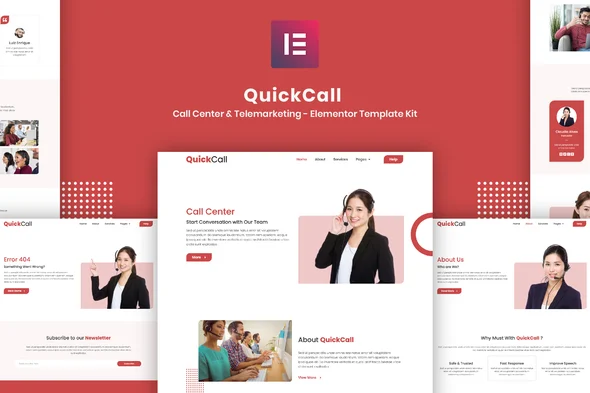
Quick Call Call Center Elementor Template Kit Overview & Design Framework
Quick Call Call Center Elementor Template Kit is an Envato Template Kit for the Elementor page builder, built for call center operators, telemarketing teams, and service agencies that need a marketing website without hand-coding layouts. The package removes the bottleneck of assembling a consistent multi-page business site by supplying ten pre-structured page templates delivered as importable JSON layouts. Within agency delivery, staging, and production workflows, the kit operates as a drop-in design framework that deploys through the standard Elementor import pipeline in a fraction of the time manual composition demands.
Technical Specifications & Deployment Matrix
The matrix below consolidates the verifiable runtime parameters, dependencies, and deliverable boundaries documented for this kit.
| Engineering Metric | Deployment Specification |
|---|---|
| Base Technology / Framework | Envato Template Kit format for the Elementor page builder (JSON layout definitions) |
| Engine Compatibility | Elementor 3.0.x and Elementor 3.1.x |
| Premium Dependency | Elementor Pro upgrade, required for some templates and features, sold separately and not included in the download |
| Required Plugins (installed via Import Requirements) | ElementsKit Lite, PowerPack Lite |
| Import Channel | Envato Elements plugin (installed via Plugins > Add New), then Elements > Installed Kits > Upload Template Kit |
| Deliverable Scope | 10 ready-to-use page templates plus header and footer regions built with the Elementor Pro Theme Builder |
| Layout Behavior | Fully responsive across desktop, tablet, and mobile viewports |
| Kit Certification | Not certified |
Template Composition & Import Execution Pipeline
Every page in the collection ships as a portable JSON layout definition that the Envato Elements plugin translates into editable Elementor structures inside WordPress. Because the kit targets the call center and telemarketing vertical, its page set covers the conversion path these businesses depend on: service presentation, company credibility, and contact-oriented entry points. Layouts render through Elementor’s responsive container engine rather than theme-specific template overrides, so visual output remains consistent regardless of the active WordPress theme. Agencies running parallel vertical builds will recognize this same pipeline in kits such as the Bon – Restaurant Elementor Template Kit, which serves hospitality clients through an identical import workflow on the Elementor platform.
Architectural & Functional Highlights
- Ten ready-to-use page templates: Each template arrives fully composed with sections, typography, and imagery placement, so deployment consists of import and content substitution rather than structural assembly from blank canvases.
- Elementor Pro Theme Builder regions: The header and footer are defined through the Theme Builder, which replaces the active theme’s native header and footer output across every imported page for site-wide navigation consistency.
- Global design token management: Colors and typography are centralized through Elementor’s global settings, allowing a single token adjustment to propagate across all ten templates without per-page manual edits.
- Fully responsive layout behavior: Section structures adapt to mobile and tablet viewports natively within the Elementor rendering engine, with per-device visibility and spacing controls available during editing.
- No-code customization path: Every element remains editable in the visual editor, so marketing teams can adjust copy, spacing, and media without touching stylesheet or template files.
Production Deployment & Implementation Considerations
Deployment begins on a WordPress instance running a compatible Elementor version. The Envato Elements plugin must be installed and activated through Plugins > Add New before anything else. The kit archive stays zipped during upload; importing happens under Elements > Installed Kits using the Upload Template Kit button. Before any individual template loads, the Install Requirements button must be clicked so ElementsKit Lite and PowerPack Lite activate in the correct order. The documented procedure also advises importing one template at a time rather than batching, which reduces the chance of partial layout data or widget registration conflicts during the JSON-to-editor translation.
Two implementation boundaries deserve attention before go-live. First, the Elementor Pro upgrade is a separate purchase and is a hard prerequisite for the Theme Builder header, footer, and certain template features; the download package contains only the layout definitions and free-plugin references. Second, all preview imagery is sourced from Envato Elements, meaning those assets must be separately licensed or replaced with owned media before production use; template structure remains intact when placeholders are swapped inside the editor.
On the customization side, all modifications happen within the Elementor visual editor and its global token system, with no child theme or code-level extension required. Once pages are live, layering WP Rocket onto the production instance adds static page caching and deferred JavaScript execution, which reduces asset-loading overhead on Elementor-rendered pages and complements the kit’s lightweight, layout-only deliverable footprint.
Frequently Asked Questions
Does the download package include the Elementor Pro upgrade?
No, the upgrade is sold separately and is required for some templates and features, including the header and footer built through the Theme Builder. The kit file itself contains only the importable JSON page layouts and references to the free required plugins.
Are the demo images included with rights for production use?
No, all preview imagery originates from Envato Elements and must be separately licensed before deployment, or substituted with owned assets. The imported layouts retain their full structure when placeholder images are replaced inside the Elementor editor.
Can multiple page templates be imported in a single batch operation?
No, the documented procedure recommends importing one template at a time and clicking the Install Requirements button first, so ElementsKit Lite and PowerPack Lite are active before any layout data loads into the editor.