Proz – Sports Store Shopify Theme
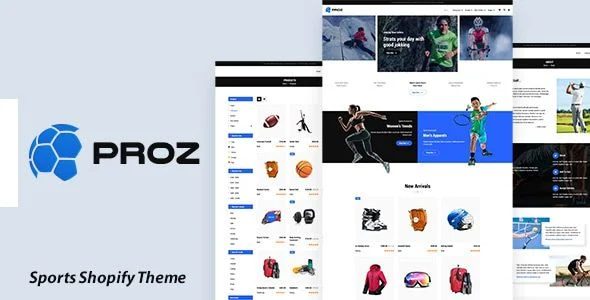
Proz Sports Store Shopify Theme Overview & Sports E-Commerce Rendering Foundation
Proz Sports Store Shopify Theme is a Shopify 2.0 storefront package engineered for sporting goods merchants and agencies to launch equipment, apparel, and accessory catalogs without custom front-end development. The package removes the assembly bottleneck of building a sports storefront from scratch by shipping pre-built Liquid sections for product carousels, comparison tables, wishlist retention, and Ajax cart handling. Inside production workflows, it operates as the presentation and merchandising layer over Shopify’s hosted runtime, deployable across athletic, gym, soccer, football, tennis, and yoga retail verticals.
Technical Specifications & Deployment Matrix
| Engineering Metric | Deployment Specification |
|---|---|
| Base Technology / Framework | Shopify Online Store 2.0 architecture with Liquid templating |
| Runtime / Language Requirements | Hosted Shopify runtime; Liquid, CSS, and JavaScript execution |
| Compatible Browsers | IE11, Firefox, Safari, Opera, Chrome |
| Data Exchange / Communication | Ajax cart, wishlist, and tag-based filter requests; nine built-in currencies (AUD, CAD, USD, GBP, JPY, EUR, NZD, INR, PHP) |
| Front-End Dependencies | Slick Slider, Owl Carousel, five mega-menu variants |
| Persistence Footprint | Shopify-hosted product, customer account, and order records |
Liquid Section Pipeline & Merchandising Execution Flow
Proz renders storefronts through Shopify’s Liquid engine, assembling drag-and-drop sections at runtime. The home page layout order is rearranged by dragging section blocks in the theme editor rather than editing template files, so marketers can reposition hero sliders, featured product grids, and carousels without touching code. The Slick Slider drives hero scenes and featured content, while the Owl Carousel handles product rotations across collection displays.
Transactional interactions run through asynchronous request flows. The Ajax cart adds items and updates drawer state without a page navigation, keeping shoppers on their current context. The wishlist operates the same way, letting visitors reserve products for later review. On collection pages, tag-based Ajax filtering narrows results by color and other parameters, refreshing the grid in place instead of reloading the full document. Five mega-menu types structure deep navigation, and collection views support grid and list modes, multi-item comparison, sale labels, and sorting by price, alphabetical order, or newest arrivals.
Customer account flows are handled by the module as well: shoppers register, log in, edit addresses, and review past orders, with session and order data persisted on Shopify’s hosted backend rather than inside the theme files. Product data is formatted for Google rich snippets, pushing structured listing attributes into search engine result pages. Agencies running multi-client portfolios on the same Shopify stack frequently position this package as the sports-vertical entry, while FlashMart occupies the multipurpose sections slot when a client catalog falls outside athletics.
Architectural & Functional Highlights
- Ajax Cart & Wishlist Synchronization: Cart additions and wishlist saves dispatch asynchronous requests, updating interface state without leaving the current page or triggering a full reload cycle.
- Tag-Driven Ajax Filtering: Collection filtering by color and other attributes runs on product tags, returning filtered grids through partial content swaps rather than complete document refreshes.
- Rich Snippet Product Structuring: Product payloads are formatted for Google rich snippets, giving search engines structured listing data aligned with current Shopify SEO mechanisms.
- Merchandising Control Layer: Sale labels, featured sliders, multi-item comparison, and grid/list toggles operate through section and collection settings, keeping catalog presentation changes inside the editor.
Production Implementation & Operational Resilience
Visual identity changes run through the theme settings panel: colors, fonts, and background images are modified from the admin interface with no coding required, which keeps rebrand passes fast during agency handovers. The browser matrix spans IE11 alongside Firefox, Safari, Opera, and Chrome, indicating defensive stylesheet fallbacks for legacy rendering engines during QA cycles. Nine currencies ship built in, covering AUD, CAD, USD, GBP, JPY, EUR, NZD, INR, and PHP for cross-border catalogs without additional configuration work.
Checkout screens inherit the store’s logo and color scheme, and a custom checkout header can be attached to the checkout flow so transactional pages stay visually consistent with the storefront. The package arrives with written documentation covering setup and section configuration, reducing onboarding friction for developer handoffs. One operational boundary deserves attention: the photography shown in the demo preview is copyrighted and excluded from the deliverable, so production stores must source their own product imagery or obtain purchase links for the stock assets.
For merchants planning a decoupled move off the Shopify runtime toward WooCommerce, S2W exists as an independent migration path, transferring products, customers, and orders through API batching with logged transactions — a process that operates entirely outside this theme’s codebase.
Frequently Asked Questions
Are the demo preview images included in the downloadable package?
No. The demo photography is copyrighted material and is excluded from the deliverable. Stores that want to reproduce the preview look must source their own imagery, and purchase links for the stock photography can be supplied separately.
Does the package include CSS and JavaScript source files?
Yes. The deliverable contains CSS files and JS files alongside the Liquid templates, giving developers direct access to the stylesheet and script layers when deeper front-end adjustments beyond the theme settings are required.
Can the newsletter form be connected to a Mailchimp account?
Yes. The newsletter component is designed to link to a Mailchimp account, letting subscriber data collected through the storefront form flow directly into an existing email marketing list without custom endpoint work.