ProHealth – Creative WordPress Theme For Medical and Healthcare
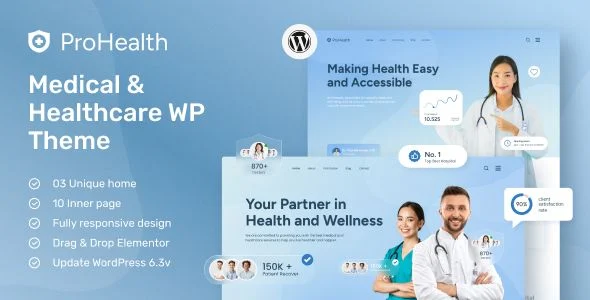
ProHealth Medical WordPress Theme Overview & Presentation-Layer Role
ProHealth is a medical and healthcare WordPress theme engineered for clinics, hospitals, dental practices, and therapy centers that need an appointment-focused website without custom front-end development. It removes the bottleneck of hand-coding department pages, doctor profiles, timetables, and booking flows by shipping 13 pre-structured templates composed in Elementor on an Underscores-based PHP foundation. Within agency delivery workflows, ProHealth functions as the presentation layer that converts a stock WordPress install into a healthcare-specific site through one-click demo import, Kirki-driven customizer controls, and widget-ready regions.
Technical Specifications & Deployment Matrix
| Engineering Metric | Deployment Specification |
|---|---|
| Base Technology / Framework | WordPress theme built on the Underscores starter framework with a Bootstrap 5.x front-end grid |
| Runtime / Language Requirements | WordPress 5.0.x through 6.9.x; delivered as PHP, CSS, JS, and HTML files |
| Compatibility Layer | Elementor, Elementor Pro, WPML, Contact Form 7 |
| Layout & Rendering Output | Responsive layout with high-resolution (retina) assets and 4+ column grids |
| Browser Matrix | IE11, Chrome, Firefox, Edge, Safari, Opera |
| Persistence Footprint | Native WordPress database and widget system; no custom schema |
Elementor Rendering Pipeline & Template Execution Flow
ProHealth renders every page through Elementor’s drag-and-drop builder, persisting layouts as structured data that WordPress serves through the standard template hierarchy. The Underscores foundation supplies the base PHP templates, template tags, and enqueue logic, while Bootstrap 5.x governs the responsive grid, spacing utilities, and component behavior from mobile through 4+ column desktop breakpoints. Elementor Pro extends this pipeline with dynamic content binding, so doctor profiles, department listings, and appointment sections pull from post data rather than duplicated static markup.
Header and footer regions are managed through dedicated builder settings exposed in the WordPress Customizer via the Kirki framework, decoupling global chrome from individual page edits. Contact Form 7 handles inbound appointment and inquiry submissions, routing entries through WordPress’s native mail and validation stack without custom endpoint development. The one-click importer populates the full 13-page demo structure—homepages, departments, doctors, appointments, timetables, and gallery—so content teams replace text, imagery, and the white-blue color tokens rather than assembling layouts from empty canvases.
For clinics whose growth model depends on searchable practitioner directories rather than fixed department pages, Doclik addresses that listing architecture as a parallel WordPress property outside this theme’s fixed-template scope.
Core Technical Capabilities of ProHealth
- Elementor visual composition: Front-end and back-end drag-and-drop editing stores layout data as post meta, letting non-developers restructure sections while PHP templates handle server-side rendering.
- One-click demo content import: The installer loads all 13 pre-designed pages into a fresh WordPress instance, reducing staging-to-production setup to configuration work rather than layout construction.
- Kirki customizer controls: Header, footer, color, and typography settings are exposed through the Customizer API, with Figtree and Poppins loaded via Google Fonts for consistent typographic output.
- WPML and translation readiness: String extraction supports multilingual deployments, letting string translation plugins mirror department and doctor content across locales without template duplication.
- Widget-ready regions: Registered sidebars accept native WordPress widgets, providing drop-in functional blocks independent of the page builder.
Production Implementation & Operational Resilience
In client staging environments, ProHealth supports safe iteration through child theme compatibility: override any default template file in a child directory, and WordPress’s template hierarchy resolves the child version first, keeping parent-theme updates non-destructive. This override channel is the sanctioned path for secondary PHP development, protecting customizations when the parent package receives maintenance releases.
Front-end behavior stays predictable across the documented browser matrix through Bootstrap 5.x normalization, with touch-friendly interaction targets for tablet and mobile intake flows. jQuery plugin dependencies—Isotope for filtered layouts, Slick for carousels, WOW JS for scroll animation, Lightgallery for image display, and Odometer for counters—are scoped to the pages that consume them, which agencies should verify during asset minification and concatenation passes to keep render-blocking JavaScript on appointment pages minimal.
For clinics operating a content-marketing arm alongside appointment pages, WP Latest Posts Pro supplies configurable news grids and sliders for health updates without additional builder widgets. Where a healthcare organization also needs a pharmacy or product storefront, that commerce requirement sits outside this theme’s scope; Medimall covers that WooCommerce storefront use case as a separate theme deployment.
Detailed documentation and video walkthroughs accompany the package, covering installation, demo import, and customization procedures so handoff to client content teams stays self-service.
Frequently Asked Questions
Can ProHealth page layouts be edited with the native Gutenberg block editor?
No. The theme is explicitly not Gutenberg-optimized; all page composition, section reordering, and dynamic content binding occur through Elementor and Elementor Pro, with Gutenberg serving only standard post and page editing.
Are the images shown in the ProHealth demo previews included in the download package?
No. Preview imagery sourced from Unsplash, Freepik, and Nothingtochance is used for demonstration only and ships separately from the theme files, so production deployments must supply licensed replacements.
Does building pages with ProHealth require writing PHP or CSS code?
No. Elementor’s drag-and-drop interface plus the Kirki customizer controls cover text, image, and color adjustments; child theme overrides remain available for developers needing deeper structural changes.
-
23 September 2024 LatestSeptember 20, 2026