Product Specification Table Widget For Elementor
Product Specification Table Widget: Technical Overview & Architecture
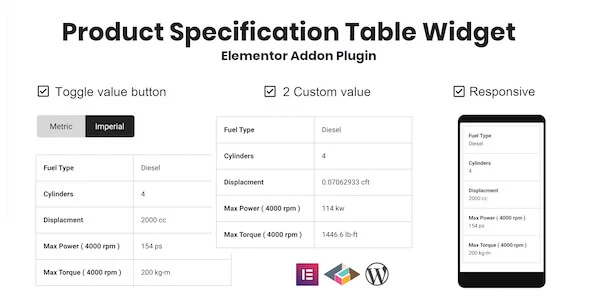
Product Specification Table Widget For Elementor is an addon plugin for the Elementor page builder that renders responsive two-column specification tables, built for WooCommerce store managers, industrial catalog editors, and hardware review publishers who need structured attribute data on product pages. The widget outputs a shallow DOM structure, one wrapper plus paired label/value cells per row, which keeps markup weight flat even when a table carries 30 or more specification rows on a single product layout. A toggle switch button re-renders the value column at runtime through JavaScript-driven class swapping, so switching between two stored value sets updates the visible table without a full page reload or an additional server round-trip.
Component assembly takes place entirely inside the native Elementor editor panel, where the widget registers as a drag-and-drop element compatible with both Elementor and Elementor Pro. The centralized content controls let administrators configure the specification row count, the label text for each row, the dual value entries assigned to the second column, and the toggle switch labels that map to each value set. Because every parameter is stored as standard Elementor widget settings, revisions propagate through the standard revision history and the live preview pane updates the table layout in real time as rows are added or edited.
Key Functional Features of the Product Specification Table Widget
- Responsive Two-Column Layout: The table renders as a label column and a value column on desktop and tablet viewports, then collapses into a single stacked column on screens narrower than 480px, removing horizontal scroll on mobile devices without requiring any custom CSS.
- Toggle Switch Button: A front-end toggle swaps the visible value set between two configured states, such as imperial and metric measurements, using a JavaScript class transition on the table container rather than a page refresh.
- Two-Value System: Each specification row accepts two value entries in the second column, making the widget suitable for dual measurement data where a single attribute must display two interchangeable readings side by side.
- Coding-Free Configuration: All table structure, row content, and toggle labels are defined through the Elementor sidebar controls, so no PHP, CSS, or JavaScript editing is required to publish a complete specification table.
- Auto Update Pipeline: The plugin ships with an automatic update channel, delivering compatibility patches and maintenance releases directly through the standard WordPress plugin update screen without manual reinstallation.
- Clean Asset Loading: Included JavaScript and CSS files are scoped to the widget instance, so stylesheets and scripts are only enqueued on pages where the specification table is actually present, keeping unnecessary bytes off unaffected templates.
Real-World Deployment Scenarios
- WooCommerce Hardware Product Pages: A store selling fasteners or piping components publishes a specification row set covering material, diameter, and thread pitch, then uses the toggle to let shoppers flip between imperial and metric readings without leaving the product page.
- Industrial Equipment Catalogs: A manufacturer documents machinery output ratings in a two-value format, storing both regional certification figures in one row and letting the toggle expose the relevant reading for each market segment.
- Consumer Electronics Review Sites: A review publisher builds side-by-side spec blocks for screen size, battery capacity, and weight, relying on the automatic mobile stacking below 480px so comparison tables remain readable on phone screens.
Technical Architecture & Compatibility Standards
The plugin is verified against WordPress versions ranging from 5.8.x through 6.8.x, and its PHP, JavaScript, and CSS assets are structured to run on standard shared hosting configurations with no external service dependencies. Browser coverage extends across Chrome, Firefox, Safari, Opera, Edge, and legacy Internet Explorer 8 through 11, which means the toggle interaction and the 480px stacking breakpoint degrade predictably even on older rendering engines. Note that the widget is not Gutenberg-optimized; it is designed strictly for the Elementor editing environment and requires Elementor or Elementor Pro to be installed and active.
Because the widget stores its configuration inside Elementor’s native settings model, tables inherit the editor’s live preview, responsive editing modes, and template reuse behavior, including saving a configured table inside a section template for repeated deployment across product pages. The demo configuration shipped by the author runs on the Hello Elementor theme, confirming compatibility with lightweight, default-configuration WordPress themes and leaving headroom for Core Web Vitals targets on content-heavy catalog pages.
Frequently Asked Questions
Does the Product Specification Table Widget switch between imperial and metric values automatically?
Yes, the built-in toggle switch button swaps the second column between two configured value sets, which is designed for exactly this dual-measurement use case on live product pages.
Can I use this Elementor addon plugin without writing any code?
Yes, all rows, labels, and toggle states are configured through the Elementor sidebar controls, so no PHP, CSS, or JavaScript editing is required to publish a working specification table.
Does the WordPress specification table stay readable on mobile screens?
Yes, the two-column layout collapses into a single stacked column on viewports narrower than 480px, eliminating horizontal scrolling on phone displays.
Does the widget work with the Gutenberg block editor?
No, the plugin is not Gutenberg-optimized; it requires Elementor or Elementor Pro to be installed and active for the widget to appear and function.
Can each specification row hold more than one value in the second column?
Yes, the two-value system stores two entries per row in the value column, and the front-end toggle determines which entry is displayed to the visitor at any given moment.