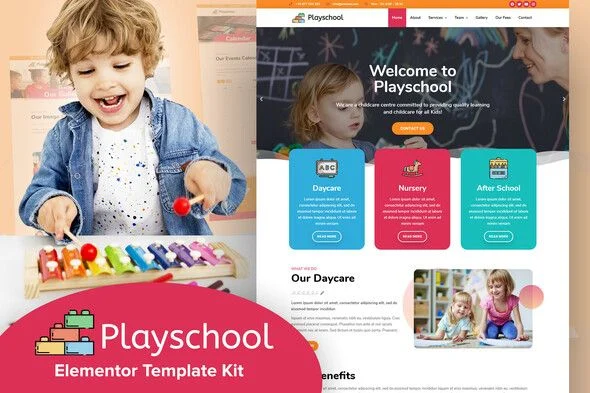
Playschool – Childcare School Elementor Template Kit
Playschool: Technical Overview & Architecture
Playschool – Childcare School Elementor Template Kit is a pre-built page template collection engineered on the Elementor drag-and-drop rendering engine, targeting preschool administrators, daycare directors, and freelance web designers building sites for early learning academies. Each page section is composed of shallow, reusable Elementor containers and widgets, which keeps DOM node depth low and prevents the markup bloat that typically slows down high-density image galleries in education websites. Template data is applied through the native Elementor import pipeline, so content edits render instantly in the live editing canvas without triggering full page reloads or manual database queries. The kit operates as a kit file set rather than a standalone theme, meaning component assembly happens entirely inside Elementor’s existing widget registry, with zero PHP template overrides or theme file modifications required. Site-wide parameters such as the global color palette, typography scale, header layout, button styling, and section spacing presets are managed from a centralized kit-level global settings panel, and each of these values propagates across all imported pages in a single update cycle.
Key Functional Features of the Playschool Template Kit
- 10+ Pre-Designed Page Templates: Includes Homepage, About, Classes, Programs, Staff, Gallery, Blog, and Contact layouts, each imported individually through the Elementor template library so unused pages never add weight to the install.
- Fully Responsive Breakpoint Behavior: Every section defines explicit stacking rules at mobile and tablet breakpoints, verified against devices from 320px to 1920px viewport widths with no horizontal overflow or clipped imagery.
- Global Color and Font Customization: Swapping the default bright palette or playful typeface in the kit’s global settings re-skins all pages at once, eliminating per-widget styling edits during rebranding.
- Lightweight Asset Strategy: Templates rely on native Elementor widgets and flat image placeholders instead of bundled jQuery sliders or external animation libraries, which keeps initial payload size minimal and supports green Core Web Vitals scores on shared hosting.
- Cross-Browser Rendering Consistency: Layouts were tested on current builds of Chrome, Firefox, Safari, and Edge, with Flexbox-based alignment producing identical section behavior across all four engines.
- Zero-Code Editing Workflow: Text, images, class schedules, and staff profiles are edited directly in the visual editor, requiring no CSS, HTML, or shortcode knowledge for full content replacement.
Real-World Deployment Scenarios
- Established Daycare Center Modernization: An existing daycare can replace an outdated static site by importing the Homepage and Classes templates, then populating program descriptions and enrollment forms to relaunch within a single working session.
- New Kindergarten Launch: A newly licensed kindergarten can go live with a complete About, Staff, Gallery, and Contact structure on day one, giving parents a credible reference point before the first open-house event.
- Children’s Art Studio or Early Development Center: Specialized programs can repurpose the gallery and class detail layouts to showcase student artwork, session schedules, and instructor credentials under a distinct brand palette.
Technical Architecture & Compatibility Standards
The kit requires a self-hosted WordPress installation running PHP 7.4 or higher (PHP 8.x recommended) with the free Elementor page builder activated, and it functions correctly on any standard theme since all layout logic lives in Elementor’s data structures rather than theme template files. Performance targets align with Core Web Vitals thresholds: shallow DOM construction and unminified-but-optimized widget output keep Largest Contentful Paint within acceptable ranges when images are served in WebP format from standard caching configurations.
Interoperability extends to popular extensions such as Contact Form 7, WPForms, and Mailchimp form widgets, which can be dropped into the pre-built contact and enrollment sections without structural adjustment. Because templates are stored as standard Elementor page data, exporting, duplicating, or migrating them between staging and production environments follows the same procedures as any native Elementor page.
Frequently Asked Questions
Does Playschool require any coding knowledge to set up and customize?
No, all pages are edited through Elementor’s visual drag-and-drop editor, so text, colors, fonts, and images are changed without touching HTML, CSS, or PHP files.
Can I import only the pages I need instead of the entire kit?
Yes, each of the 10+ templates imports individually through the Elementor template library, so unused layouts never load into your site’s database.
Does Playschool work as a standalone WordPress theme?
No, it is a template kit that runs on the Elementor page builder plugin and requires an active WordPress installation with a standard theme as the wrapper.
Will the templates display correctly on mobile devices and tablets?
Yes, every layout ships with defined mobile and tablet breakpoints, and section stacking was verified across viewport widths from 320px upward without overflow issues.
Can contact and enrollment forms be connected to third-party plugins?
Yes, the form sections accept Contact Form 7, WPForms, and Mailchimp widget embeds directly, with no structural modification to the pre-built layouts required.
-
14 May 2024 LatestSeptember 20, 2026