Picante | Restaurant WordPress
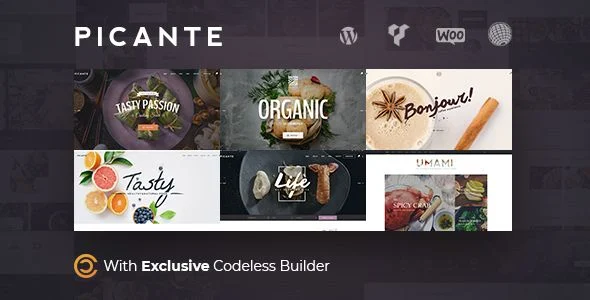
Picante Restaurant WordPress Theme Overview & Front-End Delivery Architecture
Picante Restaurant WordPress Theme is a WordPress theme engineered for restaurant groups, cafes, pizzerias, and personal chefs to publish menus, accept online table reservations, and process food orders from a single install. The package targets a persistent bottleneck in food-service web delivery: menu presentation, OpenTable reservation flows, and WooCommerce checkout typically live in disconnected plugins, whereas this codebase unifies them under one template hierarchy and one set of styled components. Within agency pipelines it operates as a deployable foundation — eight prebuilt demos covering restaurant, coffee, organic food, blog, and personal chef verticals — installable through a one-click dummy-data importer that replicates page structures, headers, and shop archives in minutes.
Technical Specifications & Deployment Matrix
| Engineering Metric | Deployment Specification |
|---|---|
| Base Technology / Framework | WordPress 4.9.x through 6.0.x, built on the Bootstrap framework with a PHP 7.2+ and PHP 8-compatible codebase |
| Rendering Engines | Codeless Builder (front-end live editor) plus WPBakery Visual Composer (back-end editor); Gutenberg-optimized templates |
| Browser Compatibility Matrix | IE9, IE10, IE11, Firefox, Safari, Opera, Chrome, Edge; high-resolution retina output |
| Commerce & Localization Protocols | WooCommerce 6.x integration, WPML translation readiness, RTL stylesheet support, WooCommerce currency switcher |
| Deliverable Footprint | PHP, CSS, and JS files with widget-ready regions, unlimited sidebars (left, right, dual), and child theme scaffolding |
Codeless Builder Rendering Pipeline & Reservation Commerce Mechanism
The core execution path runs through the Codeless Builder: a front-end editor that intercepts the rendered DOM, exposes 200+ insertable content blocks, and persists layout mutations server-side through inline text editing, drag-and-drop repositioning, and draggable margin/padding spacers — all reflected live before a single save is committed. Template hierarchy overrides map restaurant-specific needs onto native WordPress structures: a dedicated Restaurant Menu element and Recipe Block render dish catalogs without custom post-type surgery, while the OpenTable integration injects reservation booking directly into page sections. The commerce layer sits on a fully styled WooCommerce stack, with the checkout and thank-you pages restyled at template level rather than via hooks alone.
Architectural & Functional Highlights
- Menu & Recipe Presentation Layer: Purpose-built elements output structured dish listings and recipes, feeding SEO-relevant heading hierarchies (H1–H6 selectable per block) instead of generic shortcodes.
- OpenTable Reservation Bridge: The booking widget is styled and integrated at theme level, dispatching reservation requests through OpenTable’s system so table management requires no custom scheduling backend.
- WooCommerce Commerce Stack: Variation color swatches, YITH Ajax navigation, wishlist, and social login modules extend the shop; grid, list, and sidebar-filtered shop pages ship as distinct archive layouts.
- Header/Footer Builder & Wizard: Six prebuilt headers and five footers are composable through a builder with a one-click header-change wizard, supporting double navigation and per-page custom menus.
- Performance Engineering: The engine loads only the asset files a page requires, applies on-request thumbnail generation and adaptive images, and offloads animation to GPU-accelerated CSS3 transforms to contain LCP and CLS budgets.
Portfolio and blog rendering follow the same block system — grid (2–5 columns), carousel, isotope, masonry, fluid, and metro layouts — which lets a chef portfolio and a news magazine section coexist on one install. For agencies evaluating a decoupled storefront outside the WordPress runtime, Testo exists as an independent Shopify alternative for fast-food and cafe storefronts; it operates on Liquid-based architecture and cannot share this codebase’s PHP templates.
Production Implementation & Operational Resilience
Deployment in client staging environments benefits from several documented resilience measures. The one-click template importer reconstructs demo data, reducing manual page assembly, while the Envato Toolkit handles automatic theme updates so production installs track upstream releases without manual FTP cycles. Since version 2.1 the Codeless Builder ships as an official WordPress.org plugin — meaning deployments should remove the legacy bundled copy and install the repository version to avoid duplicate-loader conflicts. The v2.6 release patched PHP 8 incompatibilities and Kirki framework issues, and earlier releases fixed jQuery deprecated-function calls, so modern PHP hosts are supported on current builds.
Extension boundaries are clearly defined: child theme support allows template and stylesheet overrides to survive parent updates, and compatibility is verified against Slider Revolution, LayerSlider, Contact Form 7, Mailchimp, W3 Total Cache, and the YITH WooCommerce suite — a stack that covers caching, form dispatch, and marketing capture without bespoke plugin development. For restaurant groups whose positioning leans toward winery and fine-dining presentation rather than pizza delivery, White Rock Pro serves as a parallel WordPress solution with its own reservation feature set and demo import pipeline. Within Picante itself, RTL stylesheets and WPML readiness cover bidirectional and multilingual locales, and the theme loads minifiable CSS/JS fragments conditionally, keeping unstyled asset bloat off pages that never invoke their corresponding blocks.
Frequently Asked Questions
Does the package ship with a child theme for safe code overrides?
Yes, child theme support is explicitly documented, and the v1.1 changelog resolved an earlier child theme defect. Agencies can override templates, functions, and styles in the child layer while parent updates from the Envato Toolkit continue flowing to the base install.
Can the Codeless Page Builder be installed from the official WordPress plugin repository?
Yes. As of version 2.1 the builder became an official WordPress.org plugin, and the release notes instruct users to delete the previously bundled version and install the repository release to keep the front-end editor aligned with core updates.
Does the theme render correctly for right-to-left (RTL) languages?
Yes. RTL compatibility is listed among the technical attributes, which combined with WPML readiness allows Arabic, Hebrew, and other bidirectional locales to render menus, shop pages, and blog layouts without custom stylesheet rewrites.
-
3.0.0 LatestOct 25, 2026