Phox Pro – Hosting WordPress & WHMCS Theme
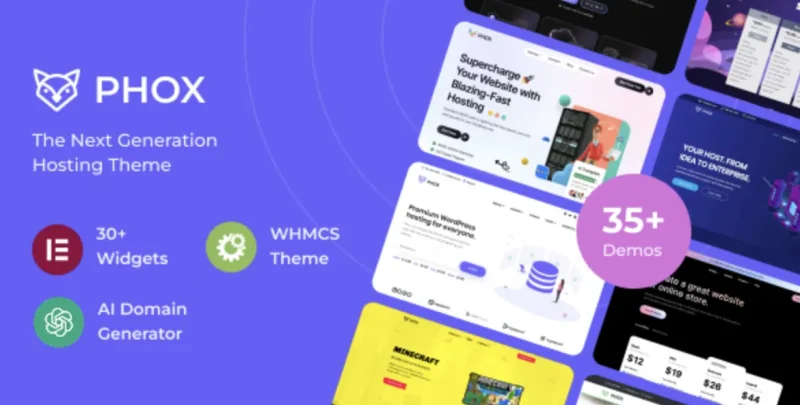
Phox Pro Hosting WordPress and WHMCS Theme Overview & Hosting Stack Architecture
Phox Pro Hosting WordPress and WHMCS Theme is a WordPress theme package engineered for hosting providers and web agencies to publish billing-integrated hosting websites without building domain-search and client-area logic from scratch. The package addresses the structural bottleneck that most WordPress themes ship no bridge into the WHMCS billing runtime, leaving hosting vendors to manually reconcile CMS marketing pages with a separately themed client portal. In production agency workflows, this architecture functions as a single codebase covering the marketing layer, the domain lookup layer, and the WHMCS template layer, so a hosting brand can maintain one coherent design system across acquisition and provisioning touchpoints.
Technical Specifications & Deployment Matrix
| Engineering Metric | Deployment Specification |
|---|---|
| Base Technology / Framework | WordPress theme (v5.0.x through 6.9.x) built on Bootstrap 4.x |
| Runtime / Language Requirements | PHP, HTML, CSS, and JS files; ReactJS-driven front-end components |
| Data Exchange / Communication Protocols | WHMCS Bridge integration, WHMCS template files, WooCommerce 6.x–9.x.x, WPML |
| Front-End / Engine Dependencies | Elementor and Elementor Pro (15+ widgets), Slider Revolution templates, Contact Form 7, 600+ Google Fonts |
| Database / Persistence Footprint | WordPress options-driven admin panel, 5 custom widgets, XML demo-content import file, layered PNG sources |
WHMCS Synchronization & Front-End Rendering Pipeline
Phox Pro routes the hosting storefront through WordPress template hierarchy overrides rather than a decoupled static front end. Theme template files intercept standard WordPress rendering, and the Elementor engine takes over DOM assembly on pages composed with its drag-and-drop editor, where more than fifteen hosting-specific widgets emit structured markup for pricing tables, domain search forms, and feature grids. The advanced domain search module, backed by ReactJS and AI-driven name suggestions, handles lookup queries at the interface layer and returns candidate domains without full page reloads. On the billing side, the WHMCS template and the WHMCS Bridge mechanism keep the client area visually synchronized with the WordPress design, while the WHMCS Menu Manager and WHMCS Page Manager map navigation and page structures between the two runtimes so menus, footers, and header states stay consistent across the CMS boundary.
Core Technical Capabilities of Phox Pro
- Advanced Domain Search with AI Suggestions: A ReactJS-driven lookup component accepts domain queries from the front end and generates AI-assisted alternative name candidates, reducing the need for custom JavaScript in the acquisition funnel.
- Dual-Channel WHMCS Integration: The package ships both a WHMCS template and Bridge-based connectivity, plus dedicated Menu and Page Managers, so billing navigation mirrors WordPress navigation instead of fragmenting into two design languages.
- Twenty-Plus Prebuilt Hosting Templates: Over twenty website templates and 200+ elements provide pre-structured starting points that agencies can import and restyle, cutting layout construction time on client staging servers.
- Multilingual and RTL-Ready Stylesheets: WPML compatibility and full RTL support allow the theme’s styles to render right-to-left locales correctly, a prerequisite for hosting brands operating in bidirectional-script markets.
- WooCommerce Commerce Layer: Compatibility with WooCommerce 6.x through 9.x.x lets hosting vendors attach product and checkout flows to the same theme runtime used for marketing and domain search pages.
Because the page-building engine is Elementor, teams that need a deeper widget inventory than the bundled fifteen can extend the editor with Livemesh Addons for Elementor Premium, which runs inside the same WordPress and Elementor stack. For studios evaluating separate standalone alternatives outside the WordPress theme runtime, the Ginsta – Cloud Hosting Company Elementor Template Kit exists as a JSON-based kit path that does not depend on PHP theme templating.
Production Implementation & Operational Resilience
Deployment follows the standard WordPress theme installation path: upload the package, activate it, then import the XML demo-content file to reproduce the reference layouts before swapping brand assets. The cross-browser matrix spans IE11, Firefox, Safari, Opera, Chrome, and Edge, which constrains the CSS layer to Bootstrap 4.x patterns and rules out layout techniques that legacy IE11 parsing cannot resolve; teams dropping IE11 from their support policy gain headroom for modern selectors. The 600+ Google Fonts system, multiple footer styles, and custom category colors are controlled through the admin panel, so identity changes happen in options rather than by editing template files directly. Localization posture is divided across two mechanisms: WPML handles string translation workflows for multilingual deployments, while the RTL build ships mirrored stylesheets for bidirectional layouts, and implementers should verify plugin interactions in RTL mode during staging rather than after go-live. Gutenberg optimization means the theme cooperates with block editor output, so mixed-content sites running both block pages and Elementor pages will not encounter conflicting editor styles. For agencies that also service non-hosting verticals with the same delivery pipeline, the Hostech – Web hosting WordPress theme occupies a parallel position in the hosting and domain-registrar niche as an alternative theme runtime. Error handling around the WHMCS Bridge layer depends on the bridge plugin’s own connection validation, so staging environments should mirror the production billing URL configuration to prevent menu synchronization failures during testing.
Frequently Asked Questions
Does the package include an importable demo-content file for staging reproduction?
Yes, an XML file with demo content is included alongside layered PNG, PHP, HTML, CSS, and JS files, allowing teams to reproduce the reference site structure before applying brand-specific styling and content replacements.
Can the theme drive a fully right-to-left localized hosting storefront?
Yes, the theme is RTL ready and WPML compatible, so bidirectional layouts render through shipped RTL styles while multilingual string management is delegated to WPML’s translation workflow during deployment.
Are the WHMCS integration components limited to the Bridge plugin?
No, the package includes a native WHMCS template plus WHMCS Menu Manager and WHMCS Page Manager modules, so billing-area navigation and page mapping are handled by dedicated tooling rather than the bridge alone.
-
v2.5.0 LatestNov 3, 2026