Oysha – Wellness Center and Yoga Studio WordPress Theme
Oysha Wellness Center WordPress Theme Overview & Front-End Delivery Architecture
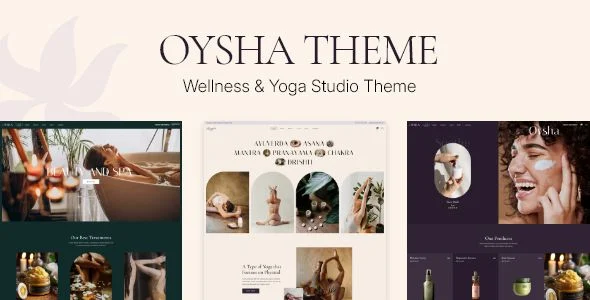
Oysha is a WordPress theme engineered for wellness centers, yoga studios, and spa operators who need class timetables, booking surfaces, and cosmetics retail unified inside a single presentation layer. The package targets the operational bottleneck of publishing recurring class schedules, event lists, and synchronized product catalogs without hand-coding custom post types or overriding template files from scratch. In an agency delivery pipeline, it operates as the front-end rendering layer of a self-hosted WordPress stack, shipping PHP template files, compiled CSS and JS assets, six prebuilt homepages, and a one-click demo importer that reconstructs the reference layout onto a client environment.
Technical Specifications & Deployment Matrix
| Engineering Metric | Deployment Specification |
|---|---|
| Base Technology / Framework | WordPress 6.5.x through 7.0.x; PHP, CSS, and JS file distribution |
| Runtime / Browser Compatibility | Firefox, Safari, Opera, Chrome, Edge; responsive and retina-ready output |
| Front-End Engine Dependencies | Elementor Page Builder, WPBakery Page Builder, Gutenberg (Qi Blocks), Qi Addons for Elementor |
| eCommerce / Commerce Layer | WooCommerce 9.x.x and 10.x.x, plus QODE Wishlist and QODE Quick View plugin compatibility |
| Localization / Data Exchange | WPML-compatible, translation-ready, Contact Form 7 form handling |
Class Scheduling, Commerce Rendering & Execution Pipeline
The rendering pipeline routes every inbound request through the standard WordPress template hierarchy, then delegates layout composition to the active page builder engine.
When a visitor lands on a class or schedule URL, the theme resolves the matching template, and the Timetable Events List shortcode pulls schedule data into the rendered DOM alongside pricing tables and instructor lists. Elementor widgets and Qi Blocks supply the layout containers, while WooCommerce handles cart, checkout, and product persistence for the cosmetics shop vertical. The admin interface exposes variable grid sizing, seven header types with distinct behaviors, and separate typography rule sets for desktop and responsive breakpoints, so layout logic and content data stay decoupled across the stack. For studios that need listing grids, custom queries, or form-driven data beyond the bundled shortcodes, wiring JetEngine into the Elementor environment adds dynamic content generation without custom PHP development.
Architectural & Functional Highlights
- Shortcode Library: Over 30 custom shortcodes—including Banner Carousel, Circular Slider, Frame Slider, Horizontal Scroll Showcase, and Timetable Events List—inject prebuilt component markup into any page builder canvas, reducing hand-written HTML.
- Dual Builder Interoperability: Full compatibility with Elementor, WPBakery, and Gutenberg lets the same content model render through different composition engines depending on editor preference.
- Commerce Extension Points: QODE Wishlist and QODE Quick View plugin support extends WooCommerce product interactions with saved-item states and modal product previews.
- Header & Navigation Layer: Seven header types, a customizable mega menu, side areas, and integrated search define the site-wide chrome independently of page content.
- Typography Engine: 1000+ Google Fonts with separate responsive typography settings allow per-breakpoint font rule overrides from the admin panel.
Production Implementation & Operational Resilience
Deployment begins with the one-click demo importer, which provisions page structures, widget areas, and header configurations in a staging environment before client content replaces placeholder media. A bundled child theme preserves overrides across parent-package updates, letting agencies modify template files and stylesheet rules without patching the core distribution. Widget readiness spans more than 20 widget types—blog lists, contact info, sticky sidebars, WooCommerce dropdown cart—mapped into Header Top, Header Bottom, Footer Top (1–4 columns), and Footer Bottom (2 columns) regions. Content entry animations, back-to-top scrolling, and parallax backgrounds execute client-side in the JS layer, so behavior degrades acceptably on low-powered devices. Translation loading and WPML configuration files are maintained in the update channel, which keeps multilingual deployments aligned with framework revisions. Error surfaces are handled through WordPress core conventions: Contact Form 7 manages validation, and WooCommerce governs cart-state edge cases such as empty-cart rendering. For teams evaluating parallel visual directions within the same wellness vertical, Luxury Spa and Wellness Joy exist as separate standalone theme packages covering adjacent spa and massage market segments.
Frequently Asked Questions
Does the package include a child theme for safe template overrides?
Yes, a child theme ships with the distribution, allowing stylesheet and template modifications to survive parent theme updates without losing custom code changes.
Can the demo images be reused directly on a production website?
No, the images shown in the demos serve presentational purposes only and require a separate stock image license before deployment on any live commercial or client website.
Is there a prebuilt component for publishing recurring class schedules?
Yes, the Timetable Events List shortcode and Timetable Responsive Schedule integration render class timetables and event lists as page-level components alongside the bundled yoga class templates.
-
5 December 2024 LatestSeptember 18, 2026