Offline Excel Formulas App with Admob Ads
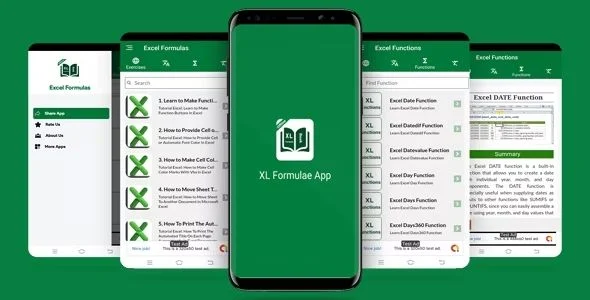
Offline Excel Formulas App with Admob Ads Overview & Offline Learning Architecture
Offline Excel Formulas App with Admob Ads is a Kotlin-based Android application source package, engineered for mobile developers and publishers to ship a self-contained Excel learning utility wired for AdMob monetization. The codebase targets Android 9.0 through 12.0 and removes the connectivity dependency of web-based tutorials by bundling 500+ formulas, 220+ functions, 450+ worked case examples, and 200+ shortcut references into a local on-device data layer. Within solo publishing or agency delivery workflows, it operates as a reskinnable, store-ready learning product whose content spans date and time, engineering, financial, information, logical, lookup and reference, math, statistical, and text function domains.
Technical Specifications & Deployment Matrix
| Engineering Metric | Deployment Specification |
|---|---|
| Base Technology / Framework | Kotlin 1.x native Android project with Java sources and XML layouts |
| Runtime / OS Compatibility | Android 9.0, 10.0, 11.0, and 12.0 |
| Data Exchange / Communication | Bundled offline content assets; Google AdMob ad request layer |
| Front-End / Engine Dependencies | Android view system, XML layouts, HTML and CSS content files |
| Database / Persistence Footprint | On-device content repository; no backend database or external API |
| Delivered File Formats | .apk, .java, .xml, CSS, HTML |
Bundled Content Engine & Execution Pipeline
The engine runs as a bundled Kotlin content repository rendered through native Android view layers. When a user selects a function category, the request resolves locally against packaged HTML and CSS content assets, so formula lookups, worked examples, and shortcut listings load without any network round-trip. This architecture inverts the typical tutorial-app model: instead of fetching lessons from a remote endpoint, every query is answered by on-device data, which keeps rendering latency independent of connection quality. The curriculum layer is structured around the function families used most in corporate spreadsheet work — logical tests, lookup and reference chains, date and time arithmetic, financial calculations, statistical aggregation, text manipulation, engineering conversions, and information functions — and extends into higher-skill territory such as pivot table reporting, formula auditing, macro and VBA task automation, and dynamic formula management.
Core Technical Capabilities of the Offline Excel Formulas App
- Offline Content Repository: 500+ formulas and 220+ functions ship with worked examples, supplemented by 450+ formula and case examples stored on-device, so content rendering requires zero connectivity.
- Nine-Domain Function Taxonomy: Navigation maps each lookup to a structured category — date and time, engineering, financial, information, logical, lookup and reference, math, statistical, and text — mirroring the Excel function library.
- Shortcut Reference Layer: 200+ Excel keyboard shortcuts are exposed as a dedicated productivity module for daily spreadsheet operation.
- AdMob Monetization Pipeline: Google AdMob ad units are wired into the Kotlin view hierarchy, generating impression-based revenue while the learning layer remains fully decoupled from network availability.
- Reskinnable Kotlin/XML Codebase: Editable .java sources, XML layouts, and HTML/CSS content files allow rebranding, theming, and content expansion ahead of store submission.
For studios weighing a parallel, independent iOS path for formula-reference utilities, GeoFormulas exists as a separate SwiftUI implementation outside the Android runtime, positioned for decoupled App Store deployments rather than any shared codebase.
Production Implementation & Operational Resilience
Deployment follows the standard native Android build path: import the Kotlin project into Android Studio, replace the placeholder AdMob application and ad unit identifiers with production values, then compile a signed release APK or AAB for Play Store distribution. The included .apk serves as a compiled reference build for validating behavior before modification. Because content is bundled rather than fetched, the primary runtime dependency is the AdMob SDK: ad requests dispatch only when connectivity exists, while formula and example screens remain reachable regardless of network state. This split defines the app’s operational boundary — learning content is immune to connection loss, monetization is not.
Two pre-release considerations deserve attention. First, documented OS compatibility spans Android 9.0 through 12.0, so regression testing on newer platform versions sits with the deploying team before submission. Second, the curriculum presumes access to Microsoft Excel for hands-on practice; the package is a reference and instruction tool, not a spreadsheet runtime, so positioning and store listing copy should reflect that boundary. Reskin work stays confined to XML layout overrides, color and string resources, and HTML/CSS content replacement, which keeps rebranding cycles short without touching the Kotlin logic layer. For publishers evaluating a separate Unity-based AdMob revenue stream, House Evolution ships as an independent casual game package on a different engine, offering a parallel monetization track rather than an extension of this codebase.
Frequently Asked Questions
Can learners study formulas without any internet connection?
Yes, the application runs in full offline mode, and all 500+ formulas, 220+ functions, 450+ examples, and 200+ shortcuts load from on-device assets. Only AdMob ad delivery itself requires network connectivity to dispatch requests.
Which file formats are included in the deliverable package?
Yes, the package contains .apk, .java, .xml, CSS, and HTML files, providing both a compiled reference build for immediate testing and the editable sources required for reskinning, content adjustment, and Play Store re-publication.
Does the app include Excel keyboard shortcut training?
Yes, a dedicated shortcut module documents 200+ Excel keyboard shortcuts, giving users a productivity reference that complements the formula and function libraries bundled within the same offline content layer.
Can this application replace working directly in Microsoft Excel?
No, the stated requirement is access to Microsoft Excel. The app functions as an offline reference and instruction tool for beginners through advanced users, not as a spreadsheet execution environment.