Notofy – Smart Notify & Reminder Android App for Daily Tasks
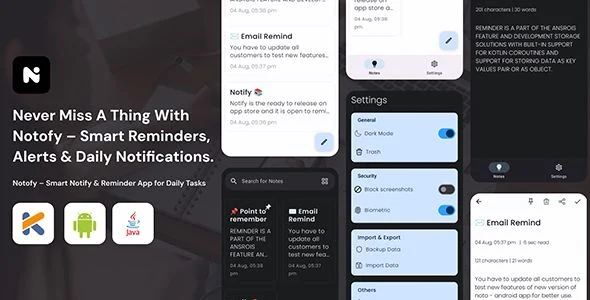
Notofy Smart Reminder Android App Overview & Mobile Notification Scheduling Architecture
Notofy is a Kotlin-based Android reminder and notification application source code, engineered for mobile developers and agencies to deploy a scheduling app that manages daily tasks, medication, meetings, and deadline alerts. The package targets a concrete mobile engineering bottleneck: delivering timely, repeatable local alerts without network connectivity, account registration, or any backend dependency. Within an agency delivery pipeline, the codebase operates as a deployable template that can be rebranded, recompiled, and shipped as an autonomous offline notification manager aimed at professionals, students, and anyone managing recurring obligations.
Technical Specifications & Deployment Matrix
| Engineering Metric | Deployment Specification |
|---|---|
| Base Technology / Framework | Kotlin 1.x Android application codebase |
| Runtime / OS Requirements | Android 10.0, 11.0, 12.0, and 15.0 |
| Deliverable File Formats | .apk, .dex, .so, .db, .java, .xml |
| Data Exchange / Communication | Fully offline; no sign-up, no network calls required |
| Database / Persistence Footprint | Local .db storage for scheduled reminders and notification history |
Reminder Scheduling Pipeline & Execution Flow
The engine converts a user-defined task into a persisted, time-triggered alert that fires through the native Android notification subsystem. When a reminder is created, its parameters—trigger time, recurrence rule, sound profile, vibration flag, and snooze behavior—are written to the local database, where the scheduler evaluates each entry against the device clock and dispatches the matching event as a system notification. Recurring entries follow daily, weekly, or monthly repetition rules computed from the stored schedule definition, so a single task definition generates an ongoing alert chain without duplicate manual input.
Once dispatched, each alert lands in a notification history log that preserves a chronological record of fired reminders, paired with quick actions for rapid re-scheduling or dismissal. The implementation keeps its runtime footprint deliberately small: the application is lightweight and battery-efficient by design, which matters for medication or routine reminders that must run continuously in the background without draining device resources. Because the entire loop—creation, persistence, dispatch, and history—executes on-device, no data leaves the phone and no server-side component exists to maintain.
Architectural & Functional Highlights
- Scheduled Notification Dispatch: Reminders are created in seconds and queued against the device clock, producing time-accurate alerts for daily routines, medication windows, meetings, and deadlines.
- Configurable Alert Channels: Sound, vibration, and snooze options can be set per reminder, giving each entry a distinct delivery behavior mapped to its urgency.
- Recurrence Engine: Daily, weekly, and monthly repeat rules are computed from stored schedule definitions, eliminating redundant task creation for recurring obligations.
- History Log with Quick Actions: Every fired notification is retained in a local history view with actionable shortcuts, so past alerts can be reviewed and re-armed without rebuilding the original entry.
- Zero-Dependency Privacy Model: No sign-up, no network exchange, and no account layer means the full reminder lifecycle stays inside the device boundary.
Production Implementation & Operational Resilience
Deployment begins with the included .apk, which allows immediate on-device validation of the compiled behavior before any code modification. From there, the .java, .xml, .dex, and .so artifacts plus the .db schema form the full rebuildable project surface: XML layout resources can be restyled for client branding, Kotlin logic can be extended with additional reminder types, and the local database persists user schedules across sessions and device restarts. The supported runtime band spans Android 10.0 through 15.0, which covers the majority of the active device ecosystem while imposing a documented minimum OS threshold for older hardware.
Because the architecture is fully offline, the classic mobile failure points—API downtime, authentication expiry, and connectivity loss—simply do not apply; alerts fire from local state regardless of network conditions. Studios shipping parallel native products on the Apple side can treat Smart Music Dark IOS Swift as a separate Swift codebase path for their iOS portfolio, since the two runtimes remain fully decoupled. One operational boundary deserves emphasis: this is a working app template, and Play Store approval is not guaranteed, because Google’s review outcome depends on each developer’s account standing, store listing configuration, and submission process rather than on the source package itself.
For teams evaluating monetized Android templates as a separate product line, Red Ball Stunt represents an independent Android Studio project with AdMob reward-video integration, illustrating a different commercialization route that exists outside this reminder architecture’s scope. Neither package modifies the other; they serve as parallel deployment options within a broader mobile catalog.
Frequently Asked Questions
Does the package include a compiled APK for testing before rebuilding the project?
Yes, the deliverables list an .apk file alongside .dex, .so, .db, .java, and .xml artifacts, so the working application can be installed and evaluated on a physical device prior to any source modification.
Does the app require an internet connection or account registration at runtime?
No, the application is fully private and offline. Reminder creation, scheduling, dispatch, and history logging all execute on-device with no sign-up flow and no network communication.
Is Google Play Store approval guaranteed with this source code?
No, approval is not guaranteed. The package provides a working app template, and Play Store review outcomes depend on each developer’s account, configuration, and submission process rather than on the codebase itself.
Can a single reminder automatically repeat without manual re-entry?
Yes, repeating reminders support daily, weekly, and monthly recurrence rules, so one schedule definition continuously regenerates alerts for recurring tasks like medication or weekly meetings.
Smart School Android App – Mobile Application for Smart School
Night Neon Clock Wallpaper – Neon Clock Widget – Live Clock Wallpaper – Smart LED Clock Faces
Smart Home App | Iot App | Home control App | Home automation App | Ionic | SmartHome