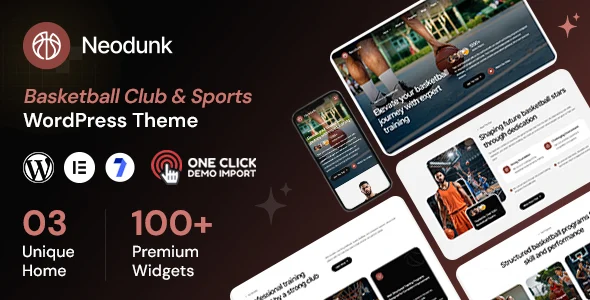
Neodunk – Basketball Club & Sports WordPress Theme
Product Overview
Neodunk functions as a dedicated Basketball Club & Sports WordPress Theme, designed to establish a robust online presence for sports organizations, teams, and local clubs. Its core purpose is to streamline the display of team rosters, match schedules, and important event information, proving ideal for entities ranging from community leagues to semi-professional outfits needing a structured digital hub.
When I first set up Neodunk – Basketball Club & Sports WordPress Theme, the initial dashboard presented various pre-built layouts. Choosing a starter design populated the site with placeholder content for teams, players, and fixtures. Editing these elements was straightforward, primarily done through custom post types accessible directly from the WordPress admin menu, rather than deeply buried within a page builder interface. This approach simplified content management, especially for quickly updating game results or player profiles.
Highlights & Value
The Basketball Club & Sports WordPress Theme provides specific functionalities that proved practical during use. Here are some observations:
- Match Management: The fixture system allows setting up games with home/away teams, dates, times, and venues. Once a match is complete, updating the score in the backend reflects immediately on the front-end schedule, showing win/loss records. The interface for entering results is a simple form with fields for each team’s score.
- Team & Player Profiles: Each team receives a dedicated page, automatically listing associated players. Player profiles include stats, positions, and photos. Adding a new player involves selecting their team from a dropdown menu within the player editor, ensuring correct association.
- Customization with Elementor: The theme integrates with Elementor, enabling direct drag-and-drop editing on pages. I frequently used the custom widgets provided for displaying teams or match results, dropping them into any page section for a custom layout.
- Responsive Design: On mobile devices, the match schedules adapt well, condensing game details into a more compact, vertically stacked format without losing critical information. Player grids also rearrange efficiently, shifting from rows to columns as screen size reduces.
- Event Calendar: Beyond just matches, a separate event calendar can track club meetings, training sessions, or fan gatherings, displaying them chronologically in a clear grid or list view.
Real-World Use Cases
- Local Youth Basketball League: Organizing multiple age groups, displaying season schedules, and posting standings for parents to easily access game times and locations.
- Semi-Pro Club Website: Featuring detailed player bios, match statistics, news updates, and integrating forms for event registrations or ticketing.
- Sports Blog/News Portal: Covering local sports events, showcasing match highlights, and reporting on team performance using the theme’s built-in content structures.
- Team Recruitment Page: Highlighting team achievements and providing clear application forms for prospective players, integrating with standard contact form plugins.
Technical & Compatibility
Neodunk demonstrates solid compatibility across the WordPress ecosystem. It works reliably with popular plugins like Elementor for page building, WooCommerce for potential merchandise sales, and various contact form solutions. I tested it with Contact Form 7 and WPForms; both integrated smoothly into template layouts without custom styling conflicts or requiring extra CSS adjustments.
Performance-wise, the theme felt responsive during development. It doesn’t load excessive scripts or rely heavily on third-party frameworks, contributing to decent page load times, assuming proper image optimization practices. The custom post types for teams and matches simplify data entry, keeping the database organized rather than relying on complex meta fields from page builders.
-
1.0.2 LatestOctober 2, 2026