Movedo Pro – Responsive Multi-Purpose WordPress Theme
Movedo Pro Overview & Multi-Purpose Theme Architecture
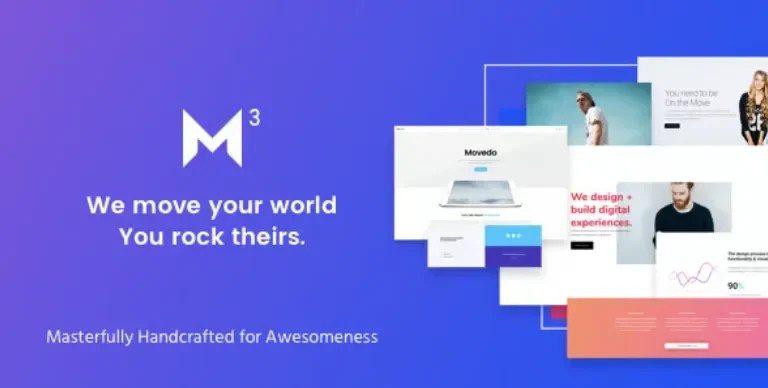
Movedo Pro is a responsive multi-purpose WordPress theme engineered for agencies, freelancers, and studio teams that need motion-driven layouts without hand-written animation code. It resolves the static, linear column structuring that constrains conventional themes by shipping column-level parallax, directional clipping animations, and free column positioning inside the WPBakery Page Builder composition layer. In agency delivery workflows it operates as a deployable design system, with seventeen prebuilt demo sites, one hundred predefined layouts, and on-demand dummy data import compressing the path from staging to a client-ready storefront or portfolio.
Technical Specifications & Deployment Matrix
| Engineering Metric | Deployment Specification |
|---|---|
| Base Technology / Framework | WordPress theme (PHP, CSS, JS files) built on WPBakery Page Builder with a Redux Framework option panel |
| Runtime / Language Requirements | WordPress 5.0.x through 7.0.x; IE10, IE11, Firefox, Safari, Opera, Chrome, Edge |
| Data Exchange / Communication Protocols | WooCommerce 6.x to 10.x, WPML, Polylang, Contact Form 7, Gravity Forms, Events Calendar and Events Calendar Pro, bbPress 2.5.x and 2.6.x |
| Front-End / Engine Dependencies | Revolution Slider, Font Awesome, Owl Carousel, Magnific Popup, Smooth Scroll |
| Database / Persistence Footprint | Native WordPress database tables; po/mo translation files; one-click dummy content import with placeholder media |
Motion Engine & Template Rendering Pipeline
Movedo Pro renders motion through a column-level parallax and clipping pipeline inside WPBakery. When WordPress resolves a page through its template hierarchy, the theme’s template overrides hand layout control to the WPBakery engine, where each column can carry parallax parameters — vertical scroll parallax, mouse-move X, mouse-move Y, or combined X+Y — plus a sensor option governing device behavior. Client-side scripts read these parameters on scroll and pointer events, transforming column layers in real time while Smooth Scroll governs viewport interpolation. Because the parallax math attaches to columns rather than whole sections, multiple independent motion layers can coexist on a single page.
Clipping animations extend the same pipeline: columns, titles, and image elements accept up, down, left, and right clip directions, each with a colored variant, producing reveal transitions without custom keyframes. Column position controls — top, bottom, right, left, and z-index — release layouts from strict row flow, while the Movedo Sticky header type plus per-page overrides of Simple, Shrink, Scroll Up, and None variants keep navigation state synchronized across templates. Header delivery spans five layouts (default, logo-on-top, side navigation, split menu, hidden side navigation), each with its own logo slot, including separate assets for dark, light, sticky, and responsive headers.
Commerce and content render through deep WooCommerce bindings — hover image switching in shop overviews, zoom effects on single products, an Ajax cart, and per-category title backgrounds — while blog and portfolio overviews offer grid, masonry, full-width, and carousel variants with filterable output. For teams whose deliverable is exclusively a furniture or decor storefront, Ginza exists as a WooCommerce-vertical alternative outside the multi-purpose chassis.
Core Technical Capabilities of Movedo Pro
- Ultra-Dynamic Column Parallax: Vertical, mouse-move X, mouse-move Y, and combined axis modes with a device sensor option apply transform math at the column layer, enabling layered motion that section-only parallax themes cannot express.
- Free Column Positioning: Top, bottom, right, left, and z-index controls per column override default document flow, letting overlapping and off-grid compositions resolve deterministically across breakpoints.
- Directional Clipping Animations: Up, down, left, and right clip reveals with colored variants attach to columns, titles, and images, executing entrance transitions through prebuilt animation logic rather than hand-written CSS.
- Modular Header and Footer System: Five header layouts, six dedicated logo slots, configurable responsive-menu screen thresholds, and all-element custom footers replace fixed header templates with per-page overridable layout objects.
- Fifty-Plus Builder Elements: Tested WPBakery elements, GUI-configured mega menus, custom modals, and more than one hundred predefined layouts allow full page composition with no code edits.
Production Implementation & Operational Resilience
Deployment follows standard theme installation from the ThemeForest file set (PHP, CSS, JS). The Redux-based option panel centralizes configuration — every option carries an inline description of its purpose — and one-click theme updates keep the parent package current against WordPress core releases from 5.0.x through 7.0.x. Child theme compatibility isolates client customizations from parent updates, and one-click dummy data import populates demo structures on demand. Imported media arrives as placeholders, since preview imagery originates from purchased Shutterstock assets; plan replacement photography or stock sourcing before client handover.
Operational resilience comes from built-in maintenance mode and coming-soon mode, which gate public access during staging, plus GDPR-oriented data handling. Translation operates through po/mo files with WPML and Polylang compatibility, and RTL support mirrors layouts for Arabic, Persian, Hebrew, and Urdu. The codebase ships standards-valid, SEO-oriented markup compatible with major SEO plugins, retina-ready assets, touch-swipe support, and a cross-browser matrix from IE10 through Edge. For consultancies that need a narrower finance-sector identity rather than a multi-purpose chassis, Invetex targets the consulting and investment vertical as an independent theme path, while Movedo Pro’s strength remains breadth: one chassis serving corporate, agency, freelancer, construction, travel, hosting, landing, and blog contexts from a single option panel.
Frequently Asked Questions
Does Movedo Pro include RTL stylesheets for right-to-left languages?
Yes, RTL support covers Arabic, Persian, Hebrew, and Urdu, with layout mirroring handled at the stylesheet layer. Pairing with WPML or Polylang keeps multilingual sites aligned, and po/mo translation files let translators regenerate localized strings without touching template files.
Is the theme compatible with WooCommerce 10.x and bbPress 2.6.x?
Yes, compatibility spans WooCommerce 6.x through 10.x plus bbPress 2.5.x and 2.6.x, alongside Contact Form 7, Gravity Forms, Events Calendar, and Events Calendar Pro, so storefront, forum, and event components can coexist on one WordPress installation.
Do the one-click demo imports deliver the preview images shown in the demos?
No, dummy data imports populate placeholder graphics because preview media originates from purchased Shutterstock assets. Budget for original photography or stock sourcing before client handover; the Construction and Small Store demos also draw from external sources such as Unsplash that warrant separate attribution review.
Can pages be composed without the bundled WPBakery Page Builder?
No, WPBakery Page Builder is the composition engine behind the fifty-plus elements, mega menus, and one hundred predefined layouts; the theme is Gutenberg-optimized for standard block content, but builder-driven layouts, parallax column parameters, and clipping effects depend on WPBakery remaining active.
Can sticky header behavior be overridden on individual pages?
Yes, five header layouts ship globally, and a per-page override selects among Simple, Shrink, Scroll Up, Movedo, and None sticky variants, while a configurable screen-size threshold defines when the responsive header and its assigned responsive menu take over.
-
3.6.9 LatestNov 7, 2026