Move The Pin – HTML5 Game (Construct3)
Move The Pin Overview & Pull-Pin Physics Puzzle Architecture
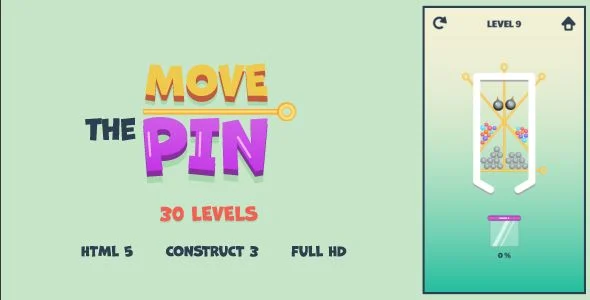
Move The Pin is an HTML5 physics puzzle game built on the Construct 3 engine, engineered for web studios and casual-game publishers who need a browser-deployable pull-pin title for desktop and mobile audiences. The core problem it removes is the cost of authoring a gravity-driven ball puzzle — colored spheres must recolor gray spheres mid-fall before draining into a transparent flask — without writing a custom physics simulation from scratch. Within an agency delivery pipeline, the package operates as a self-contained runtime: an exported HTML5 build ready for static hosting, paired with a .c3p project file for in-engine level editing.
Technical Specifications & Deployment Matrix
| Engineering Metric | Deployment Specification |
|---|---|
| Base Technology / Framework | Construct 3 event-sheet engine, exported as standalone HTML5 |
| Runtime / Browser Requirements | IE11, Firefox, Safari, Opera, Chrome, Edge |
| Input Protocols | Unified one-touch layer mapping touch and mouse events |
| Engine Dependencies | None at runtime; editing requires the Construct 3 editor |
| Deliverables / Persistence Footprint | HTML5 export, .c3p project file, documentation; no server-side storage |
Gravity-Driven Level Pipeline & Execution Flow
Each level runs as a physics scene in which pins function as removable constraints holding colored and gray balls above a transparent flask. When a pin is pulled, the Construct 3 runtime deletes the corresponding collision body and releases the stacked spheres to the gravity solver, which computes their fall trajectories frame by frame. During descent, contact between a colored ball and a gray ball triggers the recoloring routine, converting the gray sphere to the source color before both bodies continue toward the container. A level completes once the required balls settle inside the flask, at which point the engine advances the scene pointer to the next of the 30 configured stages. Studios assembling a broader browser arcade catalog on the same static hosting model can also evaluate Super Penguboy HTML5 Game, a separate Construct 3 platformer shipped with its own editable c3p source.
Core Technical Capabilities of Move The Pin
- Pull-pin constraint mechanics: pins are modeled as removable rigid bodies, and each tap fires a single removal event through the input dispatcher, keeping per-level interaction logic within one touch.
- Collision-driven recoloring: color transfer is bound to the physics collision handler, so gray balls convert on first contact with a colored ball without scripted animation paths.
- Unified one-touch input layer: touch and mouse events are normalized into a single tap channel, allowing identical gameplay on phones, tablets, and desktop pointers.
- Thirty authored levels: the content set spans 30 distinct pin arrangements, each defined inside the c3p project and adjustable through the Construct 3 event sheet.
- Full HD canvas output: scenes render at 1920×1080, providing a fixed high-resolution coordinate space for the exported HTML5 runtime.
Production Implementation & Operational Resilience
Deployment requires nothing beyond static file hosting: the exported build runs directly in IE11, Firefox, Safari, Opera, Chrome, and Edge without plugins or server-side runtimes. Because scripts, layouts, and physics definitions load from the same origin as the host page, the game introduces no cross-origin asset requests, which removes CORS header configuration from the deployment checklist entirely. Agency staging workflows can drop the folder into any CDN or web server directory and validate behavior across the documented browser matrix before client handoff, with the included documentation covering setup of the exported build.
Modification boundaries are defined by the editor requirement: the project opens only in Construct 3, so level adjustments, pin placements, and recoloring rules must be edited inside that environment’s event sheet system rather than patched directly in the exported HTML. Teams comparing additional browser titles built on this delivery model can review The Gate as an independent Construct 3 adventure alternative operating under a comparable hosting profile.
Frequently Asked Questions
Can the project file be opened in Construct 2?
No, the c3p project opens only in Construct 3 and Construct 2 cannot load it. Any level edits, pin repositioning, or recoloring rule changes must therefore be performed inside the Construct 3 editor’s event sheet environment.
Does the exported build run in Internet Explorer 11?
Yes, IE11 appears in the documented compatibility matrix alongside Firefox, Safari, Opera, Chrome, and Edge. The HTML5 export targets this browser range, so QA cycles should include a legacy-engine pass on IE11 alongside modern evergreen browsers.
Is keyboard input supported during gameplay?
No, control is documented as one-touch gameplay routed through touch and mouse events only. No keyboard bindings are part of the shipped input layer, so interaction testing should focus on tap and click behavior across devices.