MJ Battery Charging Animation with AdMob Ads Android
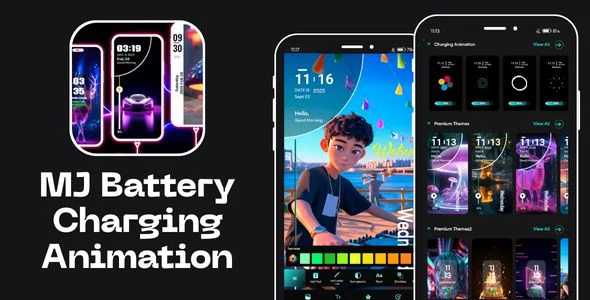
MJ Battery Charging Animation Overview & Charging-Screen Customization Engine
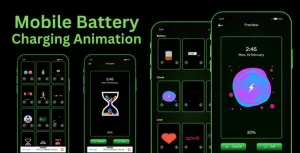
MJ Battery Charging Animation is a native Android application source package, engineered for mobile developers and app publishers to deploy a customizable charging-screen experience with integrated ad monetization. The codebase replaces the device’s default static charging indicator with a themable presentation layer that renders user-selected photos, text, stickers, and adjustable color parameters each time a power connection is detected. Within production publishing workflows, the package operates as a reskinnable Android Studio project that can be compiled, branded, and prepared for distribution with AdMob and Facebook ad placements already wired into the interface.
Technical Specifications & Deployment Matrix
| Engineering Metric | Deployment Specification |
|---|---|
| Base Technology / Framework | Native Android, Java-based application layer built in Android Studio |
| Source Deliverables | .java source files, .xml layout and resource files, compiled .apk binary |
| Supported OS Targets | Android 9.0 through Android 15.0, plus Android 16 support built against SDK 36 |
| Monetization Layer | AdMob and Facebook ad networks integrated into the runtime interface |
| Persistence Footprint | On-device storage for saved themes, charging history logs, and app usage records |
Charging-State Rendering & Battery Telemetry Pipeline
The engine intercepts battery-state broadcasts and renders a themed charging overlay in response. When a power cable is connected, a broadcast receiver registered against the platform’s battery manager dispatches an event that inflates the selected theme layout over the default charging view. The presentation layer binds three data channels: user-authored theme assets (photos, text strings, stickers, color values), live battery telemetry (health status, charge percentage, temperature), and animation draw routines that run for the duration of the charging session.
A secondary telemetry module runs behind the presentation layer. It aggregates battery consumption across activity categories such as phone calls, browsing, gaming, and music playback, then persists the results into a charging history log so users can review when the device charges most frequently. An app usage tracker sits alongside it, recording per-application screen time and correlating each entry with measured battery drain. The theme manager completes the pipeline by persisting multiple saved configurations and exposing a switching mechanism so a different theme can be activated per charging cycle without re-authoring assets.
Core Technical Capabilities of MJ Battery Charging Animation
- Themed Charging Overlay Rendering: Each plug-in event inflates a layout composed of user photos, editable text, stickers, and configurable text/background colors, replacing the stock charging indicator with a fully authored presentation.
- Live Battery Telemetry Display: Health status, charge percentage, and temperature are read from the platform battery service and rendered directly onto the charging screen during the session.
- Usage Analytics & Charging History: Consumption is tracked across calls, browsing, gaming, and music, while a persistent history log records charging patterns and per-app usage times for later review.
- Dual-Network Ad Integration: AdMob and Facebook ad units ship pre-configured in the runtime, allowing publishers to swap in their own ad identifiers and begin monetizing sessions without writing additional ad mediation code. For developers evaluating additional AdMob-backed Android templates as independent launch paths, Word Connect (Admob + GDPR + Android Studio) exists as a separate, self-contained project outside this codebase.
Production Implementation & Operational Resilience
Deployment begins in Android Studio, where the included .java and .xml files form the editable project surface and the compiled .apk allows immediate on-device testing. The project targets Android 9.0 through 15.0 and adds Android 16 support compiled against SDK 36, which positions the build to satisfy current store submission requirements that mandate recent target SDK levels. Publishers preparing a release build replace the bundled ad unit identifiers with their own AdMob and Facebook credentials, apply icon and string-resource rebranding, and sign the output artifact through the standard release keystore workflow.
Sideloading the .apk onto a test device introduces an environmental boundary worth documenting for QA teams. Because the binary is installed outside the store channel, Google Play Protect may flag it during installation; the package’s guidance describes disabling the Play Protect app-scanning toggle, enabling the “Restricted Setting” entry in the application info panel, and re-enabling scanning once installation completes. This sequence applies to internal QA distribution only and does not affect builds published through the standard store pipeline.
On the customization axis, the Java/XML structure means theme logic, animation parameters, and telemetry readouts are all addressable through direct source edits rather than an external configuration service. Developers extending the package should treat the theme persistence format and the usage-history log as the primary integration surfaces, since both are stored locally on the device. For teams surveying other self-hosted Android source projects as parallel options rather than merged codebases, Coloring Book for android mobile games follows a comparable editable-source distribution model in a different app category.
Frequently Asked Questions
Does the package include a compiled binary in addition to the editable source files?
Yes. The deliverables contain .java source files and .xml resource files for full project editing in Android Studio, alongside a compiled .apk that can be installed directly onto a device for immediate evaluation before any code changes.
Is the Facebook ad network available in addition to AdMob?
Yes. Both AdMob and Facebook ad networks are integrated into the runtime interface, so publishers can configure either network’s ad units within a single codebase rather than implementing a separate mediation layer from scratch.
Can the app display battery temperature on the charging screen?
Yes. Battery information rendered during charging sessions includes health status, charge percentage, and temperature, read from the platform battery service and displayed directly within the themed overlay throughout the active charging cycle.
Do sideloaded test builds require any device-level configuration before installation?
Yes. Because the .apk installs outside the store channel, the documented procedure requires temporarily disabling Play Protect app scanning, enabling the “Restricted Setting” option in app info after installation, and then re-enabling scanning for normal device operation.