MaxHost – Web Hosting, WHMCS and Corporate Business WordPress Theme with WooCommerce
MaxHost Overview & Hosting-Commerce Theme Architecture
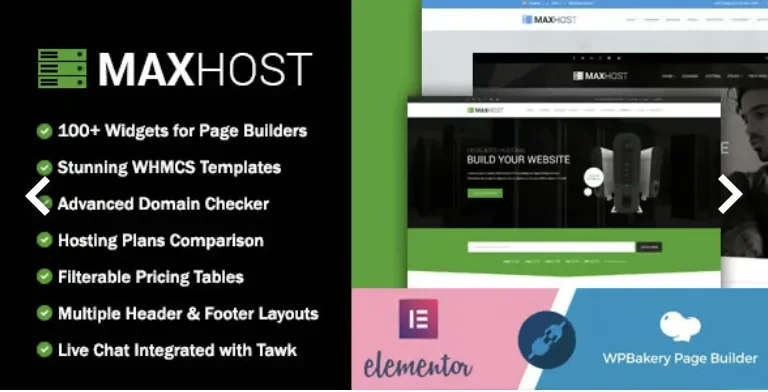
MaxHost is a WordPress theme engineered for hosting providers, resellers, and corporate businesses to launch billing-connected hosting storefronts with full WooCommerce commerce. The package resolves a specific operational bottleneck: bridging a WordPress marketing front end with a WHMCS client area, a task that historically forced operators into recurring monthly fees for a third-party bridge plugin. Within agency delivery workflows, it operates as a self-contained codebase whose bundled WHMCS templates install directly onto an existing WHMCS installation, letting teams deliver hosting packages, domain sales, SSL certificates, website security services, and SEO tools from one deployment in under half an hour.
Technical Specifications & Deployment Matrix
| Engineering Metric | Deployment Specification |
|---|---|
| Base Technology / Framework | WordPress theme built on PHP, CSS, and JS files; Redux 4.5.x options framework; current release v11.1.6 |
| Runtime / Language Requirements | WordPress 6.0.x through 7.1.x; PHP 8.4 compatible; requires WordPress 5.7 minimum |
| Front-End / Engine Dependencies | Elementor (free tier) with 60+ custom widgets, WPBakery Page Builder, Revolution Slider, Gutenberg-optimized output |
| Data Exchange / Commerce Protocols | WooCommerce 5.0.x–11.x storefront layer; native WHMCS templates for versions 8.0.x through 9.0.x; GoDaddy Reseller Store plugin 2.2.6 |
| Persistence / Localization Footprint | WPML multilingual compatibility, widget-ready sidebars, Aweber newsletter subscription capture |
WHMCS Template Engine & Front-End Execution Pipeline
The core mechanism is a dual-rendering architecture: WordPress drives marketing pages while WHMCS templates drive the client area natively. On the WordPress side, inbound requests pass through the standard template hierarchy, which is then overridden by the active page builder engine—either Elementor or WPBakery—so layout composition happens through drag-and-drop modules with real-time preview before changes reach the live DOM. The theme ships 60+ custom widgets and shortcodes for these builders, plus multiple home, header, footer, contact, and portfolio styles that can be swapped without touching template files. Scroll behavior is handled through parallax effects paired with typography animations and full-screen imagery, while an off-canvas menu manages navigation state on tablet and mobile viewports. On the WHMCS side, the included templates deploy directly onto the billing installation and inherit its session, cart, and checkout logic, enabling purchases of hosting packages, domains, SSL certificates, security services, SEO tools, and Weebly site builder products without any middleware layer. For studios operating in narrower verticals, parallel hosting implementations such as Playgard follow the same WHMCS-plus-WordPress pattern tuned for game server provisioning.
Core Technical Capabilities of MaxHost
- Bridge-Free WHMCS Connectivity: The bundled templates (WHMCS 8.0.x–9.0.x) install directly on the billing platform, eliminating the recurring middleware expense that competing WHMCS themes impose and removing an extra request hop between WordPress and the client area.
- Dual Page Builder Engine Support: Both Elementor and WPBakery are integrated, and the 60+ custom Elementor widgets run on the free version of the builder, so no additional plugin purchase is required for widget functionality.
- Native WooCommerce Commerce Layer: Styled integration spans WooCommerce 5.0.x through 11.x, allowing hosting shops to sell digital and physical products through standard cart, checkout, and order pipelines.
- One-Click Demo Provisioning: All preview pages ship as importable demo data, letting agencies reproduce the reference layouts and then modify them through builder modules rather than hand-coding templates.
- Reseller Ecosystem Hooks: Declared compatibility with the GoDaddy Reseller Store plugin 2.2.6 and Aweber list capture extends the theme into domain resale and email marketing pipelines without custom controller code.
Production Implementation & Operational Resilience
In agency staging and client production environments, deployment follows a documented sequence: install the theme, activate the bundled plugins through the TGM activation flow (repaired in v11.1.0 after a known activation defect), import demo content, then connect the WHMCS templates to the billing installation using the included documentation. Cross-browser rendering is verified across IE11, Firefox, Safari, Opera, Chrome, and Edge, which constrains CSS output to patterns safe for legacy engines—relevant when enterprise clients retain older internal browsers. The codebase has progressed through PHP 8.0 and 8.4 compatibility passes, with prior PHP warning defects on the extensions plugin corrected in v9.4.1, so modern server stacks run without deprecated-language notices. Multilingual deployments rely on WPML compatibility rather than baked-in translation routing, and visual-level typography controls (added in v11.6.0) push type scaling into the options panel governed by Redux 4.5.x, reducing the need for stylesheet overrides. Security posture is maintained through periodic patches aligned with each WordPress core release, as documented in the v10.1.0 changelog entry. For reseller-focused operators whose catalog centers on plan comparison and billing flows rather than corporate pages, ResellPress exists as a separate standalone theme targeting that onboarding path. Agencies extending content presentation beyond the bundled portfolio and blog modules can pair the theme with Mega Posts and Custom Posts Display WP Plugin, which renders post grids and carousels through its own shortcode layer without requiring template-file edits. Operational boundaries worth noting: the WHMCS templates require a functioning WHMCS installation on the server side, and the parallax-heavy front end depends on jQuery-enhanced scroll handlers, so asset minification should be tested against those bindings during optimization passes.
Frequently Asked Questions
Does MaxHost require the paid Elementor Pro plugin to use its custom widgets?
No, the 60+ custom Elementor widgets are built to run on the free version of the Elementor plugin, so no additional purchase is needed to access widget functionality.
Is the WHMCS Bridge plugin required to connect the theme to a WHMCS installation?
No, the included WHMCS templates install directly onto the WHMCS side following the documentation, which removes the recurring monthly middleware cost other WHMCS-connected themes impose.
Are the included WHMCS templates compatible with WHMCS version 9 releases?
Yes, the v11.0.0 and later packages include WHMCS 9.0.x compatible templates, alongside templates for WHMCS 8.0.x through 8.13.1, covering both current and legacy billing installations.
-
9.8.1 LatestSeptember 27, 2026