MagOne - News Magazine WordPress Theme
MagOne News Magazine WordPress Theme Overview & Publishing Architecture
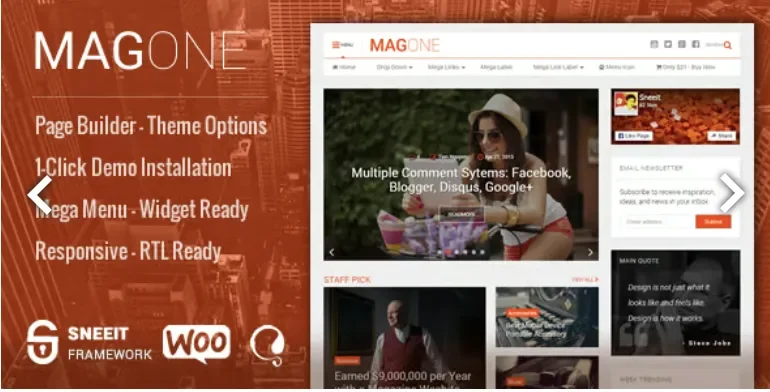
MagOne is a PHP-based responsive WordPress theme engineered for publishers and agencies building magazine, newspaper, blog, and portfolio sites without hand-coding layouts. It removes the bottleneck of manual template construction by bundling a drag-and-drop page builder, a 1-click demo importer, and a Customizer-driven styling layer inside the Sneeit Framework. In production workflows the package operates as a self-contained publishing engine: an agency imports a demo, repositions article blocks, wires ad placements, and delivers a maintainable client site.
Technical Specifications & Deployment Matrix
| Engineering Metric | Deployment Specification |
|---|---|
| Base Technology / Framework | WordPress theme (PHP files), HTML5 and CSS3 markup, Sneeit Framework core, W3C-validated output |
| Runtime / CMS Version Requirements | WordPress 5.3.x through WordPress 6.5.x |
| Plugin Ecosystem Compatibility | WooCommerce 5.x – 8.x (native shop templates), BbPress styling, Facebook and Disqus comment systems |
| Browser Matrix | IE8, IE9, IE10, IE11, Firefox, Safari, Opera, Chrome, Edge |
| Layout System | Responsive 2-column grid, multiple header variants, automatic RTL switching for right-to-left languages |
| Extension Surface | Widget-ready sidebars with custom sidebar creation, built-in shortcode library, Customizer plus Theme Options panels |
Sneeit Framework Block Composition & Rendering Pipeline
The Sneeit Framework governs the full rendering pipeline, from template selection through front-end output. Administrators compose pages by dragging article boxes—sliders, tickers, carousels, grids, columns, and blog rolls—onto any region of the canvas, and the engine serializes those placements into shortcode-backed layouts resolved through the standard WordPress template hierarchy. Because composition happens at the block level rather than through hard-coded PHP edits, a finished layout survives version updates and can be replicated across sections. Styling runs through two parallel channels: the native Customizer for colors, backgrounds, and typography, and a separate Theme Options panel exposing the same parameters for teams that avoid the Customizer interface. Mega menu structures, header variants, and taxonomy-driven widgets are all configured from that same administrative layer. For teams weighing parallel publishing stacks that run independently of this codebase, Raveen targets personal-blog and magazine deployments as a separate theme runtime rather than an extension of this architecture.
Architectural & Functional Highlights
- Drag-and-Drop Page Builder: blocks are positioned anywhere on a page and render as shortcode-backed regions, keeping the engine lightweight enough to limit hosting resource consumption.
- 1-Click Demo Importer: a deliberately small installer payload pulls pre-built magazine, blog, portfolio, fashion, tech, affiliate, music, and e-commerce demos into a clean WordPress install.
- Ad Slot Engine: dedicated placements accept pasted ad code across header, content, and sidebar regions, positioned and sized to optimize click-through rates without template surgery.
- Review System: point and star rating inputs produce structured output compatible with Google Rich Snippets, enabling review markup without a separate rating plugin.
- RTL Auto-Detection: translation files follow the WordPress.org standard, and the layout switches to right-to-left automatically when the configured site language requires it.
Production Implementation & Operational Resilience
Deployment on client staging environments carries a few prerequisites. The current release line (8.7.8.c onward) requires the Classic Editor and Classic Widgets plugins, so agencies migrating Gutenberg-first installs must pin those dependencies before activating the builder. During demo import the engine decodes sizable JSON payloads; the 5.7.5.5 release notes explicitly address memory exhaustion during that decode step, so raising the PHP memory allocation on budget hosting prevents failed imports. All asset protocols were normalized in 4.5.4.9, allowing the theme to run under SSL without mixed-content warnings, and subsequent patches closed an unauthenticated remote code execution vector (8.8.8.4) plus an XSS vulnerability (9.1.8.6), which documents an active security maintenance record across the version history.
Customization boundaries are clearly defined. The Customizer accepts uploaded TTF font files, unlimited color and background values, and per-element settings, while new versions arrive through the integrated Envato Market plugin using the current API. Email subscription boxes, social follower counters, and multi-system comment configuration (WordPress, Facebook, Disqus, with automatic media-link-to-embed conversion) are handled through widget and options surfaces rather than code edits. Where scoped style overrides are needed on individual posts beyond what the Customizer exposes, integrating INFINITO lets developers inject per-page CSS without modifying the theme’s stylesheets, keeping customizations isolated from future update cycles.
Frequently Asked Questions
Does the page builder in the current release depend on the Classic Editor and Classic Widgets plugins?
Yes, release 8.7.8.c lists both plugins as requirements for builder operation; the page builder icon was additionally patched in 7.4.7.6 to display inside the Gutenberg classic block container.
Are the advertised demo layouts bundled inside the downloadable PHP package?
Yes, every demo—tech magazine, fashion, trending news, flat design, affiliate blog, e-commerce store, music, lifestyle, and portfolio—ships with the package and imports through the 1-Click admin tool.
Is the theme marked as Gutenberg-optimized in its official compatibility attributes?
No, the attribute sheet lists Gutenberg Optimized as No, meaning block-editor-native workflows are not the primary authoring path even though the builder functions through the classic block after patch 7.4.7.6.
-
9.0 LatestNov 9, 2026