Madesign – Online Design Courses Elementor Template Kit
Madesign Online Design Courses Elementor Template Kit Overview & Page System Role
Madesign Online Design Courses Elementor Template Kit is an Elementor Template Kit engineered for design academies, online educators, and agencies to launch course catalog and enrollment websites without hand-coding page layouts. The package addresses the layout-engineering bottleneck that slows education builds by supplying pre-structured templates for course programs — drawing, 3D design, UI/UX, app design — plus methodology, instructor collaboration, and trust sections. In production delivery, it operates as a drop-in page library that a WordPress administrator imports through the Elementor editor and re-skins against a brand’s global design tokens.
Technical Specifications & Deployment Matrix
| Engineering Metric | Deployment Specification |
|---|---|
| Base Technology / Framework | Elementor page builder running on WordPress |
| Runtime / Environment Requirements | WordPress installation with the Elementor editor active; hosting meeting WordPress minimums with wp_memory_limit of 128 MB or higher |
| Data Exchange / Import Format | JSON template definitions processed through the Elementor kit import workflow |
| Front-End / Engine Dependencies | Elementor widgets, Flexbox/Grid containers, global color and typography token sets |
| Database / Persistence Footprint | No custom database tables; imported layouts persist as Elementor page data within standard WordPress content storage |
Course Enrollment Architecture & Rendering Pipeline
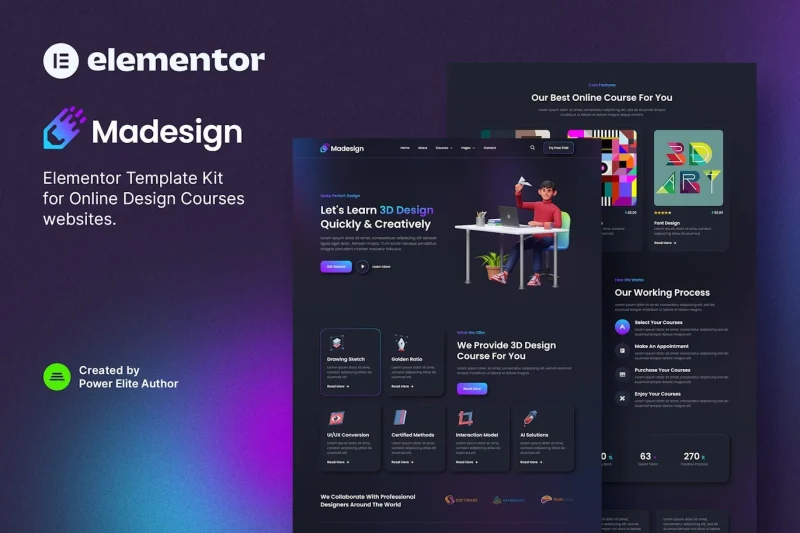
The kit’s core mechanism is a JSON-defined page set that the Elementor editor parses into nested Flexbox and Grid container trees during import. Once parsed, every section — hero, curriculum grid, methodology block, instructor showcase — renders as a manipulable container structure rather than opaque markup, so a builder can reflow, reorder, or delete regions directly on the editor canvas. Layout identity is anchored to two global token layers: a color system and a typography system. Adjusting either token propagates across every imported template, which is what keeps a multi-page education site visually coherent while individual pages are edited independently.
The information architecture follows a documented four-stage enrollment pipeline. Visitors first select courses from a catalog spanning Drawing Sketch, Golden Ratio, 3D Design, UI/UX Conversion, Certified Methods, Interaction Model, AI Solutions, and App Design. An appointment stage lets prospective students book a consultation before a purchase stage completes enrollment, and a final content-access stage frames how students enjoy their courses after checkout. Trust indicators — Trusted Platform, Security Ensured, and Real Interactions — sit alongside these conversion points, while a methodology section and a global-designer collaboration block supply the credibility content the funnel depends on. For creative studios needing a portfolio-focused variant instead of an education funnel, Agetha – Creative Portfolio Template Kit exists as a parallel Elementor kit, imported and managed separately rather than merged into this page library.
Core Technical Capabilities of Madesign
- Global design token propagation: Colors and typography are defined once at kit level; a token edit regenerates styling across all imported templates, eliminating per-page CSS patching during client rebranding.
- Container-based responsive composition: Sections are built from Flexbox and Grid containers that respond to Elementor’s device modes, so tablet and mobile variants are adjusted per container rather than per stylesheet.
- Four-stage enrollment information architecture: Select, appointment, purchase, and content-access stages map to dedicated template regions, giving the funnel a structure an agency can audit stage by stage.
- Multi-discipline curriculum coverage: Pre-built course sections for eight design tracks — from Drawing Sketch through AI Solutions and App Design — reduce the layout work of populating a broad catalog.
Production Implementation & Operational Resilience
Deployment follows the standard Elementor kit import path: install the builder, run the kit import, then bind templates to pages. Import operations are memory-bound, so staging environments should confirm wp_memory_limit is raised to at least 128 MB, with 256 MB as a safer ceiling when importing the full page set alongside an existing media library. Because layouts persist as Elementor page data rather than theme files, no child theme or PHP override layer is required, which keeps the kit portable across hosting stacks that satisfy WordPress minimums.
Customization boundaries sit at two levels. Global token edits re-skin the entire kit and should be the first lever during brand alignment. Per-widget overrides — swapping course imagery, editing curriculum copy, reordering containers — handle content-level change without touching the token layer. Agencies should avoid stacking token-level and widget-level style changes on the same property, since widget overrides take precedence and can mask later token updates. For consultancies serving non-education verticals, Finsco – Finance & Business Consulting Elementor Template Kit functions as an equivalent parallel kit for finance clients, deployed as an independent site build rather than an extension of this package.
Frequently Asked Questions
Does the kit include ready-made course sections for specific design disciplines?
Yes. The package ships with dedicated course sections covering Drawing Sketch, Golden Ratio, 3D Design, UI/UX Conversion, Certified Methods, Interaction Models, AI Solutions, and App Design, so academies can populate a multi-discipline catalog without building each curriculum block manually.
Does the kit define a complete student enrollment sequence?
Yes. Templates map a four-stage sequence: students select courses, make an appointment, purchase their chosen courses, and then enjoy the content, giving the enrollment path a documented information architecture rather than a loosely connected page set.
Are trust and security messaging blocks included in the page set?
Yes. The page set contains dedicated trust indicators — Trusted Platform, Security Ensured, and Real Interactions — positioned to support conversion points where visitors evaluate credibility before committing to a course purchase or appointment booking.