Logtra – Transportation Logistics WordPress Theme
Logtra: Technical Overview & Architecture
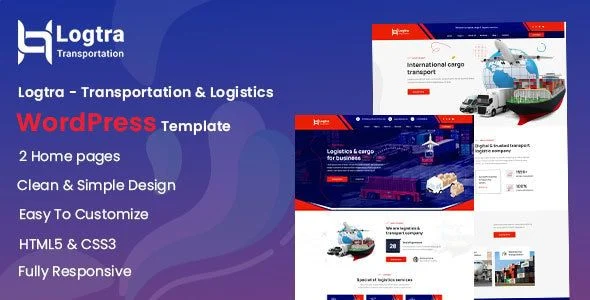
Logtra – Transportation Logistics WordPress Theme is an Elementor-based WordPress theme built for freight forwarders, cargo shipping operators, and trucking fleet managers who need a service-oriented corporate site. Its template architecture keeps DOM depth shallow by compiling each pre-built section into flat widget containers, which reduces node count on high-density pages such as service listings and freight rate tables. Quote request forms and contact submissions run through AJAX endpoints that validate input server-side and return JSON status messages, updating the UI state inline without triggering a full page reload.
Component assembly happens entirely inside the Elementor drag-and-drop editor, where every section, column, and widget maps to reusable templates stored in the theme’s template library. The centralized theme options panel exposes granular controls for global color palettes, Google Fonts typography pairings, header and footer layouts, and per-page container width values. Header and footer regions are constructed through a dedicated builder interface, letting administrators assign distinct navigation structures to specific page groups without touching template files.
Key Functional Features of Logtra for Modern Deployments
- Elementor Page Builder Integration: Every page section ships as an editable widget tree inside Elementor, so layout changes apply visually in the live editing canvas and save directly to the WordPress database without code modifications.
- Multiple Homepage Demos: Pre-designed homepage layouts target freight, cargo, and supply chain niches, each with distinct hero sections, service grids, and statistics modules that can be swapped and mixed across deployments.
- Header & Footer Builder: A flexible builder lets administrators compose navigation areas with custom logo positioning, menu alignment, CTA buttons, and sticky-scroll behavior on a per-page basis.
- WooCommerce Compatibility: Full compatibility with the WooCommerce plugin allows operators to sell service packages, shipping add-ons, or branded merchandise through native product, cart, and checkout flows.
- Quote Request Form Templates: Dedicated inner pages include structured quote request and contact forms wired for freight inquiries, capturing shipment origin, destination, cargo type, and volume details before routing submissions to the admin inbox.
- Responsive Mobile-First Rendering: Layouts apply a mobile-first CSS grid with breakpoint-specific typography scaling, so service pages and forms remain fully operable on screens from 320px upward.
Real-World Deployment Scenarios
- Freight Forwarding Agency: A forwarding agent deploys the service detail templates to document air, ocean, and road freight offerings, attaching quote request forms to each service page so inbound leads arrive pre-qualified with shipment parameters.
- Trucking & Haulage Operator: A fleet operator uses the WooCommerce-ready structure to package regional hauling subscriptions, processing recurring service payments through standard checkout while presenting fleet capacity and route coverage on dedicated inner pages.
- Warehousing & Supply Chain Provider: A warehousing company combines the statistics modules and contact page templates to publish storage capacity figures, cold-chain credentials, and distribution hub locations, converting visitors through location-specific inquiry forms.
Technical Architecture & Compatibility Standards
Logtra runs on PHP 8.x with a standard WordPress installation and requires the Elementor plugin for visual editing. Asset loading follows conditional enqueue patterns, so stylesheets and scripts attach only to pages that reference them, keeping initial payload weight low. The template markup targets Core Web Vitals thresholds, with responsive image handling, deferred non-critical assets, and container-based layout logic that avoids layout shift during rendering.
Interoperability extends to WooCommerce for commerce flows, native WordPress custom post types for services and projects, and translation-ready string packaging that supports multilingual plugin setups. Because headers, footers, and page sections operate as modular builder components, the theme’s templates can be restructured or extended without overriding parent template files, preserving a clean upgrade path through future theme releases.
Frequently Asked Questions
Does Logtra include pre-designed homepage layouts for freight and cargo companies?
Yes, the theme ships with multiple homepage demos covering freight forwarding, cargo shipping, and trucking niches, each editable in Elementor from the first install.
Can I build custom header and footer layouts without writing code?
Yes, the dedicated header and footer builder lets you compose navigation areas with custom logos, menus, and CTA buttons using drag-and-drop controls in the theme options panel.
Does Logtra support selling services or packages online?
Yes, full WooCommerce compatibility allows you to set up service packages, shipping add-ons, or physical products with native cart and checkout functionality.
Is the theme locked to a single logistics niche?
No, the template structure is modular, so warehousing providers, air cargo carriers, ocean freight companies, and trucking operators can each adapt the same layouts to their own service catalogs.
Can quote request forms be attached directly to individual service pages?
Yes, dedicated form templates capture shipment origin, destination, cargo type, and volume fields, and each form can be assigned per page through the Elementor widget panel.