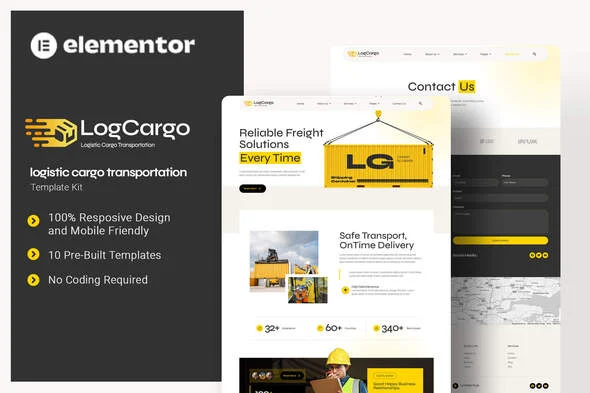
LogCargo – Logistic Cargo Transportation Elementor Template Kit
LogCargo: Technical Overview & Architecture
LogCargo – Logistic Cargo Transportation Elementor Template Kit is an Envato Template Kit built exclusively for the Elementor 3.10.x page builder, targeting freight forwarders, container shipping carriers, and warehouse or package-forwarding operators. The kit ships as pre-designed Elementor JSON data rather than a monolithic theme, which keeps the rendered DOM tree flat, avoids redundant nested wrapper divs, and prevents markup bloat across content-heavy pages such as Services and Pricing. Front-end interactions, including Metform-powered contact submissions and header navigation states, execute through standard Elementor AJAX handlers, updating UI responses without triggering a full page reload.
Component assembly runs entirely inside the Elementor editor after installation through the Envato Elements plugin, so every section, widget, and container remains editable at the node level. The kit centralizes four configuration layers in the Elementor global controls: site-wide color tokens (including the signature yellow accent palette), typography pairs mapped to the Syne and Roboto font families, responsive breakpoint behavior for tablet and mobile viewports, and display-condition rules for the global header and footer managed through the UAE Header Footer module. Plugin dependencies stay on the free tier: Elementor, ElementsKit Lite, The Plus Addons, Metform, and Ultimate Addons for Elementor Lite.
Key Functional Features of LogCargo for Modern Deployments
- 10 Page Templates: Home, About Us, Team, Services, Single Services, Pricing, FAQs, Blog, 404, and Contact Us ship as individual importable templates, each editable independently inside the Elementor editor.
- Free-Addon Construction: Every widget and section relies on the free versions of ElementsKit Lite, The Plus Addons, Metform, and Ultimate Addons for Elementor Lite, so the kit runs without a paid Elementor Pro subscription.
- Metform Integration: The Contact Us page includes a pre-built Metform block; after importing the form template through the My Templates folder in the form builder, the widget binds to the page via the Navigator panel and updates through the standard Update & Close workflow.
- Global Header and Footer via UAE: Header and footer templates import into the Ultimate Addons Header Footer module, where display conditions such as Entire Website publish site-wide navigation from a single reusable element.
- Typography System: Headings load in Syne while body copy uses Roboto, giving the logistics layouts a distinct industrial character with two lightweight Google Font families.
- Standalone Error Page: A designed 404 template keeps navigation reachable on broken URLs, reducing bounce on large catalog-style service sites.
Real-World Deployment Scenarios
- Freight Forwarding Company: A forwarding agency deploys the Home, Services, and Single Services templates to publish its air, sea, and road freight offerings, with the Pricing page presenting per-route rate tables that clients can compare directly.
- Package Forwarding & Storage Provider: A warehousing business uses the Team and About Us pages to establish operational credibility, while the Metform-powered Contact Us page captures pallet and storage inquiries without page reloads.
- Container Shipping Line: A container operator builds a cargo transportation website around the Blog template for route announcements and shipping advisories, keeping customers informed through scheduled content updates.
Technical Architecture & Compatibility Standards
LogCargo targets Elementor 3.10.x and installs through the Envato Elements plugin for WordPress, or through direct Elementor template import for ThemeForest customers. It is not a WordPress theme; the kit contains design data only, so it runs alongside any performance-oriented theme and inherits that theme’s PHP and WordPress version compatibility. Because the kit uses free addons rather than Elementor Pro, header and footer publishing routes through the UAE Header Footer module instead of the Pro Theme Builder.
Core Web Vitals performance depends on the hosting stack and image licensing: demo images load from Envato Elements and must be licensed separately or replaced with your own assets before production launch. Subsequent support requests route through the Elementor > Get Help menu inside WordPress once the kit is installed and activated.
Frequently Asked Questions
Does LogCargo require Elementor Pro to function?
No, the kit is built entirely on the free versions of Elementor, ElementsKit Lite, The Plus Addons, Metform, and Ultimate Addons for Elementor Lite.
Can I install LogCargo without the Envato Elements plugin?
Yes, ThemeForest customers can import the template kit directly through Elementor, while Envato Elements subscribers install it via the Elements plugin.
Does the kit include a working contact form?
Yes, a Metform block ships with the Contact Us template and binds to the page after importing the form through the My Templates tab in the form builder.
Can I apply a global header and footer across all pages?
Yes, the UAE Header Footer module publishes the imported header and footer templates site-wide using the Display on Entire Website condition.
Is LogCargo a full WordPress theme?
No, it is an Elementor Template Kit containing design data only, so it must be paired with an existing WordPress theme on your site.