Lia – Digital Agency HTML Bootsrap Template
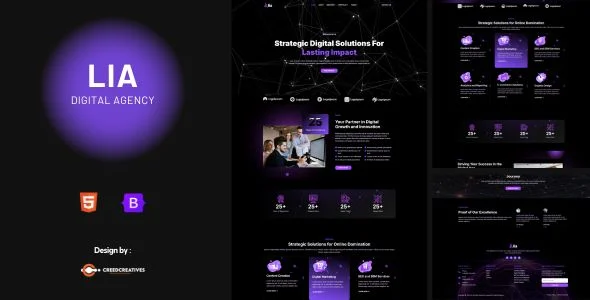
Lia Digital Agency Template Overview & Static Front-End Foundation
Lia Digital Agency Template is a static HTML5 front-end package built on the Bootstrap framework, engineered for digital agencies, freelancers, and SaaS startups that need production-ready marketing pages without a server-side CMS. The package removes the recurring bottleneck of hand-coding agency layouts from scratch by supplying prebuilt, responsive page structures covering services, portfolio showcases, pricing, team profiles, and blog delivery. In an agency workflow it functions purely as the presentational layer: front-end developers replace placeholder assets, adjust the stylesheet, and deploy the finished files to any static host.
Technical Specifications & Deployment Matrix
| Engineering Metric | Deployment Specification |
|---|---|
| Base Technology / Framework | HTML5, CSS3, vanilla JavaScript on Bootstrap (4.x and 5.x compatible) |
| Runtime / Language Requirements | Any static web server or CDN host; no PHP, Node.js, or database runtime involved |
| Front-End Dependencies | Inter via Google Fonts, Font Awesome icons, SVG Repo iconography |
| Layout System | Responsive multi-column Bootstrap grid (4+ column configurations) |
| Browser Compatibility Bracket | Chrome, Firefox, Safari, Opera, Edge, and Internet Explorer 11+ |
| Persistence / Database Footprint | None; deliverable consists of HTML and CSS files only |
Semantic Page Composition & Rendering Pipeline
Lia renders entirely on the client: the browser fetches static HTML files, parses their semantic HTML5 document structure, and applies the stylesheet alongside vanilla JavaScript to compose each page. Because no server-side templating engine participates in the request cycle, response behavior depends only on asset weight and CDN proximity rather than database queries or script execution time.
The layout engine rests on the Bootstrap framework, compatible with both the 4.x and 5.x release lines, so teams standardized on either dependency chain can adopt the markup without refactoring. Developers work with the responsive column grid, utility classes, and component conventions the framework exposes, keeping structure predictable across viewport widths. The package ships with a thirteen-page inventory — Home, About, Services, Single Service, Portfolio, Portfolio Details, Pricing Plan, Team, FAQs, 404, Contact Us, Blog Archive, and Single Post — a sitemap scope that maps directly onto typical agency client briefs, from digital marketing engagements to personal portfolio builds.
For teams evaluating a parallel path where a static package falls short, such as builds requiring pre-rendered React components and GraphQL-sourced content, Mibix operates as an independent Gatsby-based alternative on a separate technology stack.
Core Technical Capabilities of Lia Digital Agency Template
- Bootstrap dual-version compatibility: The markup aligns with Bootstrap 4.x and 5.x conventions, letting teams on either release line reuse the grid and utility classes without touching their existing dependency setup.
- Complete agency page inventory: Thirteen prebuilt templates, from Single Service and Portfolio Details through Pricing Plan and the 404 page, eliminate the structural scaffolding phase of a client engagement.
- Zero-cost typography and icon layer: Inter loads through Google Fonts at no charge, while Font Awesome and SVG Repo supply vector iconography, removing paid font or icon subscriptions from the project budget.
- Cross-browser verification matrix: Layouts render consistently across Chrome, Firefox, Safari, Opera, and Edge, with the compatibility bracket extending back to Internet Explorer 11.
Production Implementation & Operational Resilience
Deployment requires nothing beyond a static file host: because the deliverable contains HTML and CSS files, any web server, object storage bucket, or CDN edge can serve it. High-traffic scenarios introduce no state-synchronization risk, since no session data, persistence layer, or server-side form processing exists in the codebase. Interactive elements such as the contact page need a developer to attach an external handling endpoint before launch — a known boundary that must be planned during staging rather than discovered in production.
Customization follows the limits of a static layout package. Styling changes occur at the CSS level, whether overriding the flat, modern design language, adjusting the Inter typographic scale, or recoloring components, while structural edits happen directly in the HTML markup. Background images and photography arrive as placeholders; production assets must be sourced separately, because the demo imagery drawn from Envato Elements is licensed for presentation purposes only and is excluded from the final download.
For studios whose clients need an editorial interface where marketing staff update content without touching markup, Gröwla exists as a WordPress-native alternative running on a different runtime. This package instead suits engagements where the front-end developer controls the codebase directly and the client deliverable is a finished, self-contained site.
Frequently Asked Questions
Are the Envato Elements preview images included in the downloadable package?
No, the stock photography shown in the live demo serves presentation purposes only. The download ships with image placeholders in place of licensed visuals, so agencies must supply their own approved imagery before client deployment.
Does the template include a dedicated 404 error page among its prebuilt layouts?
Yes, the page inventory contains a dedicated 404 page alongside Home, About, Services, Portfolio, Pricing Plan, Team, FAQs, Contact, and blog layouts, covering the full sitemap an agency site typically requires.
Can the layouts be modified without installing a build toolchain or framework CLI?
Yes, the deliverable consists of plain HTML and CSS files with vanilla JavaScript, so any standard code editor is sufficient. No bundler, package manager, or compilation step forms part of the documented workflow.