Konstruktion – Construction Architecture WordPress Theme
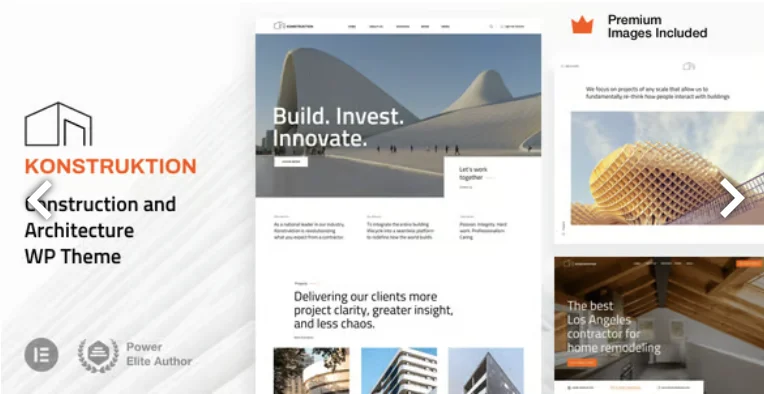
Konstruktion Construction Architecture WordPress Theme Overview & Agency-Grade Elementor Pro Framework
Konstruktion Construction Architecture WordPress Theme is an Elementor Pro-based WordPress theme package, engineered for construction teams, architecture studios, and renovation contractors to publish service portfolios and project showcases without maintaining a fragmented plugin stack. The package addresses a persistent bottleneck in WordPress theme delivery: most themes claim Elementor compatibility while shipping parallel option panels, bundled page builders, and duplicated widget systems that drift out of sync with each core update. Instead, this codebase extends the Elementor and Elementor Pro widget layer directly, so an agency can import one of three production demos — a construction team, an architecture studio, or a small renovation company — and hand the client a site the client already knows how to edit.
Technical Specifications & Deployment Matrix
| Engineering Metric | Deployment Specification |
|---|---|
| Base Technology / Framework | WordPress theme (v43), distributed as PHP, Less, and JS source files |
| Runtime / Language Requirements | WordPress 6.0.x through 7.1.x; PHP rendering with Less preprocessor sources |
| Front-End Engine Dependencies | Elementor plus Elementor Pro (Pro is required for demo import and theme setup); Gutenberg-optimized, RTL support |
| Compatibility Layer | WPML multilingual workflows, Facebook integration, widget-ready sidebars |
| Browser / Layout Footprint | Firefox, Safari, Chrome, Edge; responsive layout at 4+ columns, high-resolution assets |
Elementor Pro Widget Extension Architecture & Rendering Pipeline
The rendering pipeline routes pages, headers, footers, and archive views through Elementor Pro’s native widget engine rather than a proprietary template layer. Theme code hooks into the builder’s existing widget registry and appends styles and animations, which means the template hierarchy output stays aligned with the page builder’s DOM structure and inherits the builder’s versioned stability. Headers and footers are assembled through Elementor Pro’s theme builder, and dynamic content layouts — products, blog posts, blog and product archives, 404 pages, maintenance mode, coming soon mode, and search results — are all resolved by Elementor Pro’s dynamic content system instead of hand-written PHP overrides. Mega menus, forms, and pop-ups are dispatched through the same Pro modules, removing the need for separate form, menu, and modal plugins. Because the Elementor Pro Global Styles panel serves as the theme panel, typography and color tokens defined once propagate across every template, and per-device control extends to tablet and mobile versions with customized breakpoints. The design scope also covers trade-specific presentation areas: roofing project highlights, home renovation service sections, and portfolio pages structured for restoration, remodeling, handyman, carpenter, and painter service narratives. Studios evaluating parallel construction-sector options within the same WordPress runtime can compare Vernex – Architecture Construction WordPress Theme, which targets engineers and construction firms with a separate widget and layout direction.
Architectural & Functional Highlights
- Widget-level theme code deactivation: The extension layer can be switched off on a widget-by-widget basis, letting developers strip animation and style overrides where a leaner DOM or fewer injected assets is preferred.
- Zero plugin-clutter stack: The runtime requires only WordPress, Elementor, and Elementor Pro; forms, menus, pop-ups, and dynamic layouts all resolve inside the Pro engine, reducing update-surface conflicts.
- Demo assets bundled with content: All imagery shown on the demo website ships inside the demo content package and is cleared for use on client projects without additional stock licensing, eliminating external asset dependencies at import time.
- WPML and RTL coverage: Multilingual content is handled through WPML-compatible string registration, while RTL stylesheets mirror the layout for right-to-left locales without a separate theme variant.
Production Implementation & Operational Resilience
Deployment on client staging environments starts from a documented prerequisite: Elementor Pro must be active before the demo content importer runs, since the importer and the initial theme setup both depend on Pro’s template and widget infrastructure. Once imported, the three demos map to distinct business tracks — construction, architecture, and renovation — so an agency can select the branch closest to the client’s trade and adjust service sections rather than rebuilding layouts. The update path is documented through a dedicated theme update procedure and a published changelog, allowing versioned upgrades across the WordPress 6.0.x to 7.1.x range without losing Elementor Pro global styles or template assignments. Error handling benefits from the architecture itself: because the code only extends existing widgets rather than replacing rendering logic, builder-level fallbacks and widget recovery behavior remain intact when a widget is disabled or a plugin version changes. Onboarding is supported by an extensive setup guide and 23 HD WordPress video tutorials aimed at beginner operators, which shortens the client handover cycle. For firms whose brief leans toward interior-focused presentation, Arkio – Architecture & Interior WordPress Theme exists as a standalone WordPress alternative with a different design system, evaluated independently rather than merged into this codebase. Customization boundaries follow the Elementor model: style tokens live in the Global Styles panel, while structural changes occur at the container and widget level inside the builder.
Frequently Asked Questions
Is Elementor Pro required to import the demo content?
Yes. The demo content importer and the initial theme setup both depend on Elementor Pro, because headers, footers, dynamic layouts, forms, pop-ups, and mega menus are all built with Elementor Pro widgets.
Can the demo images be used on live client websites?
Yes. All images displayed on the demo website are included with the demo content and can be used for client projects without purchasing additional stock licenses.
Does the theme support right-to-left languages out of the box?
Yes. RTL support is built into the theme, and WPML compatibility extends the same layouts to multilingual deployments across the supported WordPress versions.
-
45.0 LatestNov 12, 2026